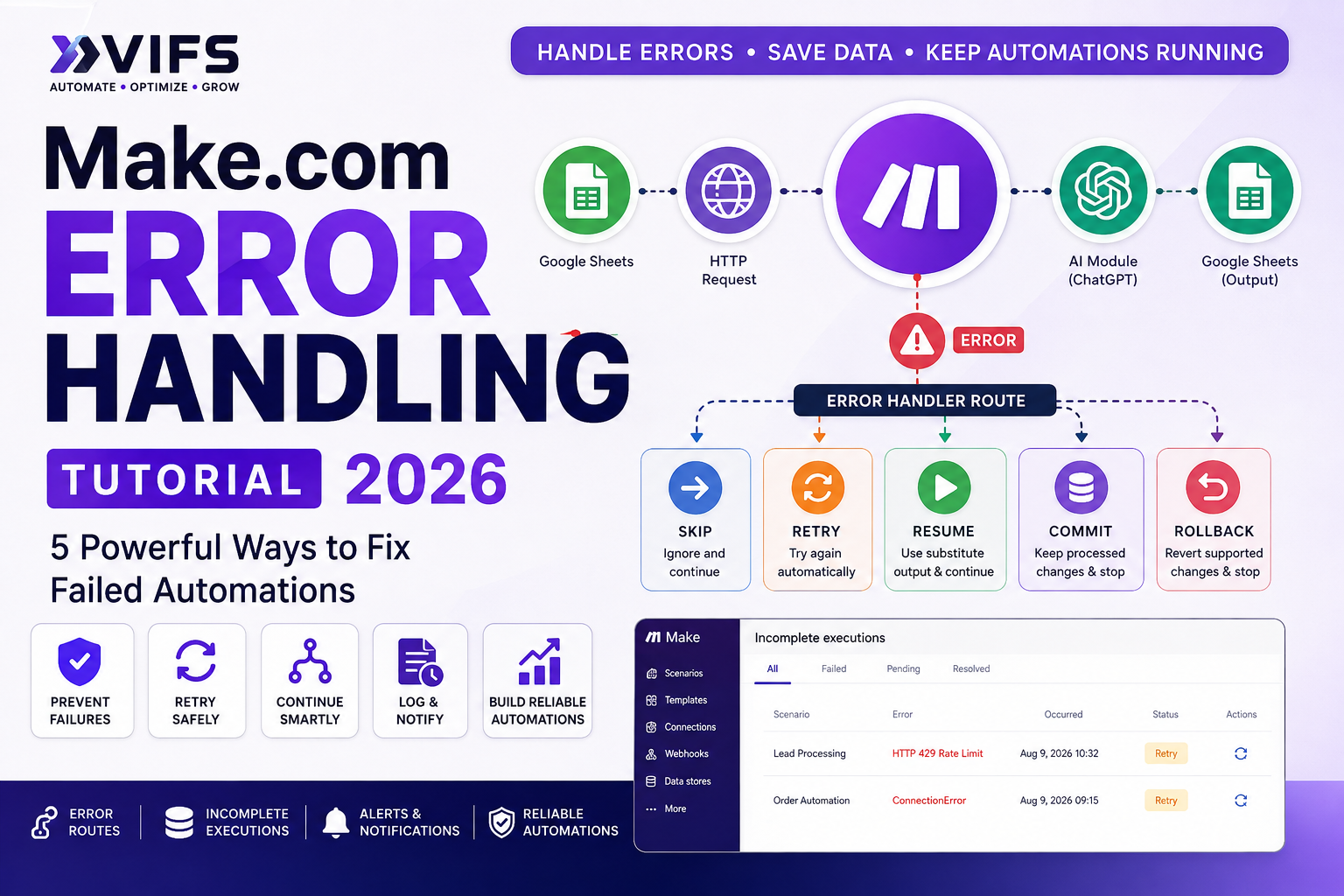
Make.com Error Handling: Complete Step-by-Step Tutorial for 2026
Make.com Error Handling is one of the most important skills to learn once your automations move beyond simple tests. APIs can time out, authentication can fail, data can arrive in the wrong format, and a single bad bundle can interrupt an otherwise useful scenario.
This Make.com Error Handling Tutorial will show you how to diagnose failures, choose the right error handler, and build more reliable automation workflows. In practical terms, Make.com error handling helps a scenario decide what should happen after a module fails instead of simply stopping the entire automation.
In this practical tutorial, you will learn how Make.com error handler routes work, when to use Skip, Retry, Resume, Commit, and Rollback, how incomplete executions protect failed work, and how to build alerts and recovery logic for production-ready automations.
If you are still learning the platform, start with the XVIFS Make.com Tutorial for Beginners. If your workflow relies on APIs, also keep our Make.com HTTP Module Tutorial open while following this guide.
Reliable error handling is also an important part of broader business automation. For practical examples of using AI and automation tools to reduce recurring manual work, see our Task Automation guide.

Make.com Error Handling Tutorial: Understanding the 5 Error Handlers
In this Make.com Error Handling Tutorial, we will compare Skip, Retry, Resume, Commit, and Rollback so you can choose the right handler for each situation.
Make.com error handling lets you control what happens when a module encounters a problem. Instead of allowing a failed module to simply interrupt the scenario, you can attach an error handler route and decide how the failed bundle should be treated.
According to Make’s current documentation, the platform provides five main error handlers: Skip, Retry, Resume, Commit, and Rollback. Each solves a different type of failure.
A simple automation might look like this:
Google Sheets → HTTP API → ChatGPT → Google Sheets
If the HTTP request fails, the scenario can follow an error route rather than losing control of the workflow.

Make.com Error Handling Tutorial: Why Make.com Scenarios Fail
Errors are normal in automation. A well-designed scenario is not one that can never fail; it is one that knows what to do when a failure occurs.
API rate limits
External services often limit how many requests can be sent in a given period. When a scenario exceeds that limit, the API may return a rate-limit error.
Connection and timeout problems
A third-party service can become temporarily unavailable even when your Make.com scenario is configured correctly.
Invalid or missing data
A module may expect an email address, number, ID, date, or other required value and receive an empty or incorrectly formatted value instead.
Authentication failures
API keys, OAuth connections, access tokens, and user permissions can expire or change.
Incorrect mappings
A field may be mapped to the wrong value or a downstream module may receive a data type it cannot process.
Make.com Error Handling Tutorial: How Error Handler Routes Work
An error handler route is attached to the module that may fail. The normal route handles successful operations, while the error route handles failures.
For example:
Google Sheets → HTTP → ChatGPT → Google Sheets
If the HTTP module fails:
HTTP → Error Handler Route → Log / Alert / Recover
This approach is especially useful when your scenario works with leads, orders, customer records, AI processing, webhooks, APIs, or other business-critical data.
If you are building branching logic as well as failure logic, see the Make.com Router Tutorial. Routers control normal paths; error routes control failure behavior.

Make.com Error Handling Tutorial: The 5 Make.com Error Handlers
| Error Handler | What It Does | Best Use Case |
|---|---|---|
| Skip | Removes the failed bundle and continues with the next bundle | One invalid record should not stop everything |
| Retry | Stores failed work as an incomplete execution and retries according to configuration | Temporary API, connection, or rate-limit problem |
| Resume | Provides substitute output and continues processing | A safe fallback value is acceptable |
| Commit | Stops the scenario while preserving supported completed database changes | Processed transactional changes should remain |
| Rollback | Stops and reverts supported transactional changes | Partial transactional processing is unacceptable |
1. Skip Error Handler
The Skip error handler removes the failed bundle from the scenario flow and lets Make continue with the next bundle. This is useful when occasional bad records are expected and losing one item is acceptable.
Example: imagine you are processing 100 Google Sheets rows. Row 37 contains invalid data. Instead of stopping the complete scenario, you can log the problem, skip row 37, and continue processing rows 38–100.
Use Skip when:
- The failed item is not business-critical.
- Other bundles should continue.
- You have another way to record or review the rejected item.
Do not use Skip simply to hide errors. Orders, payments, invoices, or important customer records should not silently disappear from a workflow.
2. Retry Error Handler
The Retry error handler is designed for failures that may be temporary. Make can store the failed bundle and remaining flow as an incomplete execution, then retry it automatically or leave it for manual resolution depending on your configuration.
Good Retry use cases:
- Rate-limit errors
- Temporary connection failures
- Module timeouts
- External services that are expected to recover
Retry is particularly useful for workflows built with the HTTP module. See the Make.com HTTP Module Tutorial for the API side of this workflow.
3. Resume Error Handler
The Resume error handler lets you define substitute output for a failed module and continue the scenario.
Suppose an enrichment API normally returns a customer score, but the request fails. If downstream modules can safely continue with a fallback such as Unknown, Resume can provide that substitute output.
Use Resume when:
- Fallback data is acceptable.
- The missing result is not critical.
- Downstream modules can safely continue.
Never invent critical values such as payment amounts, legal identifiers, invoice numbers, or other sensitive business data merely to keep a scenario running.
4. Commit Error Handler
The Commit error handler stops the scenario and preserves supported changes already made in transactional database apps such as Data Store or MySQL.
Think of Commit as: keep supported completed changes, then stop.
Commit is more specialized than Skip, Retry, or Resume. Test it carefully before using it in production because its usefulness depends on the apps and transactions in your scenario.
5. Rollback Error Handler
The Rollback error handler stops the scenario and reverts supported transactional changes. It is useful when partial completion would leave transactional data in an unacceptable state.
Rollback is not a universal “undo everything” button. It applies to modules that support transactions. An external action that has already happened, such as sending an email, cannot necessarily be reversed simply because a later module fails.
Commit vs Rollback
| Question | Commit | Rollback |
|---|---|---|
| Does the scenario stop? | Yes | Yes |
| Keep supported completed transactional changes? | Yes | No |
| Revert supported transactional changes? | No | Yes |
| Best for | Preserving completed work | All-or-nothing transactional logic |
Make.com Error Handling Tutorial: What Are Incomplete Executions?
Incomplete executions store unfinished scenario runs so failed processing can be reviewed, retried, resolved, or deleted later instead of immediately losing the failed work.
This is particularly valuable for:
- Lead processing
- CRM updates
- Orders and customer records
- API workflows
- Large data-processing scenarios
Make documents automatic retry behavior for some temporary failures, including rate-limit, connection, and module-timeout errors.
How to Enable and Review Incomplete Executions
- Open your Make.com scenario.
- Open Scenario settings.
- Enable Store incomplete executions.
- Save your scenario.
- When a failure is stored, open the Incomplete executions tab.
- Review the failed module and error details before retrying.
A retry should not be used as a substitute for fixing a broken mapping or invalid configuration. Temporary failures can recover; logical errors usually need correction first.
Make.com Error Handling Tutorial: How to Handle HTTP and API Errors
API workflows are one of the best places to use structured error handling.
Example:
Google Sheets → HTTP → ChatGPT → Google Sheets
If the HTTP module succeeds, the workflow continues normally. If it returns a temporary error, the error route can log the issue, alert you, and apply Retry or another appropriate handler.
For workflows that begin with incoming data, our Make.com Webhook Tutorial explains how webhooks can feed data into scenarios.
How to Handle API Rate Limits
Rate-limit errors happen when an API receives requests faster than its allowed limit. The correct solution is not always simply adding delays. You should understand the API’s limits, control request frequency, and create a recovery strategy for temporary failures.
A robust pattern is:
Understand limits → control request rate → store temporary failures → retry safely
Make.com Error Handling Tutorial: Error Handling vs Filters
A filter asks: Should this bundle be allowed through this normal route?
An error handler asks: What should happen because this module failed?
For normal conditional logic, see the Make.com Filters Tutorial.
Make.com Error Handling Tutorial: Error Handling vs Routers
A Router creates multiple normal paths. An error handler route responds specifically to module failure.
Example Router:
Lead → Hot / Warm / Cold
Example Error Handler:
CRM module fails → Log → Alert → Retry
Production scenarios often use Routers, Filters, Iterators, Aggregators, APIs, and error handling together. You can continue with our Make.com Iterator Tutorial and Make.com Array Aggregator Guide to strengthen the flow-control side of your Make.com knowledge.
Create an Error Alert and Log
Critical failures should not remain silent. Your error route can send an email or other notification before the final handler and can write the error to a Google Sheet for later review.
An alert can include:
- Scenario name
- Failed module
- Error message
- Timestamp
- Record or bundle ID
- Relevant input reference
A simple Google Sheets error log might contain:
| Date | Scenario | Module | Error | Record ID | Status |
|---|---|---|---|---|---|
| 13 Aug 2026 | Lead Processing | HTTP | Rate limit | L-1032 | Retry |
If Google Sheets is part of your workflow, see the Make.com Google Sheets Automation Tutorial.

Common Make.com Errors and How to Fix Them
RateLimitError
Reduce request pressure and use an appropriate retry/incomplete-execution strategy for temporary failures.
ConnectionError
If the external service is temporarily unavailable, Retry may be appropriate. If the connection itself is incorrectly configured, fix it first.
ModuleTimeoutError
Check whether the external operation is slow or unstable. Make documents automatic retry behavior for some timeout-created incomplete executions.
Data or validation errors
Inspect the incoming bundle and mappings. Retrying the same invalid input without changing anything is unlikely to solve a logical data problem.
Authentication errors
Reauthorize or correct the connection, API key, token, or permissions rather than repeatedly retrying invalid credentials.
Make.com Error Handling Tutorial: 10 Error Handling Best Practices
- Enable incomplete executions for important scenarios.
- Do not use Skip everywhere. It can hide important data loss.
- Retry temporary failures, not logical mistakes.
- Log important errors.
- Send alerts for business-critical failures.
- Understand external API limits.
- Validate data before critical modules.
- Deliberately test your error routes.
- Use fallback values carefully.
- Review scenario history and recurring failures.
A Better Production Automation Architecture
A basic automation often looks like:
Trigger → Process → Output
A production-ready architecture is closer to:
Trigger → Validate → Process → Success Path
Failure → Log → Alert → Recover → Retry/Skip/Resume/Commit/Rollback
The objective is not to create an automation that never experiences an error. The objective is to create an automation that responds to failure predictably.
Make.com Error Handling Tutorial: Frequently Asked Questions
How do I handle errors in Make.com?
Add an error handler route to the module that can fail, then choose the behavior that matches the failure. Test the route with controlled error cases and make sure important failures are logged or alerted instead of being hidden.
Why does my Make.com scenario keep failing?
Common causes include expired authentication, API rate limits, timeouts, invalid or missing data, mapping changes, and malformed API requests. Open the failed execution, identify the module and error message, then fix the root cause or add suitable recovery logic.
What is Make.com error handling?
Make.com error handling lets you define what should happen when a module encounters a problem. Error handler routes can skip, retry, resume, commit, or roll back supported processing depending on the workflow.
What are the five Make.com error handlers?
Make’s current documentation lists Skip, Retry, Resume, Commit, and Rollback.
Which Make.com error handler is best?
There is no universal best handler. Use Skip for safely disposable bad bundles, Retry for temporary failures, Resume when substitute output is safe, Commit when supported processed changes should remain, and Rollback when supported transactional changes should be reverted.
What are incomplete executions?
Incomplete executions store failed or unfinished scenario work so it can be investigated and, where appropriate, retried or resolved later.
Can Make.com automatically retry errors?
Yes. Make documents automatic retry behavior for certain temporary failures and for Retry-handler incomplete executions when configured appropriately.
Should I use Skip for API failures?
Not automatically. If the API request represents important data, skipping it could create data loss. For a temporary API problem, Retry or an incomplete-execution strategy may be safer.
Conclusion
This Make.com Error Handling Tutorial is designed to help you build automations that fail safely, recover intelligently, and give you better visibility when something goes wrong.
By following this Make.com Error Handling Tutorial, you can turn fragile scenarios into more reliable automations that recover from common failures.
Make.com Error Handling turns fragile automations into much more reliable workflows. Once you move beyond simple scenarios, you should assume that APIs, connections, credentials, data, and external services will occasionally fail.
Remember the five handlers:
- Skip — remove the failed bundle and continue.
- Retry — store failed work and retry according to configuration.
- Resume — continue with substitute output.
- Commit — preserve supported completed transactional changes and stop.
- Rollback — revert supported transactional changes and stop.
Combine error routes with incomplete executions, alerts, logs, careful data validation, and sensible API usage to build Make.com scenarios that can recover from real-world problems.
Continue with the Make.com JSON Tutorial when your error-handling workflows need to parse structured API responses, or return to the complete Make.com learning roadmap on XVIFS.