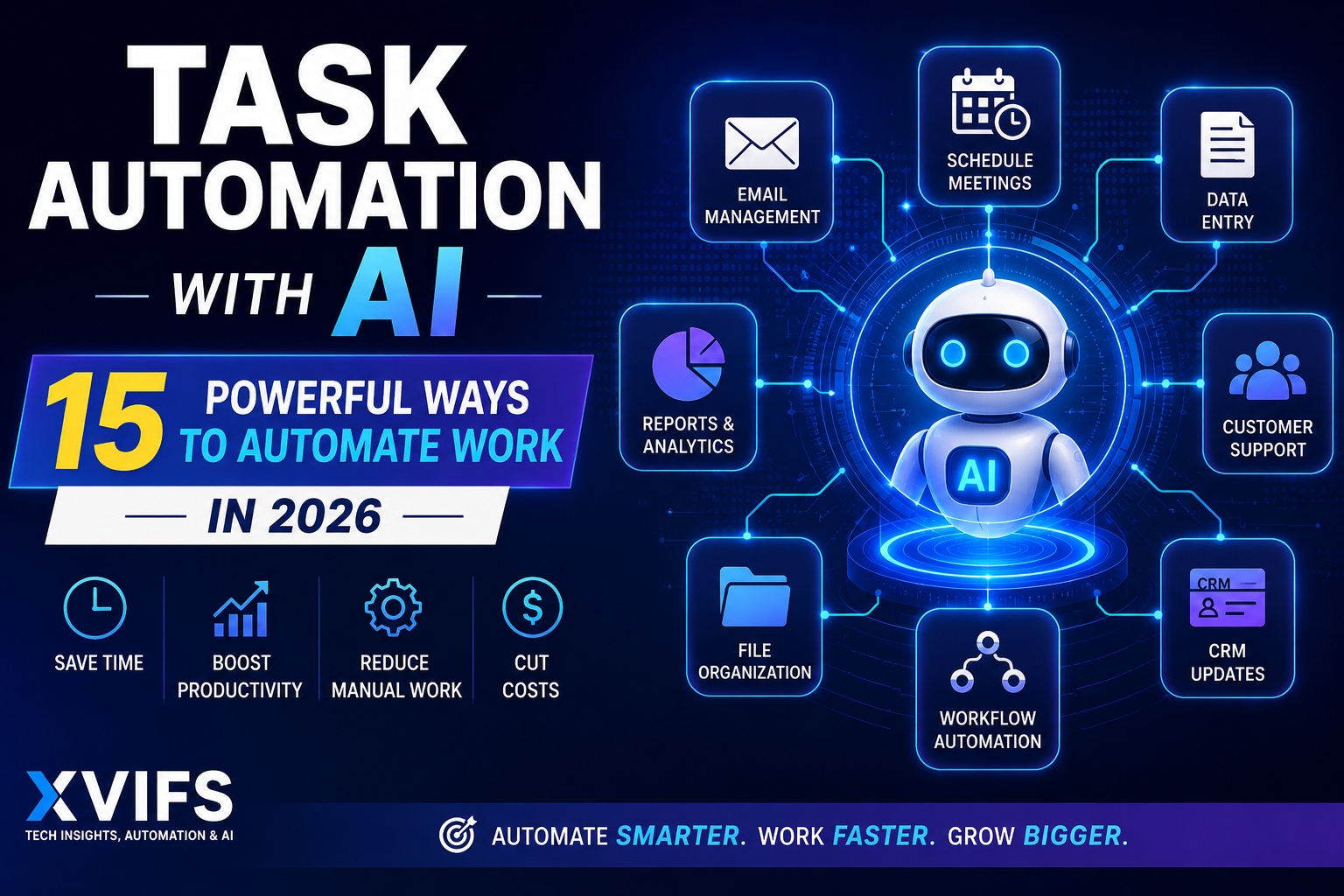
Task automation is changing the way businesses handle repetitive work in 2026. Instead of manually copying data, sorting emails, updating spreadsheets, preparing reports, or routing customer requests, businesses can use automation software and artificial intelligence to complete many of these tasks automatically.
The real opportunity is not simply replacing manual work. Modern task automation with AI can analyze information, classify inputs, generate content, make limited decisions, and then trigger actions across connected business applications.
In this guide, you will learn what task automation is, how AI changes traditional automation, which tasks are worth automating, 15 practical examples, and how platforms such as Make.com, Zapier, n8n, and Microsoft Power Automate fit into a modern automation strategy. AI-powered task automation helps businesses reduce repetitive work and build more efficient workflows.
What Is Task Automation?
Task automation is the use of software to perform repetitive or rule-based tasks with little or no manual intervention. An automated workflow normally begins with a trigger, processes information according to predefined rules, and then performs one or more actions.
A simple example is lead management. Instead of manually copying every new website lead into a CRM, an automation can detect the form submission, validate the information, create the CRM contact, notify the sales team, and record the lead in a spreadsheet.
The goal is not to automate every activity in a business. Effective automation removes predictable work so people can spend more time on decisions, customer relationships, creative work, and problems that genuinely require human judgment.
How Does Task Automation Work?
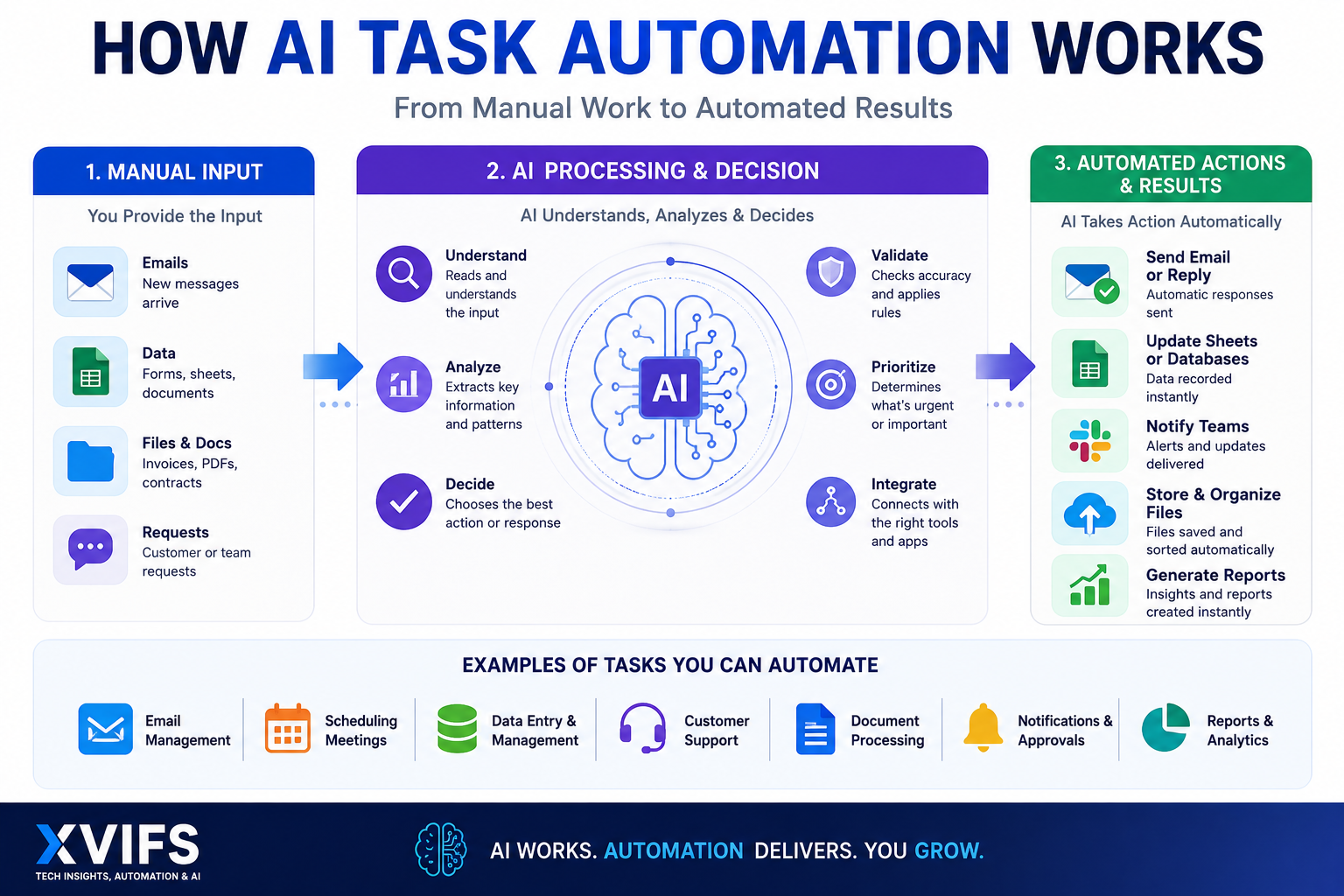
Most task automation follows a basic structure:
- Trigger: Something happens, such as an email arriving, a form being submitted, or a new spreadsheet row being created.
- Input: The workflow receives information from the triggering application.
- Processing: Rules, filters, formulas, or AI analyze the information.
- Decision: The workflow determines what should happen next.
- Action: One or more connected applications perform the required task.
- Logging: The result can be recorded for monitoring and troubleshooting.
Platforms such as Make.com allow these steps to be connected visually. More advanced workflows can include routers, filters, APIs, data transformations, aggregators, and AI models.
If you are new to this type of workflow, our Make.com tutorial for beginners explains how scenarios, modules, triggers, and actions work together.
Traditional Automation vs AI Task Automation
Traditional automation is excellent when the rules are predictable. For example:
If a new order arrives → add it to a spreadsheet → notify the fulfillment team.
The same input following the same rules should produce the same expected outcome.
AI task automation adds another layer. Artificial intelligence can help interpret unstructured information such as emails, documents, customer questions, descriptions, or free-form text before the workflow decides what to do next.
For example, an AI-assisted support workflow might:
- Read an incoming customer message.
- Identify the topic and urgency.
- Summarize the problem.
- Classify the request.
- Route it to the correct department.
- Draft a suggested response for human review.
This distinction is important. Make’s current guidance recommends standard scenarios for predictable logic, AI apps for structured workflows that need AI-generated output, and AI agents when a task requires more flexible reasoning and variable inputs. Make also warns against delegating sensitive or high-stakes decisions to AI without appropriate safeguards.
For a deeper explanation of autonomous systems, see our guide to the types of AI agents.
What Tasks Should You Automate?
The best candidates for task automation generally share several characteristics. They happen frequently, follow a repeatable process, consume meaningful staff time, and can be evaluated using clear rules.
Before automating a process, ask:
- How often does this task happen?
- Does it follow the same basic steps each time?
- How much employee time does it consume?
- What happens when the task fails?
- Does it require human judgment?
- Does it involve sensitive information?
- Can the result be checked automatically?
A repetitive five-minute task performed hundreds of times per month may be a much better automation opportunity than a complicated process performed only twice a year.
15 Powerful Ways to Use Task Automation With AI
1. Automate Email Management
Businesses can automatically categorize incoming emails, extract important information, assign messages to the correct person, create follow-up tasks, and generate draft replies.
AI becomes particularly useful when messages cannot be categorized using simple keywords alone.
2. Automate Meeting Scheduling
Scheduling workflows can check availability, create calendar events, send confirmations, distribute meeting information, and trigger reminders before a meeting.
This reduces the back-and-forth communication involved in arranging appointments.
3. Automate Data Entry
Manual data entry is one of the clearest opportunities to automate repetitive tasks.
Information from forms, emails, invoices, databases, and applications can be automatically transferred into spreadsheets, CRMs, accounting systems, or databases.
4. Automate Google Sheets Workflows
Google Sheets can act as both an input and output for business automation. A new row might trigger a workflow, while processed information from another system can automatically update existing spreadsheet records.
Our Make.com Google Sheets automation guide provides practical examples of connecting Sheets with automated workflows.
5. Automate Lead Capture
A lead submitted through a website can automatically be validated, added to a CRM, assigned to a salesperson, enriched with additional information, and followed by an acknowledgment email.
High-value leads can also trigger immediate notifications.
6. Automate Customer Support Routing
AI can help analyze incoming support requests and classify them according to product, urgency, customer type, or problem category.
Automation can then route the ticket to the appropriate queue while retaining human review for complicated or sensitive cases.
7. Automate Document Processing
Businesses receive information through PDFs, forms, invoices, contracts, and other documents. AI-assisted workflows can extract relevant information, organize it, and send structured data into another business system.
Human verification should remain part of the process when accuracy has financial, contractual, regulatory, or legal consequences.
8. Automate CRM Updates
Sales teams often spend time maintaining customer records. Automated workflows can update stages, create contacts, record activities, assign owners, and synchronize information between applications.
9. Automate Reports
Instead of manually gathering information from several systems every week, a workflow can collect the required data, calculate metrics, create a summary, and distribute the report automatically.
AI can additionally summarize trends, but important conclusions should still be validated against the underlying data.
10. Automate Content Workflows
Automation can help coordinate research, briefs, approvals, content databases, publishing schedules, and distribution.
AI can assist with specific stages, but businesses should maintain editorial review instead of automatically publishing unchecked AI-generated information.
11. Automate Social Media Scheduling
Approved content can be moved from a planning system into scheduled social posts automatically. The workflow can also notify the responsible team when assets or approvals are missing.
12. Automate Invoice Workflows
Automation can route invoices, extract basic information, notify approvers, update internal records, and flag exceptions.
Payments and material financial decisions deserve stronger approval controls than routine administrative actions.
13. Automate File Organization
Files can automatically be renamed, classified, moved into appropriate folders, or associated with the relevant customer or project.
This is particularly useful when a business handles a large volume of recurring documents.
14. Automate Notifications and Approvals
Workflows can notify employees when something requires attention and continue automatically once approval has been received.
This creates a useful balance between automation and human control.
15. Automate Cross-App Business Processes
The greatest benefit often appears when multiple applications are connected into one end-to-end process.
For example:
Website form → AI classification → CRM → Google Sheets → Slack/Teams notification → follow-up email.
This is where dedicated task automation tools become particularly valuable.
How to Automate Tasks With AI: Step-by-Step
If you are wondering how to automate tasks with AI, avoid starting with the AI model. Start with the business process.
Step 1: Choose One Repetitive Task
Pick something that happens regularly and has a clear beginning and end.
Examples include copying leads, categorizing inquiries, creating reports, processing forms, or updating records.
Step 2: Map the Current Process
Write down every step a person currently performs.
This frequently reveals unnecessary steps that should be removed before automation begins.
Step 3: Separate Rules From Judgment
Identify which steps use predictable rules and which genuinely require interpretation.
Use standard automation for predictable logic. Introduce AI only where it provides a meaningful benefit.
Step 4: Select Your Task Automation Software
Choose a platform based on your applications, workflow complexity, technical resources, deployment requirements, and expected usage.
Step 5: Build the Smallest Working Version
Do not automate an entire department on day one. Build a small workflow that solves one clearly defined problem.
Step 6: Test With Realistic Data
Test normal inputs as well as incomplete information, duplicates, unexpected values, and application errors.
Step 7: Add Error Handling
A production workflow needs a plan for failure. Our Make.com error handling tutorial explains techniques for building more resilient scenarios.
Step 8: Measure the Result
Compare the automated process with the original manual process using time, cost, accuracy, throughput, and exception rates.
Best Task Automation Tools in 2026
There is no single best task automation software for every organization. The right platform depends on the type of workflow you want to build.
Make.com
Make.com is particularly useful for visual, multi-step automation. Its scenario builder supports branching, filtering, data transformation, APIs, and increasingly AI-powered workflows.
According to Make’s current pricing information, its Free plan includes up to 1,000 credits per month and access to more than 3,000 apps. Paid tiers increase execution capacity and add additional automation and administration capabilities.
Make has also introduced its newer AI Agent experience, which can use models, tools, scenarios, knowledge, and MCP connections to handle workflows that require more flexible reasoning.
Zapier
Zapier is a strong option for users who prioritize quick setup and a very large integration ecosystem.
Its current platform supports thousands of integrations and combines Zap workflows with products such as Tables, Forms, MCP, and AI capabilities. Zapier currently uses task-based usage across much of its automation platform.
n8n
n8n is attractive to technical teams that want deeper control over workflow logic and deployment.
It offers hosted plans as well as self-hosting options. Current n8n pricing is primarily based on complete workflow executions rather than charging individually for every step inside a workflow.
Microsoft Power Automate
Microsoft Power Automate is especially relevant to organizations already operating heavily inside Microsoft 365, Dynamics, Azure, and related enterprise environments.
It can automate desktop and cloud processes and works naturally with Microsoft’s broader business ecosystem.
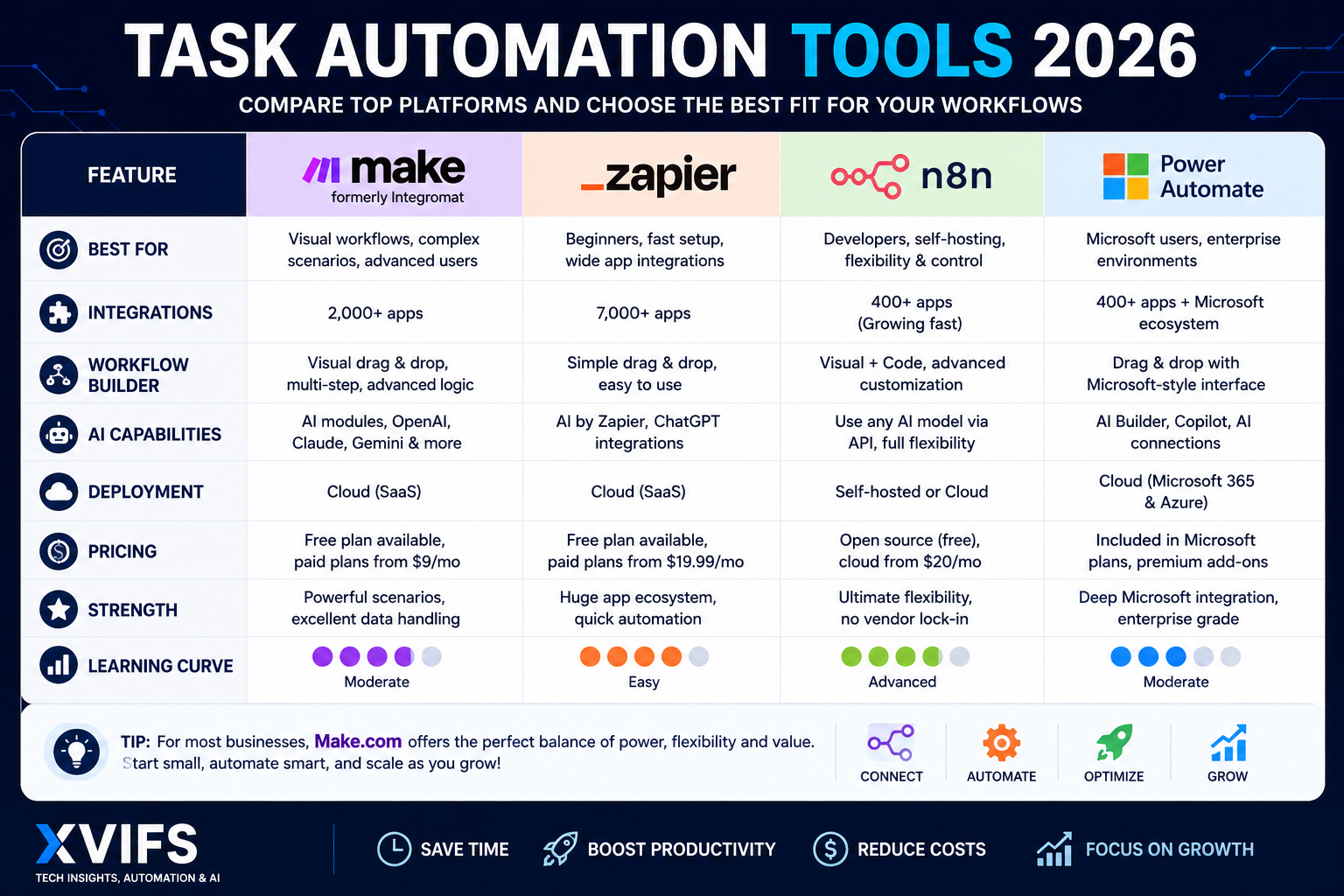
Make.com vs Zapier vs n8n vs Power Automate
| Platform | Best Fit | Main Advantage | Consider |
|---|---|---|---|
| Make.com | Visual multi-step workflows | Flexible visual scenario building and data handling | Complex scenarios require learning |
| Zapier | Fast business automation | Large integration ecosystem and approachable setup | Monitor task usage as workflows scale |
| n8n | Technical teams | Flexible workflows, code options and self-hosting | More technical knowledge may be useful |
| Power Automate | Microsoft-centered organizations | Strong Microsoft ecosystem integration | Best value depends heavily on your existing stack |
Always verify current features, limits, and pricing directly with the provider before making a purchasing decision because automation products change frequently.
Practical Task Automation Example With Make.com
Consider a company that receives customer requests through a website form.
A basic Make.com scenario could work like this:
- A new form submission triggers the scenario.
- Make receives the customer information.
- A filter checks whether required fields are present.
- An AI step classifies the request.
- A router sends different categories down different paths.
- The customer’s information is added to Google Sheets or a CRM.
- The correct team receives a notification.
- A confirmation email is sent to the customer.
This one workflow combines several concepts from our Make.com learning cluster.
For conditional logic, read our Make.com Router tutorial and Make.com Filters tutorial.
For workflows that process multiple items, see our guides to the Make.com Iterator and Make.com Array Aggregator.
And when an application does not provide the exact native module you need, the Make.com HTTP module can help connect APIs directly.
Benefits of Task Automation
Less Repetitive Work
Employees can spend less time copying, sorting, moving, and formatting information manually.
Faster Processes
Automated workflows can begin immediately when their trigger occurs instead of waiting for someone to notice and process the task.
More Consistent Execution
A properly configured workflow follows the same rules every time, which can reduce variation in repetitive processes.
Better Scalability
A process that works for ten transactions may be difficult to manage manually at a thousand. Automation can help businesses handle growing volumes without increasing manual work at the same rate.
Better Visibility
Well-designed workflows can record execution data, errors, and outcomes, making processes easier to monitor.
Tasks You Should Not Fully Automate
Not every process belongs inside an autonomous workflow.
Be especially careful with:
- Major financial decisions.
- Legal judgments.
- High-impact HR decisions.
- Safety-critical actions.
- Sensitive customer information.
- Irreversible actions.
- Complex complaints requiring empathy and context.
AI output is probabilistic rather than guaranteed. A strong automation strategy therefore includes human approval wherever the cost of an incorrect decision is significant.
A useful design principle is to automate the repetitive preparation while keeping people responsible for consequential decisions.
Common Task Automation Mistakes
Automating a Broken Process
Automation makes a process faster; it does not automatically make a poor process better. Simplify the workflow first.
Using AI Where Simple Rules Are Better
If a normal filter can make a decision reliably, an AI model may introduce unnecessary cost and unpredictability.
Ignoring Exceptions
Real-world data is messy. Missing fields, duplicate records, unavailable APIs, malformed files, and authentication failures should be expected.
Building Too Much at Once
Large workflows are harder to test. Start small, validate the result, and expand gradually.
Failing to Monitor Automations
Even a workflow that works today can fail later when an API, application, authentication method, data structure, or business rule changes.
How to Measure Task Automation Results
Successful automation should produce measurable improvement.
Track metrics such as:
- Manual minutes saved per transaction.
- Number of transactions automated.
- Workflow success rate.
- Exception rate.
- Average processing time.
- Cost per automated transaction.
- Number of manual corrections required.
- Customer response time.
A simple starting formula is:
Estimated monthly time saved = manual minutes per task × number of successfully automated tasks per month.
For example, if a repetitive process previously required four minutes and automation successfully handles 300 instances, the theoretical gross time removed from that process is 1,200 minutes, or 20 hours. Actual business savings may be lower after accounting for monitoring, exceptions, maintenance, and human review.
Task Automation FAQs
What is task automation?
Task automation is the use of software to perform repetitive or predictable activities automatically. A workflow typically responds to a trigger, processes information according to rules, and performs one or more actions.
How is AI used for task automation?
AI can analyze unstructured information, classify content, summarize data, generate text, or assist with decisions before an automated workflow takes action. It is most useful when ordinary rules alone cannot handle the variability of the input.
What are the best tasks to automate?
Frequent, repetitive, rule-based, time-consuming tasks with clear inputs and outputs are usually the strongest candidates. Examples include data entry, notifications, lead routing, spreadsheet updates, reporting, and file organization.
Can AI automate repetitive tasks?
Yes. AI can help automate repetitive tasks that involve text, documents, classification, summarization, or variable inputs. However, predictable tasks often require only traditional workflow automation rather than AI.
What are popular task automation tools?
Popular platforms include Make.com, Zapier, n8n, and Microsoft Power Automate. The best choice depends on your applications, workflow complexity, technical resources, deployment requirements, and expected automation volume.
Does task automation require coding?
No. Many modern automation platforms provide visual builders that allow users to create useful workflows without traditional programming. Coding and API knowledge become more valuable when workflows require advanced customization.
Should every business task be automated?
No. Tasks involving sensitive data, high-impact decisions, unusual circumstances, or significant human judgment may need human review or should remain primarily manual.
Final Thoughts on Task Automation in 2026
Task automation is most valuable when it solves a specific operational problem rather than when automation is adopted simply because the technology is available.
Start with one repetitive process. Map it carefully, remove unnecessary steps, automate the predictable parts, and introduce AI only where interpretation or flexible reasoning genuinely improves the workflow.
Platforms such as Make.com, Zapier, n8n, and Power Automate now make sophisticated automation accessible to businesses of many sizes. At the same time, AI is expanding what workflows can understand and process.
The strongest approach is therefore not automate everything. It is automate the right tasks, measure the result, keep humans responsible for important decisions, and improve the workflow over time.
If you want to start building instead of only reading about automation, continue with our complete Make.com tutorial for beginners and build your first practical workflow step by step.
Official resources:
Make pricing and plans |
Zapier pricing and plans |
n8n pricing and plans |
Microsoft Power Automate