Cloud application development gives businesses a flexible way to build, deploy, scale and improve modern software without relying entirely on fixed on-premises infrastructure. Instead of purchasing servers for every new workload, development teams can use cloud computing, storage, databases, networking, identity, monitoring and managed application services when they are needed.
But successful cloud development is not simply a matter of moving an existing application to a remote server. Architecture, security, scalability, reliability, observability, deployment automation and cost control all influence whether a cloud application performs well over its full lifecycle.
This XVIFS guide explains cloud application development in practical terms, including how it works, the main architecture options, the development process, AWS vs Azure vs Google Cloud, security requirements, costs, common mistakes, cloud application development services and the best practices businesses should consider in 2026.
Quick answer: Cloud application development is the process of designing, building, testing, deploying and maintaining applications that use cloud infrastructure and managed cloud services. The best architecture depends on the application’s users, performance requirements, security needs, budget, team skills and expected growth.
What Is Cloud Application Development?
Cloud application development is the process of creating software that runs on, connects to or takes advantage of cloud computing services. These applications can use cloud-based compute resources, databases, storage, APIs, identity systems, messaging platforms, monitoring tools and other managed services.
The National Institute of Standards and Technology (NIST) describes cloud computing as on-demand access to a shared pool of configurable computing resources that can be rapidly provisioned and released. Its well-known model includes service categories such as SaaS, PaaS and IaaS.
A cloud application might be a customer portal, ecommerce platform, SaaS product, mobile backend, analytics application, internal business system, API service or AI-enabled application. Some are built entirely for the cloud, while others are modernized from existing software.
How Cloud Application Development Works
A cloud application normally combines application code with a collection of infrastructure and managed services. The exact design varies, but a typical solution may include:
- Compute resources for running application code
- Databases for structured or unstructured information
- Object or file storage
- APIs and integration services
- Identity and access management
- Networking and traffic management
- Monitoring, logging and alerting
- Backup and recovery capabilities
- CI/CD automation
- Security controls and secret management
A well-designed application does not use cloud services merely because they are available. Microsoft’s current Azure application architecture guidance emphasizes reliability, security, cost optimization, operational excellence and performance efficiency as core considerations when designing cloud workloads.
Cloud Applications vs Traditional Applications
The distinction between traditional and cloud applications is not always absolute. A traditional application can run on cloud infrastructure, and a cloud application can still use a monolithic design. The main difference is usually how the application uses infrastructure, managed services, automation and scaling.
| Area | Traditional Application | Cloud Application |
|---|---|---|
| Infrastructure | Often fixed or manually provisioned | Can be provisioned on demand |
| Scaling | May require additional physical or virtual infrastructure | Can support elastic or automated scaling |
| Deployment | May involve more manual release processes | Often supported by CI/CD automation |
| Operations | Organization manages more infrastructure directly | Managed services can reduce infrastructure administration |
| Availability | Depends on locally designed redundancy | Can use multiple zones, regions and managed recovery features |
| Cost model | Often more upfront infrastructure spending | Frequently usage-based or subscription-based |
Cloud-Hosted vs Cloud-Native Applications
A cloud-hosted application can simply be an existing application running on virtual machines in a cloud data center. A cloud-native application is intentionally designed to take advantage of cloud capabilities such as automation, elasticity, managed platforms, APIs, event-driven services and distributed infrastructure.
Cloud-native does not automatically mean microservices. Microsoft explicitly notes that a specific architecture style such as microservices is not required to design an application for cloud workloads. The architecture should match the problem the team is solving.
Common Cloud Application Architecture Options
Monolithic Architecture
A monolithic application keeps most functionality inside one deployable application. It can be easier to develop and operate for smaller systems and teams. The disadvantage is that large monoliths can become difficult to change or scale selectively.
Modular Monolith
A modular monolith maintains a single deployment while separating business functionality into clearer modules. For many businesses, this provides useful structure without the operational complexity of a fully distributed system.
Microservices
Microservices divide an application into smaller services that can often be developed, deployed and scaled independently. This flexibility can be valuable at scale, but it introduces additional networking, monitoring, data-consistency and deployment complexity.
Serverless Architecture
Serverless services reduce the amount of infrastructure a development team has to manage directly. For example, Google Cloud Run is a fully managed platform that can automatically scale application instances up and down based on demand.
Event-Driven Architecture
Event-driven systems react to events such as file uploads, purchases, messages, sensor changes or API requests. This approach can reduce tight dependencies between components and is useful for asynchronous processing.
The Cloud Application Development Process
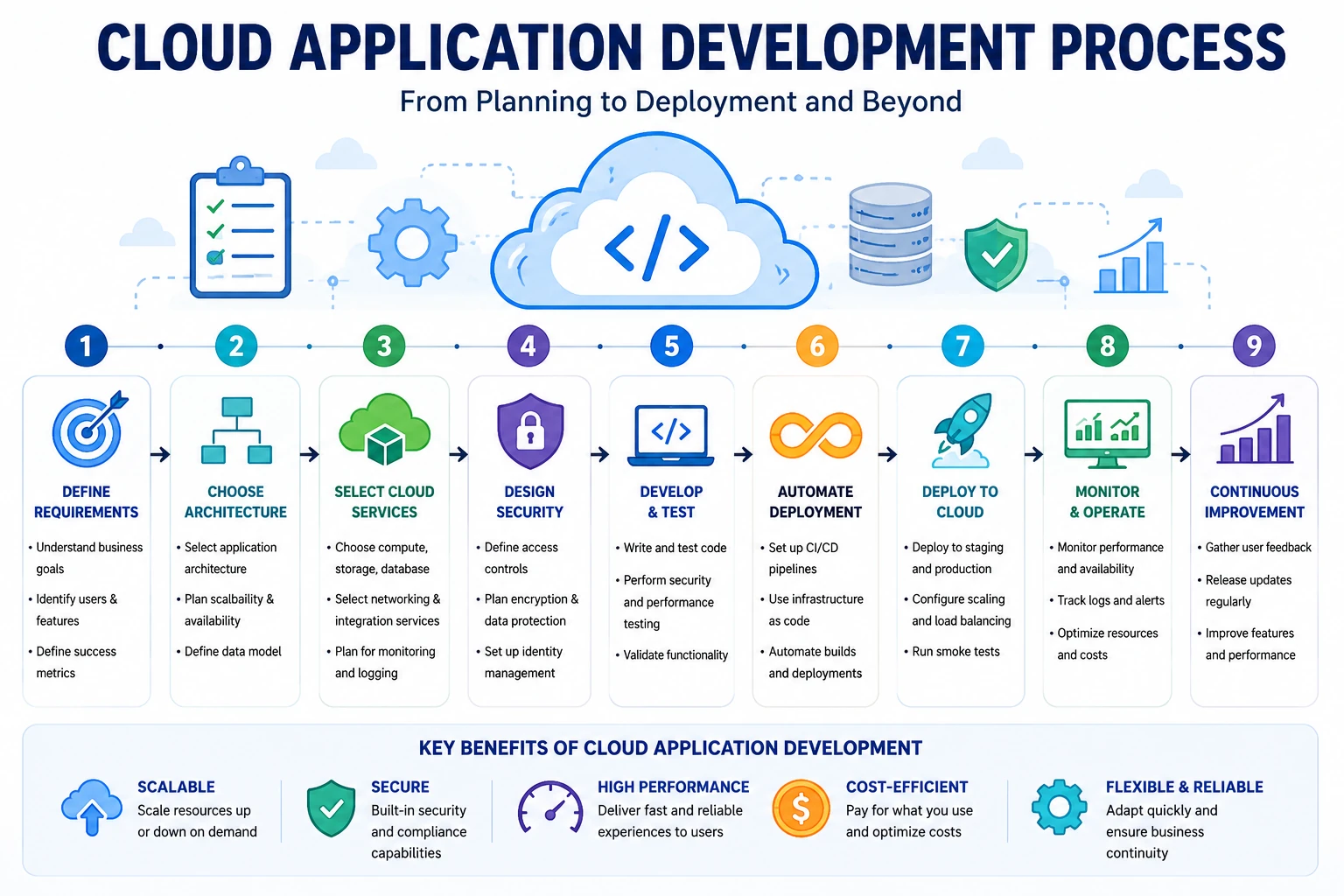
A strong cloud application development process should begin with the business problem rather than the cloud provider. The following sequence provides a practical framework.
Step 1: Define Business Requirements
Identify who will use the application, what problem it solves and what business outcome will define success. Document expected traffic, availability targets, required integrations, sensitive information, geographic requirements and budget.
Step 2: Choose the Architecture
Select the simplest architecture that can reliably satisfy the requirements. Avoid using microservices, Kubernetes or other complex technologies solely because they are popular.
Step 3: Select Cloud Services
Choose compute, storage, databases, networking and managed services based on workload needs. Evaluate service maturity, availability, region support, integration requirements and long-term operational cost.
Step 4: Design Security and Data Protection
Plan identity, authentication, authorization, encryption, secret management, backup, logging and network controls before production deployment. A documented cloud security policy can help teams define consistent requirements for access, data protection, monitoring and incident response. For organizations thinking more broadly about access security, the XVIFS guide to Okta Device Trust explains how device context can form part of a wider access-control strategy.
Step 5: Develop and Test
Develop the application in manageable increments and test more than basic functionality. Include automated unit tests, integration tests, security checks, performance testing and failure scenarios where appropriate.
Step 6: Automate Build and Deployment
CI/CD pipelines can automate testing, builds and deployments. Infrastructure as code can make infrastructure changes repeatable, reviewable and easier to recover. API-driven workflows can also connect cloud applications to other business systems; the XVIFS Make HTTP Module tutorial shows a practical example of working with HTTP-based integrations.
Step 7: Deploy to Production
Use controlled deployment strategies where possible. Depending on the platform, teams may use rolling deployments, blue-green deployments, canary releases or traffic splitting to reduce the impact of a bad release.
Step 8: Monitor and Operate
Track application health, response times, error rates, resource utilization, security events and cloud spending. Monitoring is part of application design, not something that should be added after problems occur.
Step 9: Continuously Improve
Use operational data and user feedback to improve features, performance, reliability and cost efficiency. Cloud application development is an ongoing lifecycle rather than a one-time deployment project.
AWS vs Azure vs Google Cloud for Application Development
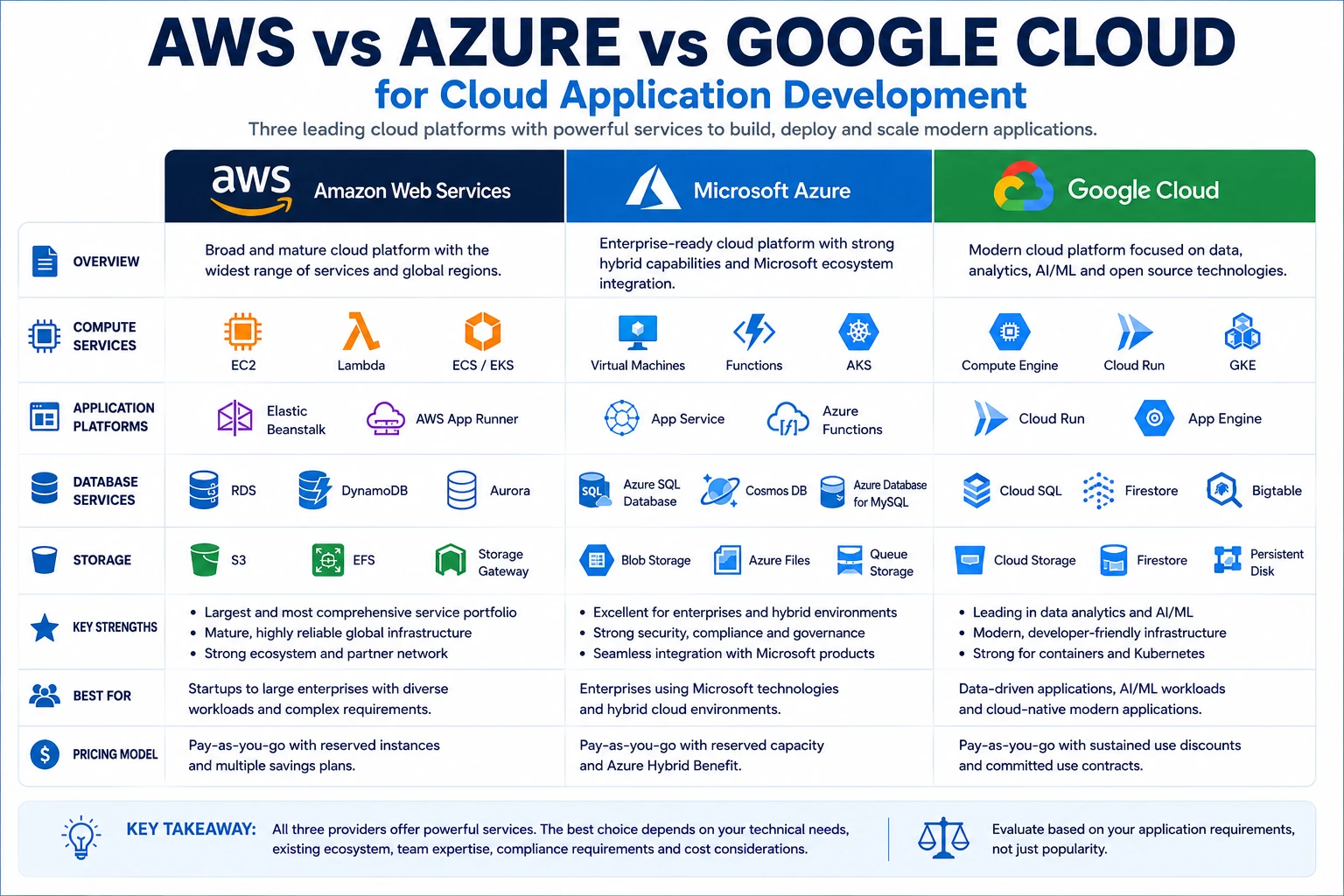
Amazon Web Services, Microsoft Azure and Google Cloud all provide mature infrastructure and application-development services. There is no universally best provider. The right choice depends on your technical stack, geographic needs, team skills, integrations, compliance requirements and cost model.
| Platform | Example Services | Potential Fit |
|---|---|---|
| AWS | EC2, Lambda, ECS/EKS, RDS, S3 and many managed services | Organizations needing a broad service portfolio and flexible infrastructure options |
| Microsoft Azure | App Service, Functions, AKS, Azure SQL and Microsoft ecosystem integrations | Enterprises already using Microsoft technologies or hybrid environments |
| Google Cloud | Cloud Run, GKE, Compute Engine, Cloud SQL and data/AI services | Containerized, data-intensive, AI-enabled and modern cloud-native workloads |
Technology Stack for Cloud Application Development
Cloud application development supports many programming languages and frameworks. Teams should select technologies they can maintain effectively rather than chasing every new framework.
- Frontend: HTML, CSS, JavaScript and frameworks such as React, Angular or Vue
- Backend: Node.js, Python, Java, .NET, Go, PHP, Ruby and other supported languages
- Databases: Relational, document, key-value, graph and analytical databases
- Containers: Docker and container orchestration platforms such as Kubernetes
- APIs: REST, GraphQL, gRPC and event-based integrations
- DevOps: CI/CD pipelines, infrastructure as code and automated testing
- Observability: Logs, metrics, traces, dashboards and alerts
JSON is commonly used for API payloads and configuration data across cloud applications. If your team is also building automation workflows, see the XVIFS Make.com JSON tutorial for a practical introduction to parsing and mapping JSON data.
Benefits of Cloud Application Development
Scalability
Applications can increase or reduce resources as demand changes. This can make it easier to support growth, seasonal traffic or unpredictable workloads without permanently maintaining peak capacity.
Faster Provisioning
Development teams can create environments and managed services much faster than purchasing and installing new physical infrastructure.
Managed Services
Managed databases, identity services, messaging platforms and application runtimes can reduce the amount of infrastructure maintenance performed by development teams.
Automation
Cloud platforms work well with infrastructure-as-code, automated testing and CI/CD practices that make releases more consistent and repeatable.
Global Reach
Major cloud providers operate infrastructure across many geographic regions, which can help applications serve distributed users and meet certain resilience or data-residency requirements.
Cloud Application Development Challenges
The cloud solves some infrastructure problems while introducing different operational responsibilities. Businesses should understand the trade-offs before selecting an architecture.
- Cost overruns: Uncontrolled resources, data transfer and inefficient services can increase spending.
- Architecture complexity: Distributed systems can be harder to debug and operate.
- Skills gaps: Teams need knowledge of cloud architecture, security, DevOps and monitoring.
- Vendor dependence: Heavy use of proprietary services can make future migration more difficult.
- Security misconfiguration: Incorrect permissions or public resources can expose data.
- Data governance: Organizations need clear rules for storage, retention, backup and access.
Cloud Application Security Best Practices
Security should be designed into the application lifecycle. It should not depend on one firewall, one login method or the assumption that the cloud provider secures everything automatically.
- Apply least-privilege access controls.
- Use strong authentication and centralized identity management.
- Encrypt sensitive information in transit and at rest where appropriate.
- Keep API keys, passwords and secrets out of source code.
- Patch dependencies and monitor known vulnerabilities.
- Use secure network boundaries and private connectivity where appropriate.
- Log important application and security events.
- Back up critical data and test recovery procedures.
- Use automated security checks in development pipelines where practical.
- Regularly review cloud permissions and unused resources.
How Much Does Cloud Application Development Cost?
There is no meaningful universal price for cloud application development. A simple business application and a global enterprise platform have completely different requirements.
| Cost Driver | Why It Affects Cost |
|---|---|
| Application complexity | More features, roles and business rules require additional development and testing |
| Architecture | Distributed architectures can require more engineering and operational effort |
| Integrations | External APIs, payment services and legacy systems add implementation work |
| Security and compliance | Regulated workloads may need additional controls, testing and documentation |
| Cloud consumption | Compute, databases, storage and data transfer create ongoing operating costs |
| Maintenance | Monitoring, updates, support and optimization continue after launch |
Cost planning should therefore include both initial development cost and ongoing cloud operating cost. A solution that is inexpensive to build but expensive to operate may not be a good long-term choice.
What Are Cloud Application Development Services?
Cloud application development services are professional services that help organizations plan, design, build, modernize, migrate, deploy or maintain cloud applications. The service may be delivered by a software development company, cloud consultancy, managed-service provider or specialist engineering team.
If your goal is to build a subscription-based cloud product, our guide to SaaS development services explains multi-tenant architecture, development stages, security, deployment and scaling in more detail.
Common services include:
- Cloud architecture planning
- Custom cloud application development
- Legacy application modernization
- Cloud migration
- API and integration development
- DevOps and CI/CD implementation
- Security architecture and reviews
- Database migration
- Performance optimization
- Monitoring and ongoing support
When Should a Business Use Cloud Application Development Services?
External specialists can be useful when an organization has a strong business requirement but lacks enough internal architecture, security or DevOps expertise to implement the solution safely.
A provider can also be valuable for short-term modernization projects, cloud migration, platform redesign, performance improvement or projects requiring specialized skills that do not justify permanent hiring. Where a project combines custom software with intelligent workflow automation, businesses may also evaluate an Artificial Intelligence Automation Agency for AI-enabled integrations and process automation.
How to Choose a Cloud Application Development Company
- Check relevant experience: Look for projects comparable to your workload rather than generic claims.
- Review architecture thinking: Ask how the team chooses between monoliths, managed services, serverless and distributed designs.
- Evaluate security: Security should be included from planning through deployment and operations.
- Confirm platform expertise: Verify experience with the cloud provider and services your project needs.
- Ask about DevOps: Understand how testing, deployment and infrastructure changes will be automated.
- Review cost controls: The provider should explain how it will monitor and optimize ongoing cloud expenditure.
- Protect ownership: Ensure your organization retains access to code, documentation, cloud accounts and credentials.
- Understand support: Define what happens after production launch.
Cloud Application Development Best Practices for 2026
- Start with business requirements, not technology trends.
- Choose the simplest architecture that can meet current and realistic future requirements.
- Use managed services where they provide a clear operational advantage.
- Design for failures and recovery rather than assuming infrastructure never fails.
- Automate repeatable testing and deployment processes.
- Build monitoring and observability into the application from the beginning.
- Apply security controls throughout development.
- Review cloud costs continuously.
- Avoid unnecessary vendor lock-in when portability is an important requirement.
- Test backup and disaster-recovery procedures rather than merely documenting them.
Microsoft’s cloud application best-practices guidance similarly emphasizes deliberate architecture choices for reliability, scalability, security, caching, data partitioning, monitoring and distributed-system concerns.
How AI Is Changing Cloud Application Development
AI is changing both how cloud applications are built and what those applications can do. Development teams can use AI-assisted tools for coding, testing, documentation, monitoring and troubleshooting, while applications can integrate language models, machine-learning APIs, intelligent search and automated decision systems. For practical business use cases, the XVIFS guide to AI Business Solutions explains how organizations can apply AI across operations, customer service, analytics and other workflows.
Some real-time AI workloads may also benefit from processing data closer to devices rather than sending everything to a distant cloud region. The XVIFS guide to Edge AI for Real-Time Analytics explains how edge processing and cloud services can work together in hybrid AI architectures.
AI does not remove the need for architecture, security or human review. Generated code, infrastructure definitions and configurations still need testing before production use.
Cloud Application Development FAQs
What is cloud application development?
Cloud application development is the process of designing, developing, testing, deploying and maintaining software that uses cloud infrastructure, platforms and managed services.
What is a cloud-native application?
A cloud-native application is intentionally designed to take advantage of cloud characteristics such as elastic scaling, managed services, automation, APIs and distributed infrastructure. Simply hosting an old application on a cloud virtual machine does not automatically make it cloud-native.
Which cloud platform is best for application development?
AWS, Microsoft Azure and Google Cloud all provide extensive application-development capabilities. The right choice depends on your workload, existing technology, team expertise, regions, compliance requirements and cost considerations.
Do cloud applications need microservices?
No. Microservices can be valuable for large or independently scalable systems, but they add operational complexity. Many successful cloud applications use monolithic or modular architectures.
Is cloud application development expensive?
Costs vary widely. Application scope, development effort, architecture, integrations, security, cloud consumption and maintenance all influence the total cost.
What are cloud application development services?
Cloud application development services are professional services that help businesses plan, build, migrate, modernize, deploy and maintain software applications using cloud platforms.
Can a cloud application work without microservices or Kubernetes?
Yes. Many workloads do not require either technology. The architecture should be selected according to application complexity, scalability needs, operational capability and business value.
Final Verdict: Is Cloud Application Development Worth It?
Cloud application development is a strong fit for organizations that need scalable infrastructure, faster provisioning, managed services, automated deployment and access to modern data or AI capabilities. It can also make global expansion and resilience easier when the architecture is designed correctly.
However, the cloud is not a shortcut around good engineering. Poor architecture, weak security, unnecessary complexity and uncontrolled cloud consumption can create serious operational and financial problems.
The best approach is to start with the business problem, select the simplest architecture that can meet the requirements, build security and monitoring into the application, automate repeatable processes and continuously review performance and cost.
Businesses without enough internal cloud expertise can use cloud application development services to accelerate planning, migration or implementation, but providers should be evaluated on architecture quality, security, maintainability and long-term cost—not price alone.
Last reviewed: August 2026
Editorial note: Cloud service names, capabilities and pricing can change over time. Confirm production requirements and current service details with the official cloud provider before making architecture or purchasing decisions.