Okta Device Trust has changed significantly from the older certificate and platform-specific model many administrators remember. In 2026, organizations using Okta Identity Engine should understand device security through a broader set of capabilities including Okta Verify, Okta FastPass, managed-device signals, Device Assurance, app sign-in policies, and endpoint security integrations.
This distinction matters because older Okta Device Trust tutorials can lead administrators toward legacy configuration paths. Okta states that Classic Engine Device Trust isn’t compatible with Identity Engine as a configurable framework. For modern desktop deployments, Okta uses Okta Verify with a managed certificate and FastPass; mobile deployments use Okta Verify with management attestation.
This guide explains what Okta Device Trust means today, how Device Assurance evaluates device posture, how trusted and managed devices are identified, how access policies work, and what organizations migrating from Classic Engine should know before changing their environment.
What Is Okta Device Trust in 2026?
At a high level, device trust is the idea that access decisions should consider not only who a user is, but also the security state of the device requesting access. A valid password or authentication factor alone does not necessarily mean an endpoint should be trusted with sensitive corporate applications.
In modern Okta Identity Engine environments, registered devices become device objects in Okta Universal Directory. This gives administrators visibility into devices and allows device context to become part of access decisions.
The modern framework combines several capabilities. Okta Verify registers and evaluates endpoints, Okta FastPass provides passwordless and phishing-resistant authentication capabilities, management attestation helps establish whether an endpoint is managed, and Device Assurance evaluates security-related device attributes before protected resources are accessed.
Legacy Okta Device Trust vs Identity Engine
This is the most important update for anyone reading an older Okta Device Trust guide. Okta’s current documentation says Classic Engine Device Trust is replaced differently depending on the platform.
| Platform | Legacy Approach | Identity Engine Direction |
|---|---|---|
| Windows / macOS | Classic Engine Device Trust, including certificate-based and IWA-related workflows | Okta Verify with managed certificate and Okta FastPass |
| iOS / Android | Client-based or SAML-based mobile Device Trust | Okta Verify with management attestation |
| Device posture | Legacy trusted/not-trusted conditions | Device Assurance and app sign-in policy conditions |
Organizations should therefore avoid treating the old Device Trust menu and the current Identity Engine device-security framework as identical products. The security objective remains similar, but the implementation has evolved.
How the Modern Okta Device Trust Architecture Works
A modern access decision can combine user identity, authentication strength, device registration, management status, device posture, and the policy protecting the requested application. This supports a Zero Trust approach in which access is evaluated using context rather than assumed simply because a user is inside a corporate network.
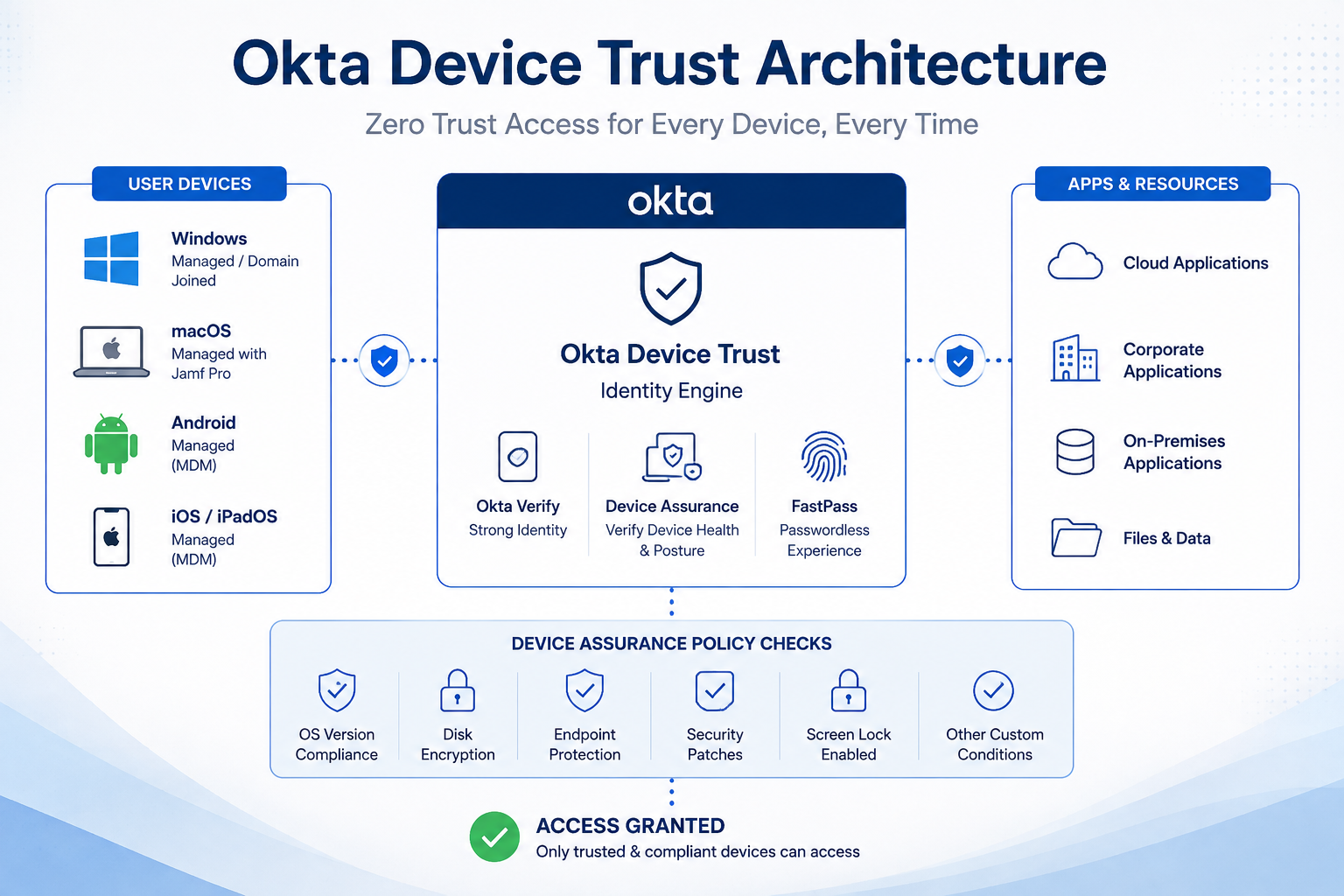
For example, an employee may successfully authenticate but still fail an application’s device requirements because the endpoint does not meet the organization’s security baseline. The administrator can use Device Assurance conditions inside app sign-in policy rules to enforce those requirements.
What Is Okta Device Assurance?
Device Assurance is one of the most important components of the current Okta device-security model. Okta describes Device Assurance policies as sets of security-related device attributes that can be checked as part of app sign-in policies.
Administrators can create platform-specific assurance policies and define minimum security conditions. Depending on the platform and configured posture provider, these can include requirements related to operating-system versions, security patches, screen lock, disk encryption and other supported security signals.
A Device Assurance policy does not protect applications merely because it exists. Okta requires the policy to be included in an app sign-in policy rule before it affects access.
Okta Device Trust Security Checks
The exact signals available depend on the operating system, Okta configuration and device posture provider. A practical policy may evaluate whether an endpoint meets several conditions before allowing access to sensitive SaaS or corporate resources.
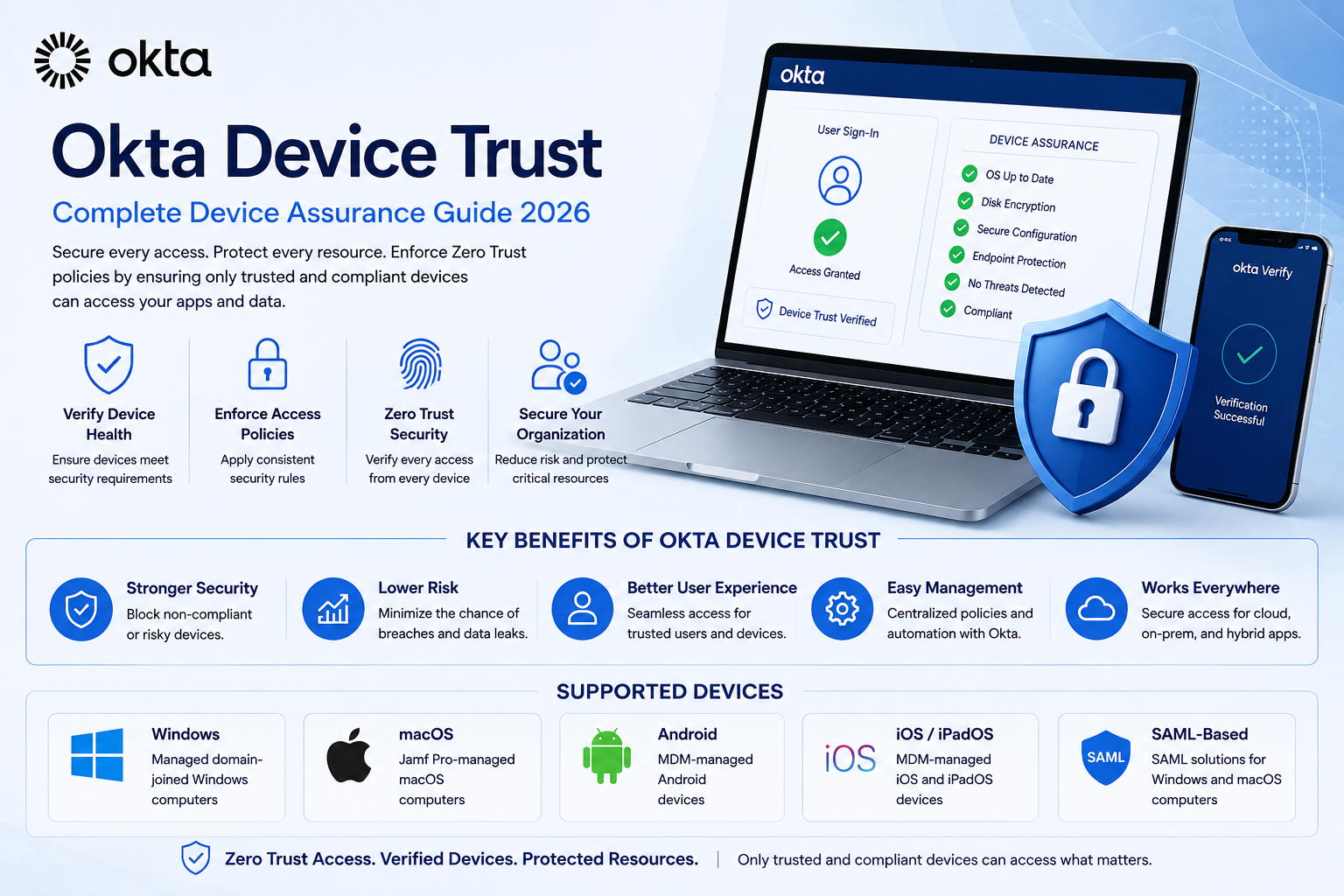
- Operating-system compliance: require a supported or sufficiently recent OS version.
- Security patch posture: use supported platform signals to enforce patch requirements.
- Screen lock: require an appropriate lock-screen configuration where supported.
- Disk encryption: verify encryption status where the selected platform and provider support the signal.
- Device management: distinguish managed endpoints using management attestation and configured device integrations.
- Platform-specific conditions: apply security requirements appropriate to Android, iOS, macOS, Windows or other supported platforms.
Dynamic OS Version Compliance
One useful capability in current Device Assurance policies is dynamic operating-system version compliance. Instead of permanently hard-coding one minimum version and manually updating it after every major release, administrators can use supported dynamic conditions tied to Okta’s OS definitions.
Okta updates its OS definitions as vendors release major versions and security patches, and removes versions when vendors stop issuing security updates. This can reduce the administrative work required to keep device requirements aligned with supported operating systems.
Okta Verify and Device Registration
Okta Verify is central to the Identity Engine device model. It can be deployed to Android, iOS, macOS and Windows endpoints, and an Okta Verify enrollment can register a device with the organization.
Registered does not automatically mean managed or compliant. Those concepts should be treated separately. Device registration establishes a device object and context, while management attestation and Device Assurance can provide additional signals used by access policies.
What Is Okta FastPass?
Okta FastPass is an authentication capability within Okta Verify designed to provide passwordless access and support stronger, phishing-resistant authentication scenarios. It is also a key part of Okta’s replacement path for legacy desktop Device Trust.
For organizations migrating desktop Device Trust from Classic Engine, Okta’s documented replacement uses Okta Verify, a managed certificate and FastPass rather than continuing to build around the old IWA-based Device Trust model.
Registered, Managed and Compliant Devices
These terms are related but not interchangeable.
- Registered device: a device known to Okta through an enrollment such as Okta Verify.
- Managed device: an endpoint for which Okta receives appropriate management evidence through a configured device-management workflow.
- Compliant device: a device that satisfies the relevant Device Assurance conditions applied to the requested resource.
This separation gives administrators more flexibility. An organization may allow a registered personal device to reach a low-risk application while requiring a managed and policy-compliant corporate device for finance, HR or administrative systems.
How Managed Devices Work in Okta
Okta’s current managed-device documentation uses management attestation to help establish that an endpoint is managed. For mobile devices, an MDM solution can deploy a management hint to the endpoint. Desktop environments can use management attestation certificates distributed through device-management tooling.
This means Okta complements endpoint-management platforms rather than replacing every MDM function. Organizations can continue using their device-management system while Okta consumes relevant management context for identity and access decisions.
Okta Device Trust for Windows
Windows deployments in Identity Engine should be designed around the current Okta Verify, FastPass, managed-device and Device Assurance framework rather than assuming the older domain-joined/IWA model is the preferred architecture.
Administrators can create Windows-specific Device Assurance policies and use supported posture conditions in app sign-in rules. Before deployment, verify current Okta Verify requirements, Windows support levels, endpoint-management configuration and authentication policies.
Okta Device Trust for macOS
macOS devices can use Okta Verify and modern management-attestation workflows. Device Assurance policies can also evaluate supported macOS security attributes, allowing organizations to apply platform-specific conditions before granting application access.
Organizations using Apple-focused management platforms should validate the current Okta integration path rather than assuming that every historical Jamf or certificate workflow remains unchanged.
Okta Device Trust for Android and iOS
For mobile devices, Identity Engine uses Okta Verify with management attestation instead of the old Classic Engine mobile Device Trust model. Okta notes that there is no automated migration for general mobile Device Trust configurations, so organizations moving from Classic Engine need to plan the transition carefully.
Device Assurance can apply platform-specific requirements to Android and iOS devices. Depending on platform support, administrators can evaluate OS requirements and other security signals before allowing access.
How to Configure a Device Assurance Policy
The exact settings depend on your Okta subscription, platform and environment, but the current Identity Engine workflow follows a clear policy model.
- Open the Okta Admin Console.
- Go to Security → Device Assurance Policies.
- Select Add a policy.
- Give the policy a unique name.
- Select the device platform.
- Choose the applicable device-attribute provider where available.
- Select the platform-specific device conditions you want to enforce.
- Configure remediation guidance where appropriate.
- Save the Device Assurance policy.
- Add the policy to the appropriate app sign-in policy rule so it actually participates in access decisions.
Because Device Assurance conditions are platform-specific, administrators should design separate policy logic for the platforms they support rather than assuming one Windows rule will automatically evaluate macOS, Android or iOS devices.
Okta Device Trust and App Sign-In Policies
App sign-in policies are where device context becomes an access-control decision. Device Assurance can be included in policy rules alongside other authentication and contextual requirements.
This allows organizations to apply stricter requirements to high-value applications while maintaining a more appropriate user experience for lower-risk resources. Policy design should follow the sensitivity of the application, user population, device ownership model and organizational risk requirements.
Okta Device Trust and Zero Trust Security
Device-aware access fits naturally into a Zero Trust strategy because it avoids treating network location as sufficient evidence of trust. Instead, the organization evaluates identity and device context when deciding whether access should be allowed.
A practical Zero Trust policy might require strong authentication plus a managed device that satisfies defined security requirements before allowing access to sensitive systems. Less sensitive resources may use different requirements.
Teams building their own cloud subscription products should also treat identity, access control and security architecture as part of the product design from the beginning. Our SaaS development services guide explains how these considerations fit into the broader SaaS development, deployment and scaling process.
Migrating from Classic Engine Device Trust
Organizations still referencing Classic Engine documentation should treat migration as a planned security change rather than a simple terminology update.
For desktop devices, Okta’s high-level migration path includes configuring Device Integration and a new certificate authority, deploying the CA through device-management software, deploying Okta Verify, enabling FastPass, and eventually decommissioning legacy IWA infrastructure and Device Trust platforms.
For mobile devices, the replacement is Okta Verify with management attestation. Okta warns that disabling some legacy mobile Device Trust configurations can be destructive, so administrators should document the existing environment and plan the replacement before changing production settings.
Best Practices for Okta Device Trust in 2026
- Use current Identity Engine documentation. Avoid building a new deployment from Classic Engine tutorials.
- Separate registration, management and compliance. Define what each status means in your access model.
- Create platform-specific policies. Windows, macOS, Android and iOS do not expose identical posture signals.
- Use Device Assurance where appropriate. Make endpoint security requirements part of app access decisions.
- Test before enforcing broadly. Pilot policies with test users and devices to avoid unexpected lockouts.
- Keep operating-system requirements current. Consider supported dynamic OS compliance options where suitable.
- Provide remediation instructions. Users should understand why a device failed and what action they need to take.
- Monitor policy results. Review device health and relevant System Log events when troubleshooting.
- Protect high-risk applications more strongly. Match assurance requirements to the sensitivity of each resource.
Common Okta Device Trust Problems
A managed device appears unmanaged
Check the Okta Verify enrollment, device-management configuration, Device Integration settings and required management attestation. A device being managed by an MDM does not automatically mean Okta has received the evidence required to treat it as managed.
Users fail Device Assurance checks
Review the failed security requirement rather than bypassing the policy immediately. Users with supported Okta Verify versions can view device health information and remediation messages in Okta Verify.
A policy works on Windows but not macOS
Device Assurance policies are platform-specific. Confirm that a separate policy and matching app sign-in rule have been created for the affected platform.
Old Device Trust instructions no longer match the Admin Console
The documentation may refer to Classic Engine. Determine whether the organization is using Identity Engine and follow the corresponding current device-security workflow.
Advantages of Modern Okta Device Trust
- Combines identity and device context for stronger access decisions.
- Supports managed-device requirements for sensitive applications.
- Allows platform-specific device security baselines.
- Integrates Device Assurance into app sign-in policies.
- Supports passwordless and phishing-resistant authentication scenarios with FastPass.
- Provides users with device-health visibility and remediation guidance.
- Works alongside endpoint-management and security tooling rather than requiring identity policies to operate in isolation.
Limitations and Considerations
- Legacy Device Trust documentation can cause confusion during new deployments.
- Migration from Classic Engine requires planning and can differ between desktop and mobile platforms.
- Available posture signals vary by operating system and provider.
- Incorrect policy design can block legitimate users or devices.
- Device Assurance must be connected to app sign-in policy rules to enforce access.
- Organizations still need endpoint-management and security processes beyond identity access control.
- Feature availability and configuration can depend on the organization’s Okta products and licensing.
Frequently Asked Questions About Okta Device Trust
What is Okta Device Trust?
Okta Device Trust is commonly used to describe device-aware access controls that evaluate whether an endpoint should be trusted before accessing protected resources. In Identity Engine, modern device security uses capabilities such as Okta Verify, FastPass, managed-device signals and Device Assurance rather than relying only on the legacy Classic Engine Device Trust model.
Is Okta Device Trust deprecated?
Classic Engine Device Trust isn’t the current configurable framework for Identity Engine. Okta documents replacement paths using Okta Verify, managed certificates and FastPass for desktop devices, and Okta Verify with management attestation for mobile devices.
What is the difference between Device Trust and Device Assurance?
Device Trust is the broader concept and also the name associated with Okta’s legacy implementation. Device Assurance is a current Identity Engine capability for evaluating security-related device attributes and using those requirements in app sign-in policy rules.
Does Okta Device Trust require MDM?
Not every device-security use case is identical, but managed-device workflows rely on device-management evidence. Okta can work with endpoint-management solutions to receive management signals while Okta handles identity and access decisions.
Does Okta replace Microsoft Intune or another MDM?
No. Okta’s device-aware access capabilities and an MDM solve different parts of the problem. An MDM manages endpoints and configuration, while Okta can use device context as part of authentication and application-access policy.
What platforms does Okta Device Assurance support?
Current Okta Device Assurance documentation provides platform-specific conditions for environments including Android, iOS, macOS and Windows, with additional posture-provider options depending on configuration. Always check Okta’s current support documentation before deployment because supported OS versions and signals change over time.
Can Okta block an outdated device?
Device Assurance policies can include operating-system requirements and other supported device-health conditions. When those requirements are included in an application’s sign-in policy, a device that fails the required conditions can be prevented from accessing that protected resource.
Final Verdict: Okta Device Trust in 2026
Okta Device Trust remains an important search term and security concept, but administrators should understand that the implementation has evolved. A modern Identity Engine deployment is built around device registration, Okta Verify, FastPass, management attestation, Device Assurance and application sign-in policies rather than simply reproducing Classic Engine Device Trust configurations.
The strongest benefit is contextual access control. Organizations can evaluate both the user and the endpoint before allowing access, applying stricter requirements to sensitive applications and using device-health signals to reduce exposure from outdated, unmanaged or noncompliant endpoints.
If your organization is migrating an older Okta environment, do not remove legacy Device Trust components without a migration plan. Review the current replacement path for each platform, test the new policies with a controlled user group, and validate access before decommissioning old infrastructure.
For current technical configuration, use the official Okta Device Assurance documentation and Okta Device Trust replacement guidance. These official resources should take priority over older tutorials because Okta’s device-security architecture continues to evolve.
For more business software and automation guides, explore XVIFS coverage of Make.com automation and our AI tools for small businesses.
Editor’s note: Okta features, licensing, supported operating systems and policy options can change. Verify production configuration against current official Okta documentation before deploying or modifying access policies.