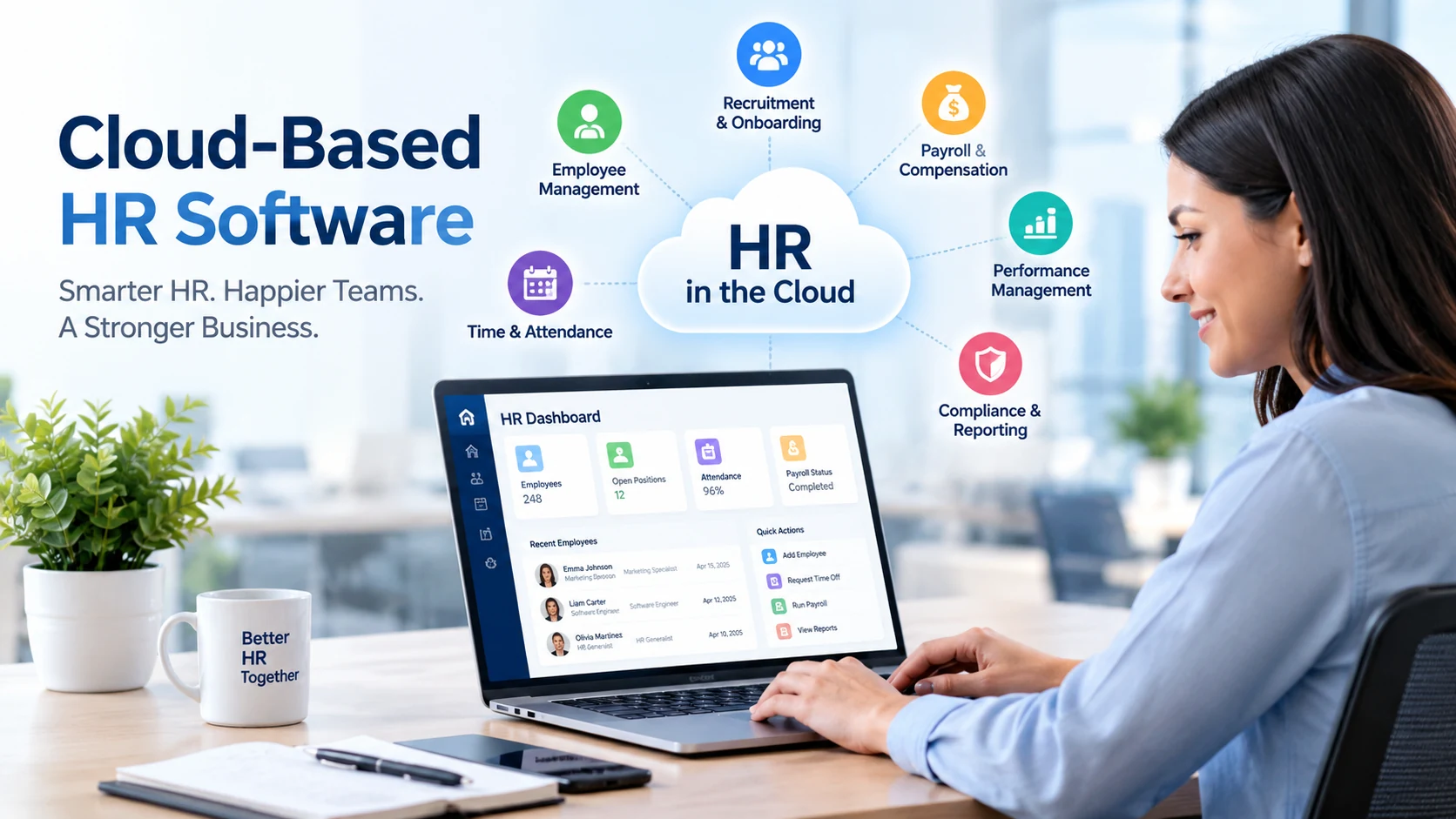
Choosing the right Cloud Based HR Software can simplify how a business manages employee records, recruitment, onboarding, payroll-related processes, performance, time off, reporting, and everyday HR administration. Instead of maintaining disconnected spreadsheets and legacy systems, modern cloud HR platforms give HR teams and managers access to workforce information through a centralized online system.
However, cloud HR platforms vary considerably. A small company may need straightforward employee management and payroll integrations, while a multinational organization may require advanced workforce planning, global compliance capabilities, analytics, integrations, and complex approval workflows.
This XVIFS guide compares some of the leading cloud-based HR software options for 2026 and explains their strengths, limitations, features, costs, security considerations, and ideal use cases so you can create a realistic shortlist for your business.
What Is Cloud Based HR Software?
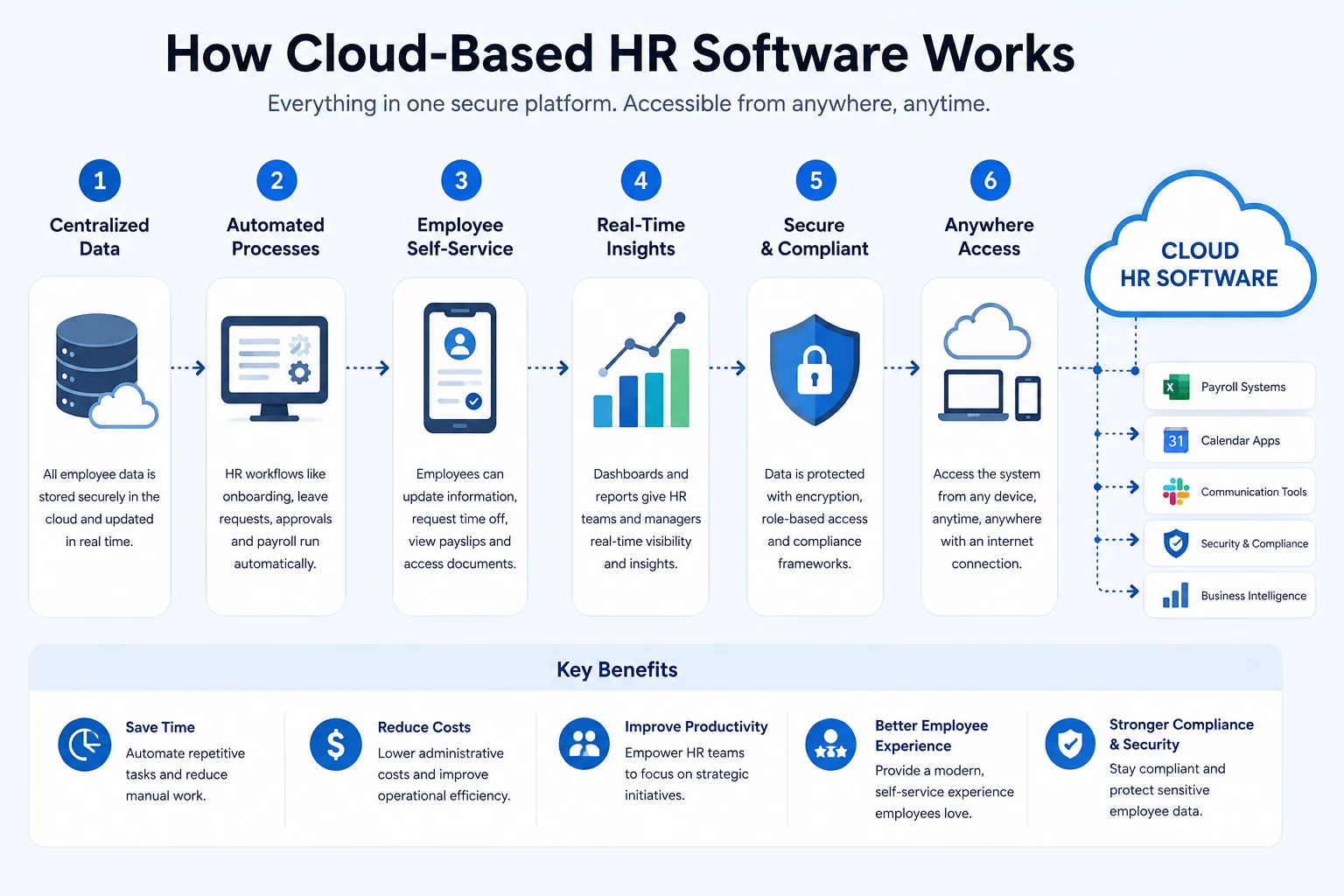
Cloud based HR software is a human resources platform hosted by the software provider and accessed through the internet rather than installed primarily on a company’s own servers. It is commonly delivered using a Software-as-a-Service (SaaS) subscription model.
Depending on the platform, one system may support employee records, onboarding, leave management, payroll, benefits administration, recruiting, performance management, workforce analytics, document management, employee self-service, and workflow automation.
Best Cloud-Based HR Software for 2026: Quick Comparison
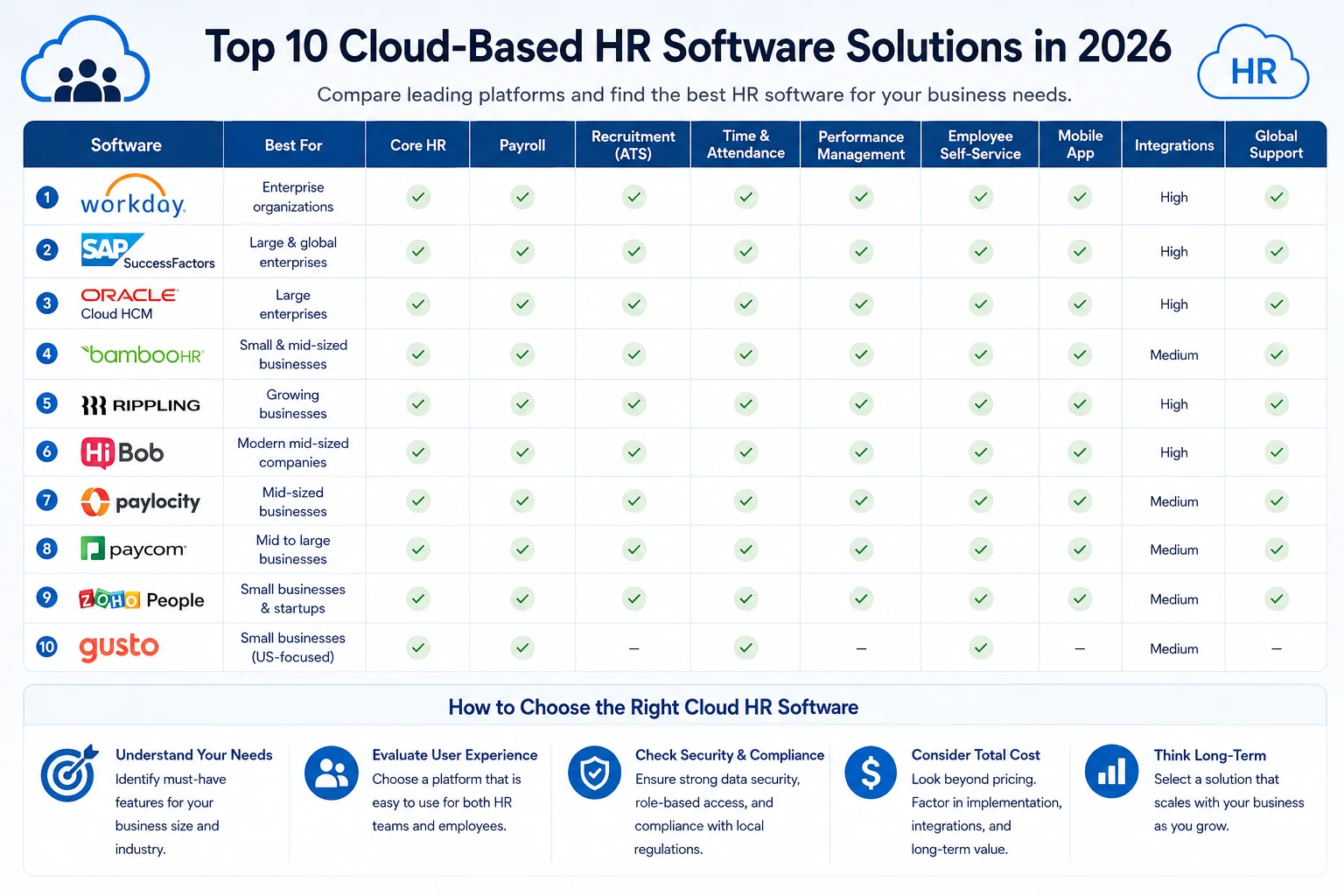
There is no single HR platform that is best for every organization. The strongest choice depends on factors such as workforce size, countries of operation, payroll requirements, integrations, HR complexity, available budget, and expected growth.
| HR Software | Best For | Key Strength | Typical Fit |
|---|---|---|---|
| BambooHR | Growing businesses | User-friendly core HR | SMB / Mid-market |
| Rippling | HR and IT automation | Unified workforce workflows | SMB / Mid-market |
| Gusto | Small businesses | Payroll-centered HR | Small business |
| Workday HCM | Complex organizations | Enterprise HCM and planning | Mid-market / Enterprise |
| SAP SuccessFactors | Global enterprises | Broad enterprise HR suite | Enterprise |
| Oracle Fusion Cloud HCM | Large organizations | Integrated enterprise HCM | Enterprise |
| HiBob | Growing global teams | Employee-centric HRIS | Mid-market |
| UKG | Complex workforce management | HR and workforce operations | Mid-market / Enterprise |
| ADP Workforce Now | Payroll-heavy organizations | Payroll and HR administration | Mid-market |
| Zoho People | Cost-conscious growing teams | Flexible HR administration | SMB / Mid-market |
Note: Product capabilities, packaging and pricing can change. Always confirm current functionality and pricing directly with the provider before purchasing.
1. BambooHR — Best for Straightforward HR Management
BambooHR is a well-known HR platform aimed particularly at growing organizations that want to centralize employee information and streamline routine HR administration without immediately moving to a highly complex enterprise HCM environment.
Depending on the selected products and region, businesses can use BambooHR for core employee records, hiring and onboarding processes, time-related functions, performance management, reporting and other HR activities.
- Best for: Small and mid-sized organizations seeking approachable HR administration.
- Strength: Relatively accessible employee and HR experience.
- Consider carefully: Very complex global enterprises may require broader enterprise capabilities.
Businesses considering the platform should verify current capabilities on the official BambooHR website.
2. Rippling — Best for HR and IT Automation
Rippling takes a broader approach to workforce operations by connecting HR processes with areas such as identity, application access and device-related administration. This can be particularly useful when employee lifecycle events need to trigger actions across multiple business systems.
For example, onboarding a new employee can involve more than creating an HR record. The business may also need approvals, account provisioning, application access and other operational tasks. A connected workflow can reduce repetitive administration. For a broader look at automating repetitive company processes, see our Agentic Process Automation guide.
- Best for: Companies prioritizing automation across HR and IT.
- Strength: Employee lifecycle workflow automation.
- Consider carefully: Organizations wanting only a basic HR database may not need the broader ecosystem.
See current modules and availability through the official Rippling website.
3. Gusto — Best for Small-Business Payroll and HR
Gusto is particularly associated with payroll and people administration for smaller businesses. It can be attractive to companies that want payroll-related processes and essential HR functions within a relatively approachable platform.
- Best for: Smaller businesses with payroll-centered requirements.
- Strength: Combining payroll with common people-management tasks.
- Consider carefully: Large multinational organizations generally have more complex HCM requirements.
4. Workday HCM — Best for Complex Enterprise HR
Workday Human Capital Management is designed for organizations that need much more than basic employee recordkeeping. Its broader HCM environment supports sophisticated workforce, talent, organizational and planning requirements.
The breadth that makes enterprise systems attractive can also make implementation more demanding. Businesses should evaluate configuration requirements, internal resources, data migration, integrations and long-term administration rather than comparing products only by feature count.
- Best for: Mid-sized to large organizations with complex HR operations.
- Strength: Broad HCM and workforce capabilities.
- Consider carefully: Implementation effort and organizational complexity.
Enterprise buyers can review current functionality through Workday.
5. SAP SuccessFactors — Best for Large Global Organizations
SAP SuccessFactors is an enterprise-focused human experience and human capital management suite. It is particularly relevant to organizations already operating in complex international environments or using other SAP technologies.
- Best for: Large and multinational organizations.
- Strength: Extensive enterprise HR and talent capabilities.
- Consider carefully: May be unnecessarily complex for smaller companies with simple HR requirements.
6. Oracle Fusion Cloud HCM — Best for Integrated Enterprise HCM
Oracle Fusion Cloud HCM is another major enterprise option. It is designed to support organizations requiring integrated human capital management across areas such as HR, talent and workforce operations.
It deserves particular consideration when a company already has substantial Oracle infrastructure or needs an enterprise-scale platform that can fit within a wider business technology environment.
7. HiBob — Best for Growing and Distributed Teams
HiBob, commonly known through its Bob platform, targets modern growing organizations and distributed workforces. Its approach combines core people management with areas such as employee lifecycle processes, performance, compensation and workforce insights.
- Best for: Growing and internationally distributed organizations.
- Strength: Modern employee-centered HR experience.
- Consider carefully: Compare required payroll coverage and integrations by country.
8. UKG — Best for Workforce Management
UKG provides HR, payroll and workforce-management technologies for organizations with varying levels of complexity. Businesses with substantial scheduling, time, workforce and employee-management requirements may find its broader workforce focus particularly relevant.
9. ADP Workforce Now — Best for Established Payroll Operations
ADP has extensive experience in payroll and workforce administration. ADP Workforce Now combines payroll-related capabilities with HR functionality aimed primarily at established organizations.
Companies comparing ADP should evaluate the specific package required, integrations, service model and total cost rather than assuming every HR capability is automatically included.
10. Zoho People — Best for Flexible HR Administration
Zoho People is particularly interesting for organizations already using the wider Zoho ecosystem. It provides cloud HR capabilities for areas such as employee information, attendance, leave, performance and HR processes, depending on the selected plan and configuration.
- Best for: Small and growing organizations, especially existing Zoho users.
- Strength: Integration opportunities within the broader Zoho ecosystem.
- Consider carefully: Compare requirements carefully if you need highly sophisticated enterprise HCM functionality.
Key Features to Look for in Cloud Based HR Software
A useful comparison should begin with business requirements. The following capabilities are among the most important areas to evaluate.
Centralized Employee Records
A cloud HR platform should provide an organized source for essential workforce information with appropriate permissions and controls. This reduces dependence on separate spreadsheets, emails and disconnected files.
Recruitment and Onboarding
Recruitment and onboarding capabilities can help businesses move candidates and new hires through repeatable processes. Look for workflows, document handling, approvals, task assignment and integrations relevant to your hiring process.
Payroll and Benefits
Payroll requirements vary significantly by country and business structure. Confirm whether payroll is native, provided through partners or handled through integrations, and verify geographic availability before selecting a system.
Time, Attendance and Leave
Businesses with hourly employees, shifts or complex leave policies should examine time tracking, scheduling, attendance, overtime and approval capabilities carefully.
Employee Self-Service
Employee self-service can reduce repetitive HR requests by allowing authorized employees to view or update appropriate information, submit requests and access relevant documents.
Performance Management
Depending on organizational needs, useful capabilities may include goals, reviews, feedback, development plans and performance cycles.
Reporting and Workforce Analytics
Reporting should help decision-makers understand workforce changes rather than simply store information. Evaluate dashboards, custom reports, exports, permissions and the quality of the underlying data.
Integrations and APIs
HR systems rarely operate alone. Your platform may need to exchange information with accounting software, identity systems, collaboration tools, payroll providers, recruiting systems and other business applications.
Cloud HR Software vs Traditional On-Premise HR Systems
| Area | Cloud HR Software | Traditional On-Premise System |
|---|---|---|
| Hosting | Provider-managed cloud infrastructure | Organization-managed infrastructure |
| Access | Typically browser/app based | Often more dependent on internal infrastructure |
| Updates | Usually provider managed | May require internal upgrade projects |
| Initial infrastructure | Generally lower local infrastructure requirement | Can require servers and internal resources |
| Scaling | Usually subscription-based scaling | May require additional infrastructure/licensing |
| Customization | Configuration within vendor platform | Can permit deep custom deployments |
| Maintenance | Much of platform maintenance handled by provider | Greater internal maintenance responsibility |
Benefits of Cloud-Based Human Resources Software
The business case for moving HR operations to the cloud goes beyond eliminating local servers.
- Centralized information: Reduce fragmented workforce records.
- Remote accessibility: Authorized users can access relevant functions from supported locations and devices.
- Automation: Repetitive approvals and administrative tasks can be converted into structured workflows.
- Scalability: Systems can generally expand as employee numbers and organizational requirements grow.
- Employee self-service: Routine requests can require less manual HR intervention.
- Reporting: Centralized information can improve workforce visibility when the underlying data is accurate.
- Managed updates: SaaS providers generally handle platform updates and infrastructure maintenance.
The same cloud principles extend beyond HR. Businesses evaluating broader infrastructure modernization can also read the XVIFS guide to Cloud Application Development.
How Much Does Cloud Based HR Software Cost?
There is no reliable universal price for cloud HR software. Providers use different pricing structures, and the final cost can depend on employee count, selected modules, countries, payroll requirements, implementation services, integrations, support and contract terms.
Common pricing structures include:
- Per employee per month pricing
- Base subscription plus employee fees
- Tiered packages
- Module-based pricing
- Custom enterprise quotations
- Separate implementation or onboarding charges
Do not compare vendors using the headline subscription price alone. Ask for the expected total cost of ownership, including setup, implementation, integrations, migration, optional modules, support and expected future headcount.
Cloud HR Software for Small Businesses
A small company usually benefits more from simplicity than from an enormous enterprise feature set. Priorities often include employee records, onboarding, leave, payroll or payroll integration, basic reporting and employee self-service. Companies modernizing other operational systems can also review our guide to Small Business Inventory Management.
Platforms such as Gusto, BambooHR, Zoho People and some Rippling configurations may deserve consideration depending on geography and requirements. The right choice should minimize administrative overhead rather than introduce unnecessary complexity.
Cloud HR Software for Mid-Sized Businesses
As headcount increases, requirements often expand into performance management, compensation, advanced permissions, integrations, structured reporting, automation and multi-entity operations. This is where products such as BambooHR, Rippling, HiBob, ADP and UKG may enter the shortlist alongside other specialist platforms.
Cloud HR Software for Enterprises
Large organizations should evaluate architecture and operational fit much more deeply. Requirements can include multiple legal entities, countries, languages, currencies, sophisticated security controls, complex organizational structures, workforce planning, talent management and integrations with enterprise systems.
Workday, SAP SuccessFactors and Oracle Fusion Cloud HCM are prominent enterprise options, but selecting an enterprise HCM platform should involve detailed requirements gathering, demonstrations, security review, integration analysis and implementation planning.
Security Considerations for Cloud HR Platforms
HR platforms process sensitive workforce information, so security should be a core procurement requirement rather than an afterthought.
- Role-based access controls
- Multi-factor authentication options
- Encryption practices
- Audit logs
- Backup and recovery procedures
- Data retention controls
- Security certifications and independent assurance reports where applicable
- Data residency requirements
- Privacy and regulatory obligations relevant to your jurisdictions
- Processes for employee access changes and offboarding
Businesses building broader governance standards may also find our Cloud Security Policy guide useful when defining controls for cloud applications.
How to Choose the Best Cloud Based HR Software
A disciplined selection process is more reliable than choosing whichever platform has the longest feature list.
Step 1: Document Your Current HR Problems
Identify what is actually failing today. Examples could include duplicate data entry, slow onboarding, fragmented employee records, poor reporting, manual leave approvals or difficult payroll processes.
Step 2: Separate Essential Features from Nice-to-Haves
Create three categories: mandatory, preferred and optional. This prevents attractive demonstrations from distracting the buying team from real requirements.
Step 3: Check Geographic Coverage
Never assume that payroll, benefits or compliance-related capabilities available in one country automatically exist in another.
Step 4: Map Required Integrations
List every system that must exchange information with HR, including payroll, accounting, identity, recruiting and collaboration tools.
Step 5: Evaluate Security
Include your security, privacy and IT stakeholders before signing a contract—not after implementation begins.
Step 6: Request a Real Workflow Demonstration
Instead of accepting a generic sales demonstration, ask shortlisted vendors to show your actual scenarios: hiring an employee, approving leave, changing a manager, generating a report and offboarding a worker.
Step 7: Calculate Total Cost
Compare realistic three-year costs rather than only the first month’s subscription.
Cloud HR Software Selection Checklist
- Does it solve our highest-priority HR problems?
- Does it support our current employee count?
- Can it support expected growth?
- Does it operate in the countries we need?
- Does it integrate with our existing systems?
- Are permissions sufficiently granular?
- Can employees and managers use it without excessive training?
- Are reporting capabilities sufficient?
- Does the vendor meet our security requirements?
- What does implementation involve?
- How will existing employee data be migrated?
- What is included in support?
- Which capabilities cost extra?
- What is the realistic total cost over three years?
Common Mistakes When Buying Cloud HR Software
Buying Too Many Features
A huge feature list has little value if employees and managers find the system difficult to use. Prioritize workflows that materially improve your operations.
Ignoring Implementation
Software selection is only part of the project. Data cleaning, migration, configuration, permissions, integrations, testing and training can determine whether the implementation succeeds.
Ignoring Future Growth
A platform that works for 30 employees may not remain suitable after rapid expansion into several countries or business entities.
Assuming Every Integration Is Native
Confirm exactly how important integrations work, what information moves between systems, how frequently it synchronizes and whether additional charges apply.
Selecting on Price Alone
The cheapest subscription can become expensive if it creates manual work, requires numerous add-ons or needs replacement after a short period.
The Role of AI and Automation in Cloud HR Software
AI and automation are increasingly being incorporated into HR platforms for tasks such as workflow assistance, employee support, analytics, recruiting processes and administrative automation. However, buyers should distinguish practical functionality from marketing claims. Organizations evaluating wider automation initiatives may also find our Artificial Intelligence Automation Agency guide useful.
Ask vendors to demonstrate exactly what an AI capability does, which data it uses, what administrators can control, how outputs are reviewed and how employee information is protected.
Organizations exploring automation more broadly can also read our guide to AI Business Solutions to understand where AI can support business processes beyond HR.
Frequently Asked Questions
What is cloud based HR software?
Cloud based HR software is an online HR platform hosted on cloud infrastructure and generally delivered through a SaaS model. It can centralize employee information and support processes such as onboarding, leave, payroll-related workflows, performance and reporting.
What is the best cloud HR software?
There is no universal best option. BambooHR may suit organizations prioritizing straightforward HR management, Rippling may appeal to automation-focused businesses, Gusto is commonly considered by smaller payroll-centered businesses, while Workday, SAP SuccessFactors and Oracle target more complex enterprise requirements.
Is cloud HR software suitable for small businesses?
Yes. Many cloud HR platforms are designed specifically for smaller organizations. Small businesses should prioritize ease of use, essential HR functionality, realistic pricing and payroll availability rather than enterprise-level complexity.
Is cloud HR software secure?
Cloud HR software can provide strong security controls, but security varies by provider, configuration and organizational practices. Buyers should evaluate authentication, permissions, encryption, auditing, backups, privacy requirements and relevant assurance documentation.
How much does cloud HR software cost?
Pricing varies substantially. Vendors may charge per employee, use tiered subscriptions, price individual modules or provide custom enterprise quotes. Implementation, migration, integrations and support can also affect total cost.
What is the difference between HRIS, HRMS and HCM?
The terms overlap in modern software marketing. HRIS traditionally emphasizes employee information and core HR processes; HRMS can describe broader HR management capabilities; HCM generally refers to a wider approach covering areas such as talent, workforce planning and strategic people management. Always compare actual product functionality instead of relying only on the label.
Can cloud HR software integrate with payroll?
Many platforms provide native payroll in selected markets or integrate with payroll providers. Availability varies by product and country, so businesses should verify their exact payroll workflow before purchasing.
How long does cloud HR software implementation take?
Implementation time depends on company size, data quality, integrations, selected modules, countries, configuration requirements and project resources. A simple small-business deployment can be much less demanding than a multinational enterprise HCM transformation.
Final Verdict: Which Cloud HR Platform Should You Choose?
The best Cloud Based HR Software is not necessarily the platform with the most features. It is the system that matches your workforce, processes, geographic requirements, security expectations, integrations, budget and expected growth.
Small businesses should generally prioritize simplicity and essential HR workflows. Growing organizations should pay closer attention to automation, integrations and scalability. Enterprises need to evaluate global capabilities, architecture, security, workforce planning and implementation requirements in much greater depth.
Create a shortlist of two or three platforms, demonstrate your real HR workflows, verify current pricing directly with each provider, evaluate security and integrations, and calculate the total cost before making the final decision.
XVIFS Editorial Note: Software features, availability and pricing change frequently. Product references in this guide are intended to help businesses create a shortlist rather than guarantee that a platform is suitable for every organization. Verify important requirements directly with the software provider before purchasing.