Claude vs Gemini has become one of the most important AI assistant comparisons in 2026. Both platforms can help with writing, coding, research, document analysis, business tasks, and everyday productivity, but they are increasingly optimized for different kinds of work.
Anthropic is pushing Claude deeper into coding, agentic workflows, tool use, and professional knowledge work. Google is expanding Gemini across Search, Gmail, Docs, multimodal creation, developer tools, and a much broader Google ecosystem. That means the best choice is not simply the model with the highest benchmark score—it is the assistant that fits your workflow.
Quick verdict: Claude is our preferred choice for focused writing, coding, long-form analysis, and complex professional work. Gemini is especially compelling for Google Workspace users, multimodal tasks, search-connected research, and people who want AI integrated directly into Google’s products.
Claude vs Gemini: Quick Verdict
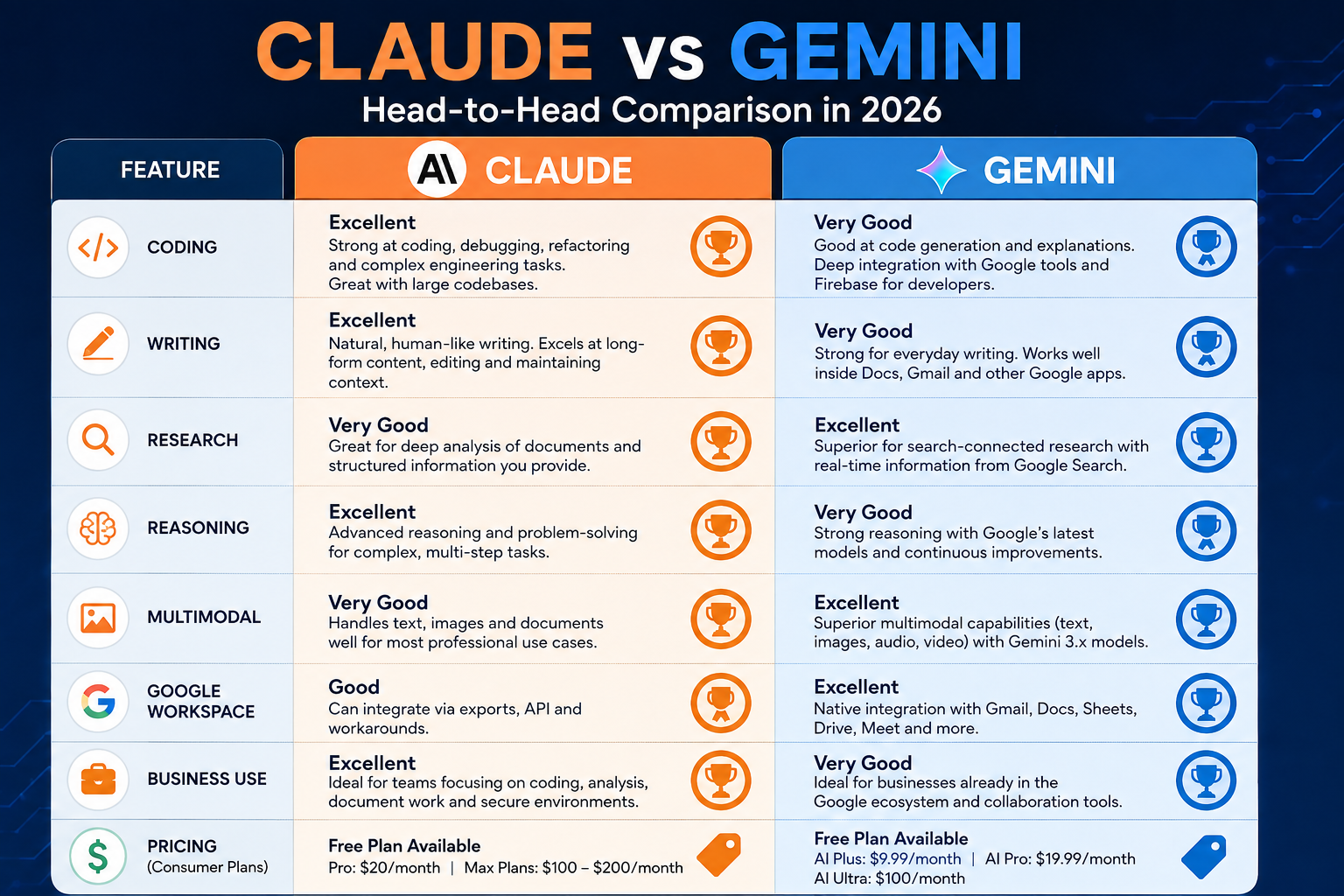
| Use Case | Recommended AI | Why |
|---|---|---|
| Writing and editing | Claude | Strong long-form structure, editing, tone control, and document-focused work. |
| Coding | Claude | Anthropic has made coding, agents, and Claude Code central to its product direction. |
| Research | Depends | Claude is excellent with supplied documents; Gemini is strong when Google Search and Deep Research matter. |
| Complex reasoning | Claude | Well suited to structured, multi-step, text-heavy professional tasks. |
| Multimodal work | Gemini | Google is investing heavily in text, image, audio, video, and multimodal creation. |
| Google Workspace | Gemini | Native integration across Gmail, Docs, and other Google services is a major advantage. |
| Business productivity | Depends | Claude suits deep work; Gemini suits Google-centered teams and workflows. |
| Overall | No universal winner | The better assistant depends on the work you need to complete. |
Claude vs Gemini at a Glance
Claude is developed by Anthropic. In 2026, Anthropic has continued positioning Claude around sophisticated knowledge work, coding, tool use, and increasingly agentic tasks. Anthropic’s official Claude Sonnet 5 announcement says Sonnet 5 is available across all plans, is the default model for Free and Pro users, and is available in Claude Code and on the Claude Platform.
Gemini is Google’s broader AI platform. At Google I/O 2026, Google introduced the Gemini 3.5 family with an emphasis on combining advanced intelligence with action, while also expanding multimodal and agentic experiences across its products. Google’s Gemini 3.5 announcement describes the family as being designed for complex agentic workflows.
Current Claude and Gemini Models in 2026
AI model names change quickly, so this guide compares Claude vs Gemini as platforms first, then uses current model families to explain how each company is developing its products.
Claude in 2026
Anthropic’s Claude Sonnet 5 is positioned as a highly capable general model for reasoning, coding, tool use, and professional work. Anthropic states that it is currently the default model for Free and Pro plans and is also available to Max, Team, and Enterprise users.
Anthropic is also strengthening the relationship between Claude and Claude Code. According to the Anthropic Help Center, Pro and Max subscribers can use Claude Code directly from the terminal, giving developers access to Claude for both conversational work and coding workflows through the same subscription.
Gemini in 2026
Google introduced Gemini 3.5 Flash in May 2026 as part of a new model family focused on frontier intelligence, speed, coding, and long-horizon agentic tasks. Google’s I/O announcements also introduced Gemini Omni, extending Gemini further into multimodal creation and editing.
Google’s broader advantage is that Gemini does not operate only as a standalone chatbot. It increasingly appears across Search, Gmail, Docs, developer tools, and other Google products. This platform-level integration is one of the clearest differences in any Claude vs Gemini comparison.
Claude vs Gemini for Writing
For dedicated long-form writing, editing, reports, proposals, and content workflows, Claude is our preferred choice.
Claude is particularly useful when you want to provide a large amount of context, establish detailed instructions, and then iterate on the same document through multiple stages. That makes it well suited to articles, business reports, summaries, rewrites, document analysis, and structured drafting.
Gemini is also a capable writing assistant, but its strongest advantage is convenience for people already working inside Google’s ecosystem. If your workflow begins in Gmail or Google Docs and you want AI assistance without constantly moving content between tools, Gemini can be the more practical option.
Writing verdict: Choose Claude for dedicated writing and editing workflows. Choose Gemini when native Google productivity integration matters more.
Claude vs Gemini for Coding
The question of Claude vs Gemini for coding deserves special attention because coding is now a major battleground for both companies.
Anthropic has made software development central to Claude’s positioning. Claude Code gives developers a terminal-based environment for delegating coding tasks, working with repositories, debugging, refactoring, and handling multi-step development workflows.
Google is also moving aggressively into agentic development. Gemini 3.5 Flash was introduced with a focus on coding and long-horizon agentic tasks, while Google continues expanding its developer ecosystem through Gemini API, AI Studio, Android Studio, and agent-first development tools.
For general coding work, we currently give Claude the edge because its product direction is highly focused on software development and tool use. However, the competition is close enough that developers should also consider their existing stack and preferred ecosystem.
Coding verdict: Claude wins for intensive coding and development workflows. Gemini remains a strong option, especially for developers already invested in Google’s tools.
We will treat Claude Code vs Gemini CLI as a separate XVIFS comparison because that search intent is more specific than the general Claude vs Gemini decision covered here.
Claude vs Gemini for Research
Research is one of the closest categories because the two platforms excel in different research workflows.
Claude is especially strong when the information is already in front of you. Give it documents, reports, source material, or structured data and it can help summarize, compare, extract insights, and turn complex information into an organized output.
Gemini becomes particularly attractive when research benefits from Google’s information ecosystem. Google continues to connect Gemini with Search and offers Deep Research capabilities in its paid AI plans. The official Google One plans page currently lists Deep Research among the benefits available through Google AI Pro.
Research verdict: Claude is excellent for deep analysis of supplied material. Gemini is especially useful for search-connected research and Google-centered information gathering.
Claude vs Gemini for Reasoning and Complex Tasks
Both Claude and Gemini can handle sophisticated reasoning, planning, and multi-step tasks, but the way you use them matters.
Claude is particularly comfortable in text-heavy professional workflows where the task requires maintaining instructions, analyzing several pieces of information, and producing a structured answer. This makes it useful for strategy documents, business analysis, technical planning, and complex writing tasks.
Google’s Gemini 3.5 direction shows that Google is equally serious about agentic reasoning. The company describes Gemini 3.5 as a family built to execute complex workflows rather than simply answer prompts.
Reasoning verdict: We lean toward Claude for structured, text-centric professional reasoning, while Gemini is increasingly competitive for workflows that combine reasoning with Google’s ecosystem and multimodal inputs.
Claude vs Gemini for Long Documents
Large-document analysis is one of Claude’s most natural use cases. Users who regularly work with reports, contracts, research material, strategy documents, or lengthy source files may prefer Claude’s document-focused style and structured responses.
Gemini can also work with complex source material, particularly when it connects to Google’s wider productivity and research environment. The decision therefore depends on whether your workflow is primarily document analysis or Google-connected information work.
Long-document verdict: Claude is our preferred option for focused document analysis and synthesis.
Claude vs Gemini for Images and Multimodal Tasks
Multimodality is one of Gemini’s clearest strategic strengths.
Google’s 2026 AI announcements emphasize models and experiences that work across text, images, audio, video, and other inputs. Gemini Omni was introduced specifically around creating from multimodal input and expanding world understanding and editing capabilities.
Claude also supports image understanding and multimodal workflows, but Google’s larger portfolio of search, creative, video, mobile, and productivity products gives Gemini more opportunities to combine different media types in one ecosystem.
Multimodal verdict: Gemini wins for users whose work regularly involves multiple media types.
Claude vs Gemini for Business
For business use, there is no sensible universal winner.
Claude is a strong choice for teams focused on writing, coding, analysis, internal knowledge, documents, strategy, and sophisticated professional tasks. Gemini becomes especially compelling for businesses that already run heavily on Gmail, Google Docs, Drive, and other Google services.
A practical way to decide is to ask where the work already happens. If AI itself will be the center of the workflow, Claude may be the better dedicated environment. If AI needs to live inside a Google-centered workplace, Gemini can reduce friction.
Businesses comparing a wider range of tools should also read our 15 Best AI Tools for Small Businesses in 2026 and our AI Tools for Customer Support comparison.
Claude vs Gemini for Google Workspace
This category has a clear winner: Gemini.
Google’s current AI plans integrate Gemini across products including Gmail and Docs, with different access levels depending on the subscription. Google AI Pro also bundles larger storage and additional AI features.
Claude can still help you write emails, analyze exported content, prepare reports, or generate material for Google Docs, but it does not own the underlying Google productivity ecosystem.
Google Workspace verdict: Gemini is the better choice for users who spend most of their working day inside Google products.
Claude vs Gemini Pricing and Value
Pricing changes frequently, so always check the official plan pages before subscribing.
Claude consumer pricing
Anthropic currently lists Claude Pro at $20 per month in the United States. Its Max plans offer higher usage tiers at $100 per month and $200 per month. These figures are documented in Anthropic’s official help resources.
Gemini consumer pricing
Google’s current U.S. Google One plan page lists Google AI Plus at $9.99 per month and Google AI Pro at $19.99 per month. Google AI Pro includes higher Gemini usage limits, access to a Pro model and Deep Research, plus Gemini functionality across Gmail, Docs, Vids, and additional Google services.
| Plan | Current U.S. Price | Best For |
|---|---|---|
| Claude Free | Free | Trying Claude and lighter everyday use |
| Claude Pro | $20/month | Regular Claude users and lighter Claude Code use |
| Claude Max | $100 or $200/month | Power users needing significantly higher usage |
| Google AI Plus | $9.99/month | Lower-cost access to expanded Gemini features |
| Google AI Pro | $19.99/month | Higher Gemini access, Deep Research, and Google integrations |
For mainstream paid users, Claude Pro and Google AI Pro are essentially the same price. The better value therefore depends on what you actually receive from each ecosystem.
API pricing
Developers should compare API pricing separately from consumer subscriptions. Anthropic says Claude Sonnet 5 has introductory API pricing of $2 per million input tokens and $10 per million output tokens through August 31, 2026, after which it moves to $3 input and $15 output per million tokens. Check Anthropic’s official Sonnet 5 information for the latest terms.
Google maintains multiple Gemini API models and pricing tiers, so developers should compare the specific Gemini model required for their workload rather than treating all Gemini API usage as one price.
Claude Pros and Cons
Pros
- Excellent fit for long-form writing and editing.
- Strong coding and software-development focus.
- Claude Code provides a dedicated developer workflow.
- Well suited to document analysis and structured professional work.
- Strong direction toward tools, agents, and complex knowledge tasks.
Cons
- Does not have Google’s native Workspace ecosystem.
- May be less convenient for users whose workflows revolve around Gmail, Docs, and Google Search.
- Higher usage tiers can become expensive for power users.
- The best model and usage limits depend on the subscription level.
Gemini Pros and Cons
Pros
- Deep integration with Google’s products and services.
- Strong multimodal strategy across text, image, audio, and video.
- Excellent fit for Gmail and Google Docs users.
- Search-connected and Deep Research workflows are a major strength.
- Multiple consumer and developer options at different price levels.
Cons
- The rapidly changing model lineup can be confusing.
- Features and limits vary significantly across models and plans.
- Some ecosystem benefits matter less if you do not rely on Google products.
- Choosing the right Gemini model can require more evaluation for developers.
Who Should Choose Claude?
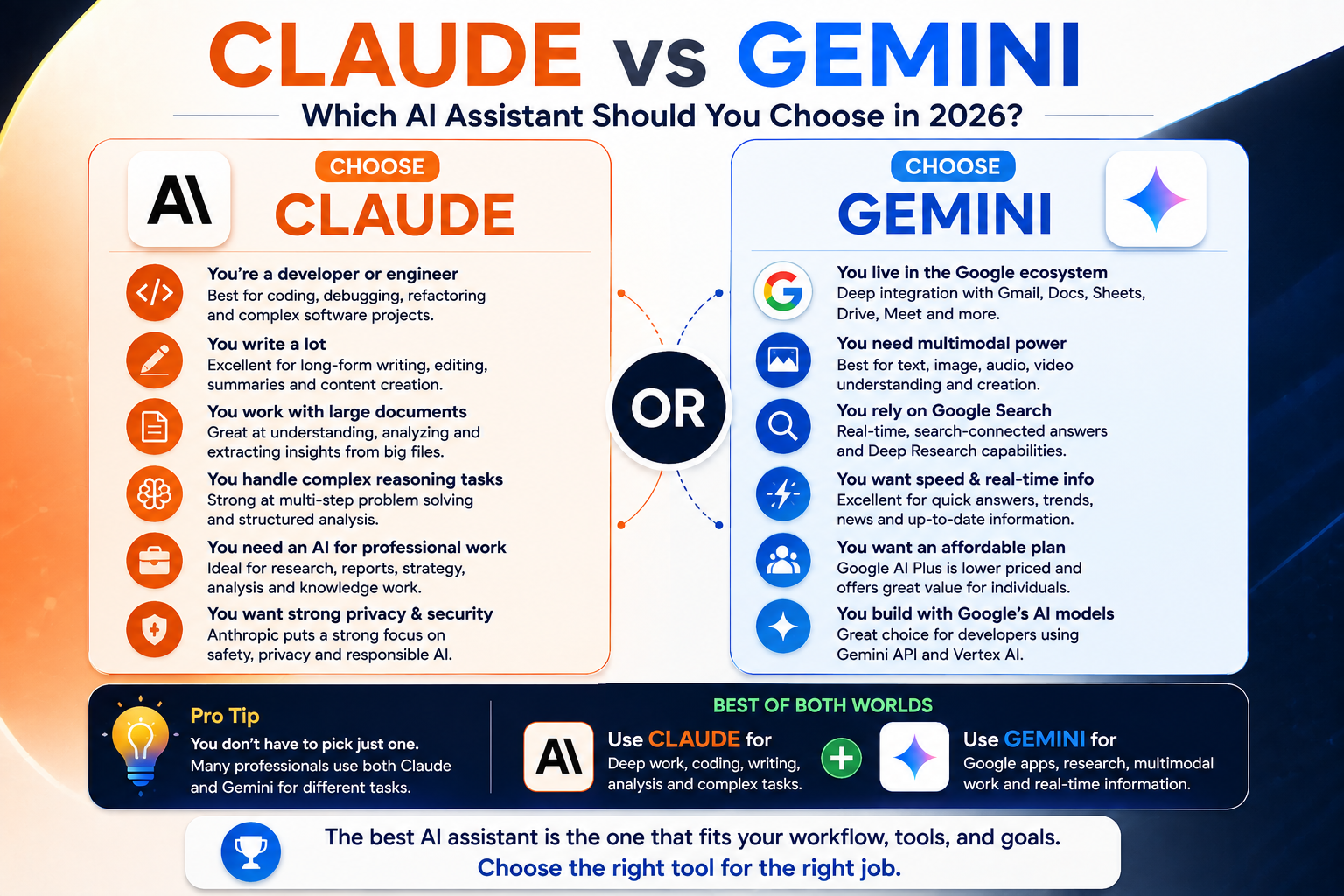
Choose Claude if you are primarily a developer, writer, analyst, researcher, strategist, or knowledge worker who wants an AI environment for focused deep work.
Claude makes particular sense when you regularly perform tasks such as:
- coding and debugging;
- long-form writing and editing;
- analyzing substantial documents;
- working through complex business problems;
- creating structured reports;
- performing multi-step professional tasks.
If you are also considering OpenAI’s assistant, see our existing ChatGPT vs Claude in 2026 comparison.
Who Should Choose Gemini?
Choose Gemini if your work is closely connected to Google’s ecosystem or if multimodal capabilities are particularly important.
Gemini is especially attractive when you regularly rely on:
- Gmail and Google Docs;
- Google Search and Deep Research;
- multimodal inputs;
- Google’s creative and productivity tools;
- Google-centric development environments;
- one subscription that combines AI capabilities with broader Google benefits.
Can You Use Claude and Gemini Together?
Yes, and for some professionals that may be the most practical answer.
You could use Claude for deep writing, coding, document analysis, and structured problem solving while using Gemini for Google Workspace, search-connected research, and multimodal tasks. There is no reason every workload must be forced into a single AI platform.
This approach also reduces dependence on one provider and allows you to choose the strongest tool for each task.
Claude vs Gemini: Final Verdict
So, which assistant wins Claude vs Gemini in 2026?
Choose Claude if your priorities are coding, long-form writing, complex document analysis, structured reasoning, and focused professional workflows.
Choose Gemini if your priorities are Google Workspace integration, multimodal work, Google-connected research, and having AI embedded across a larger ecosystem.
For many people, the best answer is not Claude or Gemini—it is using each platform where it provides the greatest practical advantage.
If you are comparing the wider AI market, continue with our Best AI Tools in 2026 guide to see how these assistants compare with other leading AI platforms.
Frequently Asked Questions
Is Claude better than Gemini?
Claude is our preferred option for writing, coding, long-document analysis, and many complex professional workflows. Gemini can be the better choice for Google Workspace, multimodal tasks, and search-connected research.
Is Claude or Gemini better for coding?
We currently give Claude the edge for intensive coding workflows because Anthropic has made coding, tool use, and Claude Code central to its platform. Gemini remains highly competitive, particularly for developers using Google’s ecosystem.
Is Gemini better than Claude for research?
It depends on the research process. Gemini is attractive when Google Search, Deep Research, and Google’s ecosystem are important. Claude is especially strong when you already have documents or source material that need careful analysis and synthesis.
Is Claude or Gemini better for writing?
Claude is our preferred choice for dedicated long-form writing, editing, reports, and structured text-heavy work. Gemini is highly convenient when writing happens primarily inside Gmail or Google Docs.
Which is cheaper, Claude or Gemini?
Google currently offers a lower-priced Google AI Plus tier at $9.99 per month. For the mainstream premium tiers, Claude Pro is $20 per month while Google AI Pro is $19.99 per month in the United States. Prices and plan benefits can change, so confirm them on the official provider websites before subscribing.
Can I use Claude and Gemini together?
Yes. Many users may get better results by using Claude for coding, writing, and deep analysis while using Gemini for Google-integrated workflows, multimodal tasks, and search-connected research.
Which AI assistant is better for a small business?
Google-centered businesses may prefer Gemini because of its integrations, while teams focused on coding, documents, analysis, and complex knowledge work may prefer Claude. The best choice depends on the applications your business already uses and the tasks you want to automate.
Editorial note: AI models, pricing, limits, and features change rapidly. XVIFS recommends checking the official Anthropic and Google product pages for the latest availability and pricing before making a purchasing decision.