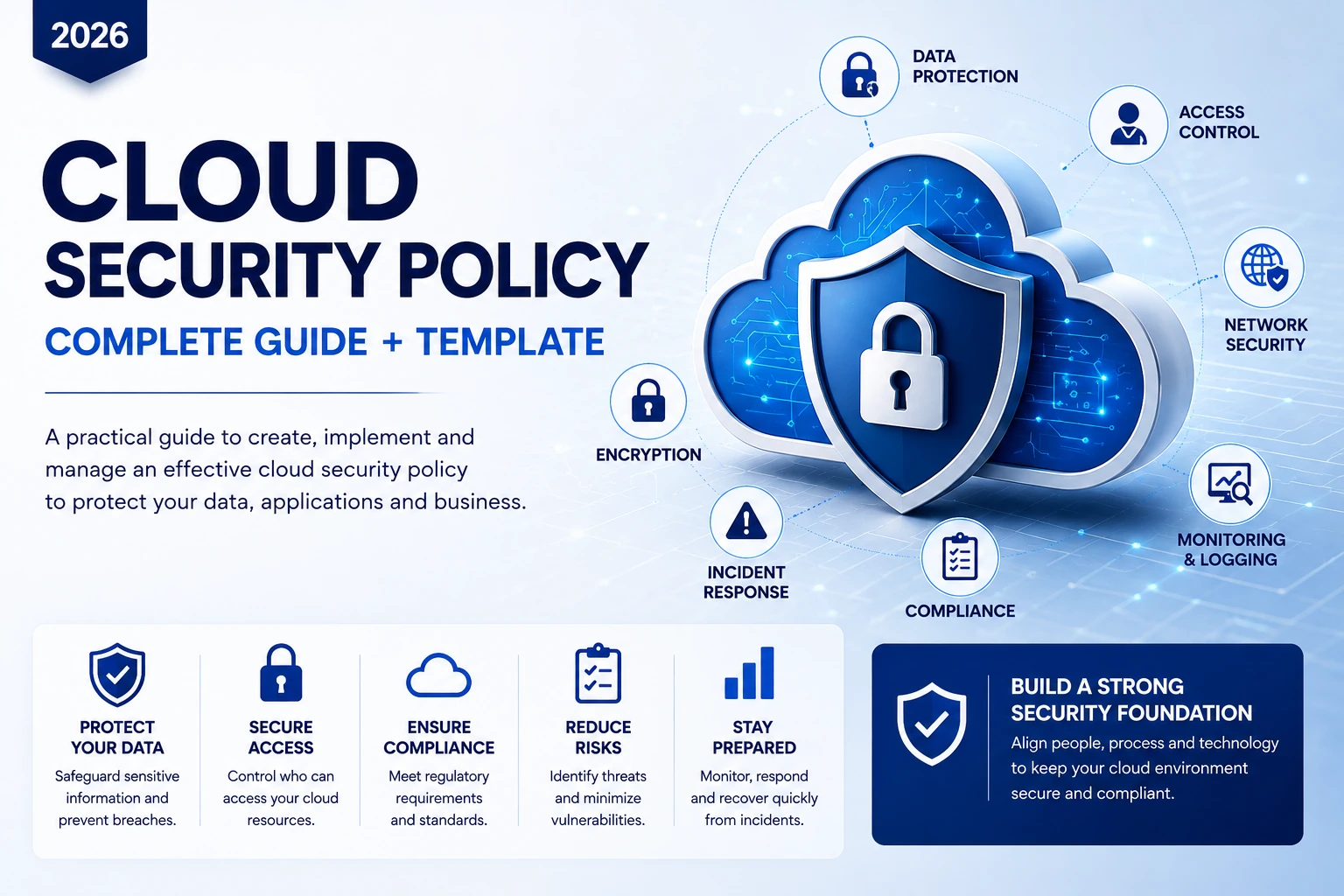
Cloud security policy gives an organization clear rules for protecting cloud accounts, applications, data, identities, networks and services. Without a documented policy, teams can make inconsistent security decisions, create excessive permissions, leave resources exposed, or respond too slowly when something goes wrong.
This guide explains how to create a practical cloud security policy in 2026, what controls it should contain, how AWS, Microsoft Azure and Google Cloud affect policy design, and how to turn policy statements into day-to-day security practices. It also includes a ready-to-adapt cloud security policy template near the end of the article.
Quick answer: A cloud security policy is a formal set of rules that defines how an organization protects cloud systems and data. It should cover access control, identity management, encryption, network security, logging, monitoring, backups, incident response, compliance, third-party providers, responsibilities and regular policy reviews.
Cloud Security Policy Table of Contents
- What Is a Cloud Security Policy?
- Why Every Business Needs a Cloud Security Policy
- Essential Cloud Security Policy Components
- Cloud Security Policy for AWS, Azure and Google Cloud
- How to Create a Cloud Security Policy
- Cloud Security Policy Template for 2026
- Cloud Security Policy FAQs
What Is a Cloud Security Policy?
A cloud security policy is a documented set of requirements that explains how cloud resources must be accessed, configured, monitored, protected and maintained. It translates security goals into clear expectations for employees, administrators, developers, vendors and service providers.
The policy should apply to the full cloud environment, not just virtual machines. Depending on the business, that may include software-as-a-service applications, cloud databases, object storage, APIs, serverless functions, containers, identity systems, development environments, backups and third-party integrations.
Organizations can use established security frameworks as a reference point. The CIS Critical Security Controls provide a practical set of safeguards, while the NIST Guidelines on Security and Privacy in Public Cloud Computing provide additional cloud-specific security considerations.
Why Every Business Needs a Cloud Security Policy
Cloud platforms make it easy to create new resources quickly. That speed is useful for development and business growth, but it also increases the risk of inconsistent configurations and unmanaged access if the organization does not define clear controls. Businesses adopting AI Business Solutions should apply the same security discipline when those systems depend on cloud applications, APIs, data stores, and third-party services.
- Clear responsibilities: Teams understand who owns security decisions and who approves exceptions.
- Consistent access control: Administrators apply the same identity and permission rules across cloud accounts.
- Better data protection: Employees know which information requires encryption, restricted access or special retention rules.
- Stronger compliance: Security requirements can be aligned with industry, legal and contractual obligations.
- Faster incident response: Teams already know who must be notified and what actions are expected.
- Reduced operational risk: Standardized configuration and monitoring practices can reduce preventable security mistakes.
Cloud Security Policy vs Security Controls
A policy explains what must be achieved. Security controls explain how those requirements are enforced. For example, a policy may state that administrator access requires multi-factor authentication. The control may be a specific MFA configuration in AWS IAM, Microsoft Entra ID or Google Cloud IAM.
This distinction is important because cloud platforms change over time. A good policy should remain useful even when individual product names or configuration screens change.
Understand the Cloud Shared Responsibility Model
A cloud provider is responsible for securing parts of the underlying cloud infrastructure, but the customer still has significant security responsibilities. Those responsibilities vary according to the service being used.
For infrastructure services, the customer usually manages more of the operating system, application, access and data-security configuration. With managed platforms and SaaS, the provider may manage more infrastructure, but the customer still controls users, permissions, data use and many configuration decisions. The same principle applies to cloud-based operational software such as Small Business Inventory Management systems, where access permissions, integrations, and business data still need appropriate protection.
Review the official responsibility guidance for your provider: AWS Shared Responsibility Model, Microsoft Azure shared responsibility, and Google Cloud shared responsibility and shared fate.
Essential Components of a Cloud Security Policy
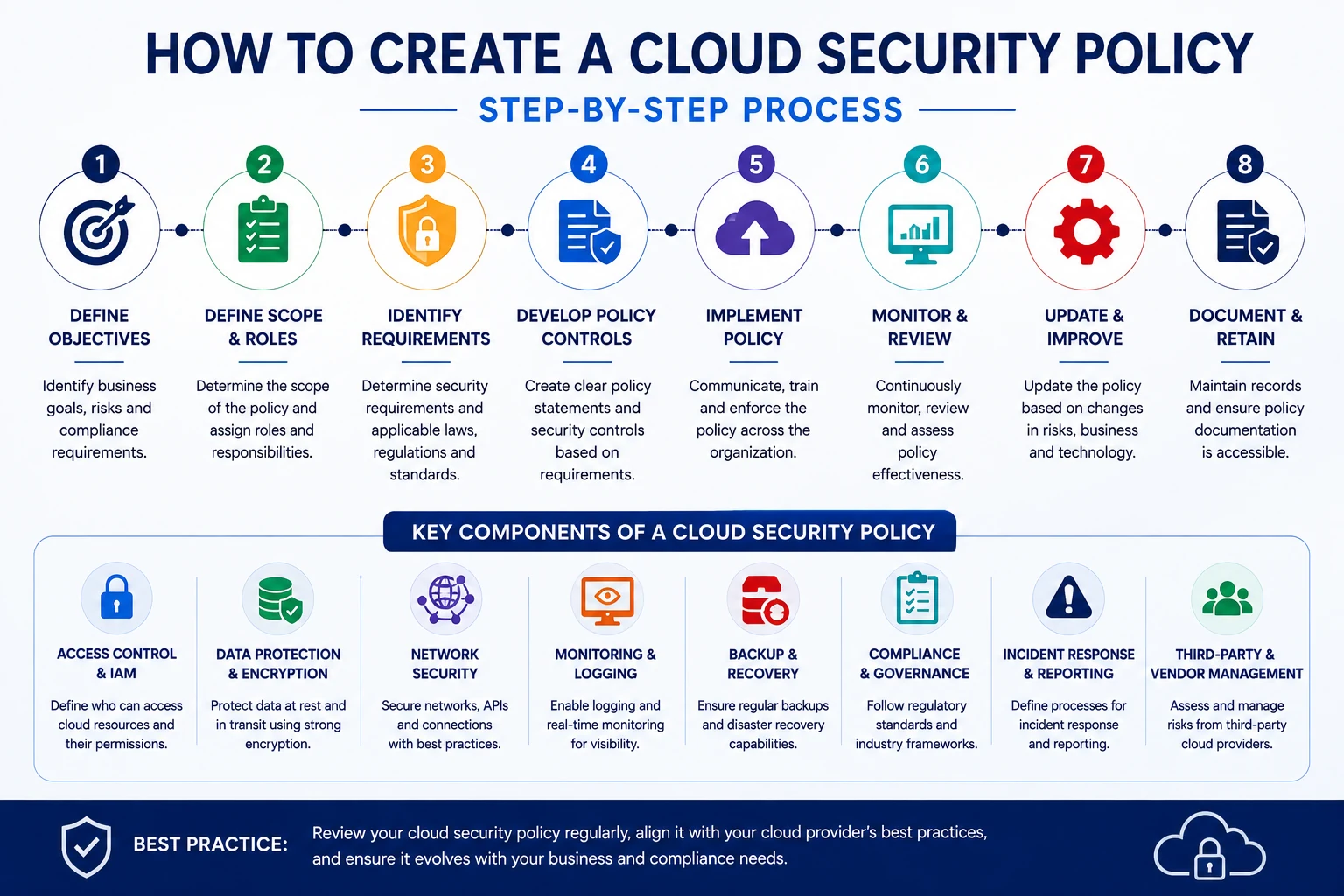
An effective cloud security policy should be specific enough to guide decisions but flexible enough to remain useful as technology evolves. The following components form a strong baseline.
1. Purpose and Objectives
Explain why the policy exists. Typical objectives include protecting confidential information, reducing unauthorized access, maintaining service availability, meeting regulatory obligations and improving incident readiness.
2. Scope
Define which cloud accounts, applications, users, business units, data types, environments and third-party services are covered. State whether the policy applies to development, testing and production systems.
3. Roles and Responsibilities
Assign ownership clearly. Define the responsibilities of cloud administrators, developers, security teams, managers, system owners, end users and external vendors.
4. Identity and Access Management
Access control is one of the most important parts of any cloud computing security policy. Specify how accounts are created, approved, reviewed and removed.
- Require unique user accounts.
- Use multi-factor authentication for privileged and sensitive access.
- Apply least-privilege permissions.
- Avoid unnecessary shared administrator accounts.
- Review privileged access regularly.
- Disable access promptly when employees or vendors leave.
- Use role-based or attribute-based access controls where appropriate.
- Restrict service accounts and API credentials to the permissions they actually need.
If your organization is also reviewing device-aware access, the XVIFS guide to Okta Device Trust explains how device context can support broader identity and access-control strategies.
5. Data Classification and Protection
Define how information should be classified and protected. A policy may distinguish between public, internal, confidential and highly sensitive data.
- Specify where sensitive data may be stored.
- Require encryption where appropriate.
- Define retention and deletion requirements.
- Restrict copying sensitive data into personal or unmanaged cloud services.
- Control who may export or download regulated information.
- Require secure disposal when data is no longer needed.
6. Encryption and Key Management
The cloud security policy should define when encryption is required for data at rest and in transit. It should also address who controls encryption keys, who can access them, how they are rotated and how key-management activity is audited.
7. Network Security
Define how cloud networks must be segmented and protected. Typical requirements may include:
- Restricting unnecessary inbound internet access
- Using firewalls and security groups
- Separating production from development environments
- Using private connectivity where practical
- Protecting public applications with web application firewalls
- Monitoring unusual traffic and connection attempts
8. Secure Configuration
Cloud resources should follow approved configuration standards. Define rules for storage permissions, public access, logging, network exposure, operating-system hardening and managed service settings.
Standard templates and infrastructure-as-code can help reduce configuration differences between environments and make security changes easier to review.
9. Logging and Monitoring
Security teams need visibility into authentication, administrator activity, configuration changes, API calls and suspicious behavior. The policy should specify what must be logged, how long logs are retained, who reviews them and how alerts are handled.
10. Backup and Recovery
Define backup requirements for critical cloud data and systems. Backups should be protected from unauthorized deletion or modification, and recovery procedures should be tested periodically.
11. Vulnerability and Patch Management
Specify who is responsible for patching operating systems, containers, application dependencies and managed services. Include vulnerability scanning, remediation timelines and exception procedures.
12. Incident Response
The cloud security policy should define how cloud security incidents are reported, investigated and contained. It should identify the people responsible for technical response, legal review, management communication and external notification where required.
13. Compliance and Governance
Map cloud security requirements to relevant laws, industry standards, contracts and internal policies. Requirements vary by organization, so avoid assuming that one generic compliance checklist applies to every business.
14. Third-Party and Vendor Security
Cloud environments often depend on SaaS applications, managed service providers, consultants and software vendors. Define how vendors are assessed, approved and reviewed, especially when they handle sensitive data or receive privileged access. This is especially relevant when working with an Artificial Intelligence Automation Agency that may connect cloud systems, business data, APIs, and automation workflows.
Cloud Security Policy for AWS, Azure and Google Cloud
The core policy principles remain similar across major cloud platforms, but the implementation tools differ. Your policy should describe outcomes and responsibilities while supporting platform-specific controls.
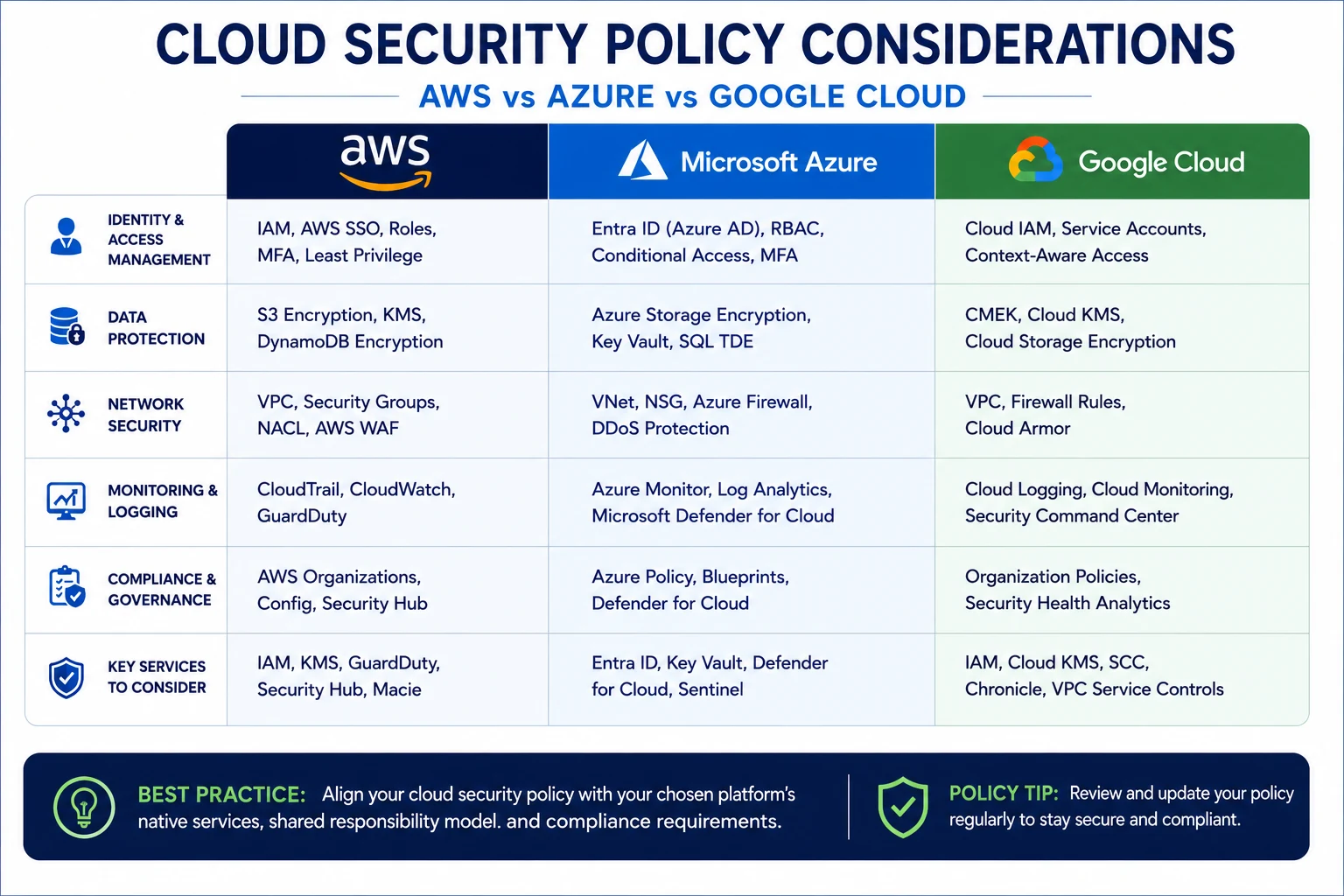
| Security Area | AWS Examples | Microsoft Azure Examples | Google Cloud Examples |
|---|---|---|---|
| Identity | IAM, IAM Identity Center, roles, MFA | Microsoft Entra ID, RBAC, Conditional Access | Cloud IAM, service accounts, context-aware access |
| Key Management | AWS KMS | Azure Key Vault | Cloud KMS |
| Network Controls | VPC, security groups, NACLs, AWS WAF | VNet, NSG, Azure Firewall, DDoS Protection | VPC, firewall rules, Cloud Armor |
| Monitoring | CloudTrail, CloudWatch, GuardDuty | Azure Monitor, Log Analytics, Defender for Cloud | Cloud Logging, Cloud Monitoring, Security Command Center |
| Governance | AWS Organizations, Config, Security Hub | Azure Policy, management groups, Defender for Cloud | Organization Policy, Security Command Center |
How to Create a Cloud Security Policy Step by Step
Step 1: Define Security Objectives
Identify the business goals the policy must protect. These may include confidentiality, system availability, customer trust, regulatory compliance and resilience.
Step 2: Inventory Your Cloud Environment
List cloud providers, SaaS applications, accounts, subscriptions, projects, production environments, databases, storage services and major integrations. You cannot protect assets you do not know exist.
Step 3: Identify Risks and Requirements
Document major risks such as excessive permissions, exposed storage, data loss, weak authentication, vulnerable applications, insecure APIs, ransomware and third-party compromise. Then identify the legal, contractual and internal requirements that apply.
Step 4: Write Clear Policy Statements
Avoid vague wording such as “users should use good security.” Write specific requirements such as “privileged cloud accounts must use multi-factor authentication” or “public access to cloud storage must be approved and documented.”
Step 5: Assign Owners
Every important requirement should have an owner. If nobody is responsible for reviewing access, monitoring alerts or managing exceptions, the policy will be difficult to enforce.
Step 6: Implement Technical Controls
Translate policy statements into actual platform configurations. Examples include MFA requirements, IAM roles, encryption settings, firewall policies, logging, backups and security alerts.
Step 7: Train Users and Administrators
Employees need to understand the rules that affect them. Administrators and developers need more detailed guidance because they can create or modify cloud resources.
Step 8: Monitor and Review
Measure whether the policy is working. Review access, exposed resources, logging coverage, backup success, incidents and exceptions. Update the policy when business requirements, technology or risks change.
Common Cloud Security Policy Mistakes
- Making the policy too generic: Employees cannot follow rules they do not understand.
- Copying another company’s policy unchanged: Security requirements depend on your actual environment and risks.
- Focusing only on one cloud platform: Many organizations use SaaS and multiple providers.
- Ignoring service accounts: Machine identities can have powerful permissions and must be governed.
- Not assigning responsibility: A policy without owners often becomes documentation rather than an operating control.
- Failing to review the policy: Cloud environments change quickly.
- Confusing compliance with security: Meeting a checklist does not automatically mean the environment is secure.
Cloud Security Policy Template for 2026
The following cloud security policy template is designed as a practical starting point. It should be adapted to your organization’s technology, risks, industry and legal requirements before formal approval.
1. Purpose
This policy establishes minimum security requirements for cloud services used by the organization and is intended to protect information, systems, users and business operations from unauthorized access, misuse, loss and disruption.
2. Scope
This policy applies to all employees, contractors, cloud administrators, developers, vendors, cloud accounts, SaaS platforms, cloud-hosted applications and data managed on behalf of the organization.
3. Access Control
- Users must use individually assigned accounts.
- Privileged accounts must use multi-factor authentication.
- Access must follow least-privilege principles.
- Privileged access must be reviewed periodically.
- Access for departing employees and vendors must be removed promptly.
4. Data Protection
- Sensitive information must be stored only in approved cloud services.
- Encryption must be used when required by risk, regulation or company policy.
- Data retention and deletion requirements must be followed.
- Public sharing of confidential information is prohibited unless specifically approved.
5. Secure Configuration
- Cloud resources must follow approved configuration standards.
- Public exposure must be limited to services that require it.
- Administrative services should not be exposed directly to the public internet unless specifically justified.
- Security logging must be enabled for critical systems.
6. Monitoring and Logging
- Authentication and privileged activity must be logged where technically possible.
- Security alerts must be reviewed according to documented procedures.
- Critical logs must be retained according to business and compliance requirements.
7. Backup and Recovery
- Critical information must be backed up according to approved schedules.
- Backup access must be restricted.
- Recovery procedures must be tested periodically.
8. Incident Response
Suspected cloud security incidents must be reported immediately through the organization’s approved incident-reporting process. Security and technology teams will investigate, contain and document incidents according to the incident-response plan.
9. Third-Party Services
Cloud vendors that process sensitive data or receive privileged access must undergo an appropriate security review before approval and periodically thereafter. Marketing teams should apply similar governance when connecting customer data, analytics, CRM systems, and Internet Advertising Platforms through cloud integrations.
10. Exceptions
Exceptions to this policy must be documented, risk-assessed and approved by an authorized owner. Exceptions should include an expiry or review date.
11. Review
This policy will be reviewed at least annually and whenever significant changes occur to cloud architecture, legal requirements, business operations or identified security risks.
How Often Should a Cloud Security Policy Be Reviewed?
An annual review is a useful minimum for many organizations, but high-change environments may need more frequent review. Do not wait for the annual date if the organization adopts a new cloud provider, experiences a major incident, changes its regulatory obligations or introduces significant new applications.
How Cloud Security Connects With Application Development
Cloud security should be part of application design rather than a separate task performed after deployment. Developers need clear rules for credentials, APIs, databases, logging, access permissions and production changes.
If your organization is planning new cloud software, read the XVIFS guide to Cloud Application Development for architecture, deployment, AWS/Azure/Google Cloud and development best practices. Security requirements should be designed alongside application architecture rather than added only after deployment.
Modern applications also depend heavily on APIs and automation. The XVIFS Make HTTP Module tutorial provides a practical example of API-based integration workflows, while the Make.com JSON tutorial explains how structured data commonly moves between connected systems.
Cloud Security Policy FAQs
What is a cloud security policy?
A cloud security policy is a documented set of rules defining how cloud systems, accounts, applications and data must be accessed, configured, protected, monitored and maintained.
What should a cloud security policy include?
It should normally include scope, responsibilities, IAM, MFA, data protection, encryption, network security, configuration standards, monitoring, backups, vulnerability management, incident response, compliance, vendor security and policy review requirements.
Who is responsible for cloud security?
Responsibility is shared. Cloud providers secure defined parts of the underlying platform, while customers remain responsible for areas such as identities, permissions, data, applications and many configuration choices. Exact responsibilities depend on the service model.
Is a cloud security policy required by law?
There is no single universal law requiring the same cloud security policy for every organization. However, specific industries, contracts, privacy laws or security frameworks may require documented security controls and governance. Organizations should determine the requirements that apply to them.
Can a small business use a cloud security policy?
Yes. Small businesses can use a shorter policy focused on their actual cloud services, users and risks. The policy does not need to be complicated to be useful.
What is the difference between a cloud security policy and a cloud security standard?
A policy normally states mandatory security requirements and responsibilities. A standard usually provides more detailed technical requirements for implementing those policies.
How often should a cloud security policy be updated?
Review it at least annually and whenever major changes occur in cloud architecture, business operations, legal requirements, threats or security incidents.
Related XVIFS Cloud and Security Guides
Continue your research with our cloud application development guide, Okta Device Trust guide, and Make HTTP Module tutorial.
Final Thoughts
A cloud security policy creates consistency across a cloud environment by turning security expectations into clear rules. The most effective policies are practical, aligned with actual business risks and connected to technical controls that administrators and developers can implement.
Start with access control, data protection, network security, logging, backups and incident response. Assign clear owners, align the policy with the cloud provider’s shared-responsibility model and review it regularly as technology and business requirements change.
The template in this guide provides a useful starting point, but every organization should adapt it to its own systems, risks, contracts, legal obligations and operational requirements before formal approval.
Last reviewed: August 2026
Editorial note: This article provides general cloud security guidance and a policy template for planning purposes. It is not legal or regulatory advice. Organizations should verify applicable requirements and current provider capabilities before implementing formal security policies.