Make.com Iterator vs Array Aggregator: 7 Powerful Differences & Examples (2026)
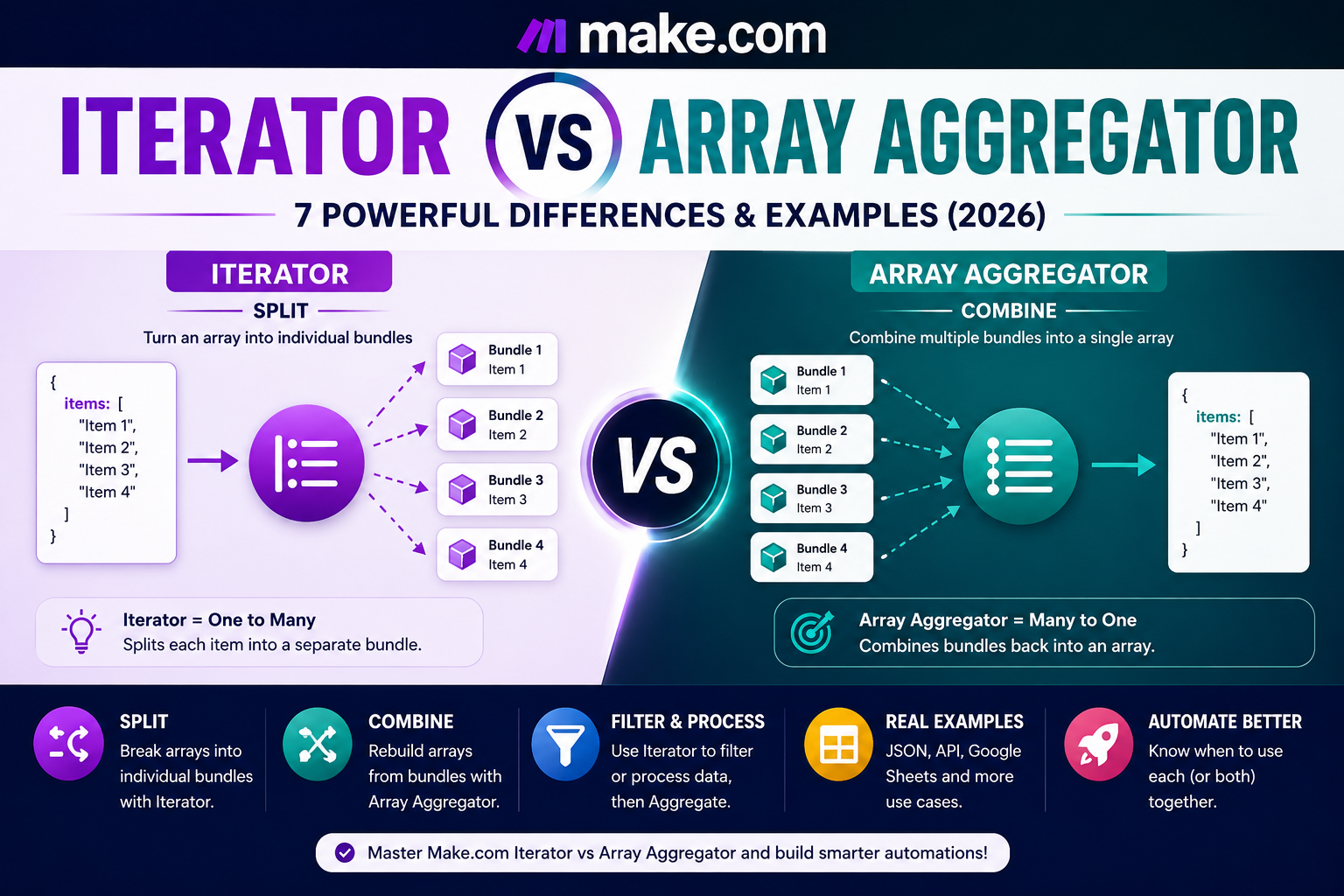
If you are confused about Make.com Iterator vs Array Aggregator, the easiest way to remember the difference is simple: an Iterator splits an array into separate bundles, while an Array Aggregator combines multiple bundles into one array.
In many Make.com scenarios, the two modules work together: split the data, process each item, and then rebuild the results into a structured array. This Make.com Iterator vs Array Aggregator pattern is one of the most useful data-processing workflows to understand.
This guide explains the seven most important differences, when to use each module, how arrays and bundles behave, and how to build an Iterator → Filter → Array Aggregator workflow without common mapping mistakes.
Make.com Iterator vs Array Aggregator: Quick Comparison
| Feature | Iterator | Array Aggregator |
|---|---|---|
| Main purpose | Splits data | Combines data |
| Typical input | One array | Multiple bundles |
| Typical output | Individual bundles | One bundle containing an array |
| Best used when | Each array item must be processed separately | Processed bundles must be grouped again |
| Common position | Before processing modules | After processing modules |
| Works with filters | Yes | Yes, after filtered bundles reach it |
| Easy memory rule | One → many | Many → one |
Make’s documentation describes the Iterator as a module that converts an array into a series of bundles. Its aggregator documentation explains that aggregators accumulate bundles and output a single bundle containing an array. That makes the two tools complementary rather than competing features.
For a dedicated step-by-step setup, read our Make.com Iterator Tutorial and Make.com Array Aggregator Tutorial.
What Is an Iterator in Make.com?
An Iterator is a Flow Control module used when one bundle contains an array and you need to work with every item separately. Each item in the selected array becomes its own bundle. In a Make.com Iterator vs Array Aggregator comparison, this is the defining role of the Iterator.
Imagine an API returns one order containing five products. Without an Iterator, the products may remain together inside a single array. If you want to check the price, SKU, stock level, or category of every product individually, the Iterator separates those five items so later modules can process them one by one.
Example:
Order → Products[] → Iterator → Product 1 → Product 2 → Product 3…
This is especially useful with JSON responses, email attachments, line items, contacts, tasks, and other fields that contain multiple collections inside an array. If your source is JSON, our Make.com JSON Tutorial explains how to parse and inspect the data before iterating it.
What Is an Array Aggregator in Make.com?
An Array Aggregator performs the opposite transformation. Instead of turning one array into many bundles, it collects multiple incoming bundles and produces a single bundle containing an array. This is the second half of the Make.com Iterator vs Array Aggregator workflow.
For example, suppose an Iterator produces five product bundles and you process or filter them individually. If the next API expects one array of products rather than five separate operations, an Array Aggregator can rebuild the remaining bundles into the structure required by the destination.
Example:
Product bundles → Array Aggregator → Products[]
The Source Module setting is important because it tells Make where the aggregation begins. Modules between that source and the Array Aggregator are part of the aggregation route.
7 Key Differences Between Make.com Iterator and Array Aggregator
1. Iterator Splits; Array Aggregator Combines
This is the core difference. Use an Iterator when data is packed inside an array and individual processing is required. Use an Array Aggregator when separate bundles need to become one structured array again.
2. Their Inputs Are Different
An Iterator expects an array in its Array field. An Array Aggregator receives a stream of bundles from its selected Source Module and the modules that follow that source on the aggregation route.
3. Their Outputs Are Different
The Iterator outputs one bundle for each array item. The Array Aggregator normally outputs one bundle containing an Array field made from the bundles it collected.
4. They Usually Appear at Different Stages
The Iterator normally appears before modules that must handle items individually. The Array Aggregator normally appears after those modules when their results must be grouped for the next step.
5. Iterator Can Increase Downstream Processing
When an Iterator creates many bundles, downstream modules can run once for each bundle. This matters when designing efficient scenarios because processing ten iterated items may cause a later action to execute ten times.
6. Array Aggregator Controls the Rebuilt Structure
The Array Aggregator lets you decide which fields should be included in the resulting array. Depending on the scenario, you can use a custom target structure or map a structure expected by a later module.
7. An Array Aggregator Does Not Require an Iterator
This is a common misunderstanding. An Array Aggregator needs multiple bundles, but those bundles can come from an Iterator, a search module, Google Sheets rows, or another module that already outputs multiple bundles. You only need an Iterator when an actual array must first be split.
In a practical Make.com Iterator vs Array Aggregator workflow, the Iterator is the right choice when your starting data is still packed inside an array and each item needs its own processing step.
When Should You Use an Iterator?
Use an Iterator when the source gives you an array but the next action needs to work with each item separately. The Make.com Iterator vs Array Aggregator choice starts with checking whether your incoming data is still one array or already multiple bundles. Common situations include:
- Processing individual products from an order.
- Uploading email attachments one at a time.
- Checking each item in a JSON array.
- Applying a filter to individual records.
- Creating separate tasks, rows, messages, or API requests for each item.
If you simply need to access a particular value from an array, an Iterator may not always be necessary. Make also provides array mapping functions for certain cases. The correct choice depends on whether you need to process every element as a separate bundle.
The Make.com Iterator vs Array Aggregator decision becomes simple here: if your data already exists as multiple bundles and you need one final array, the Array Aggregator is usually the correct tool.
When Should You Use an Array Aggregator?
Use an Array Aggregator when several bundles must be sent forward as one array. In a Make.com Iterator vs Array Aggregator workflow, this is usually the final step after individual bundles have been processed. Typical use cases include:
- Combining processed products before sending an API request.
- Collecting search results into a single structured payload.
- Rebuilding filtered items after an Iterator.
- Creating an array of attachments or records for another module.
- Grouping bundles by a category, customer, status, or another key.
The Array Aggregator also supports grouping. When you use the Group by field, Make can produce separate aggregated outputs for distinct group values rather than putting everything into one array.
The most useful Make.com Iterator vs Array Aggregator pattern is to split data, process or filter each bundle, and then combine the accepted results into a new array.
How to Use Iterator and Array Aggregator Together
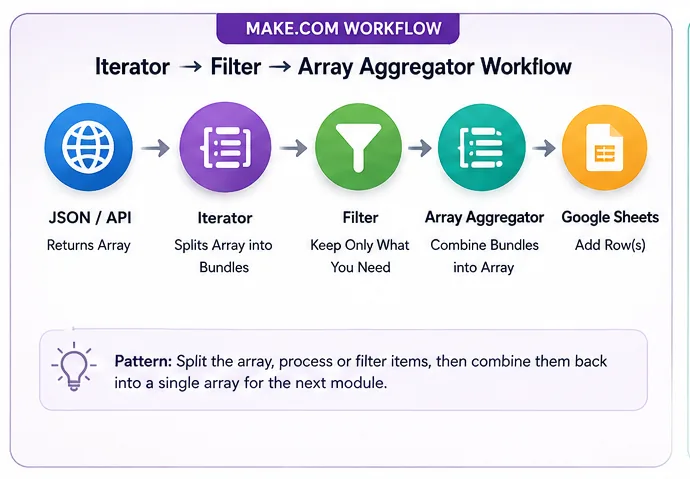
A powerful Make.com Iterator vs Array Aggregator pattern is:
JSON/API → Iterator → Filter → Process Data → Array Aggregator → Destination
Here is how the flow works:
- The source module receives an array, such as products from an API.
- The Iterator converts each product into a separate bundle.
- A Make.com Filter keeps only the items that meet your condition.
- Optional modules modify, enrich, calculate, or validate each remaining bundle.
- The Array Aggregator collects the processed bundles.
- The destination receives one rebuilt array.
This pattern is useful when you want to remove unwanted items, transform values, or call another service for every item before sending the final data onward.
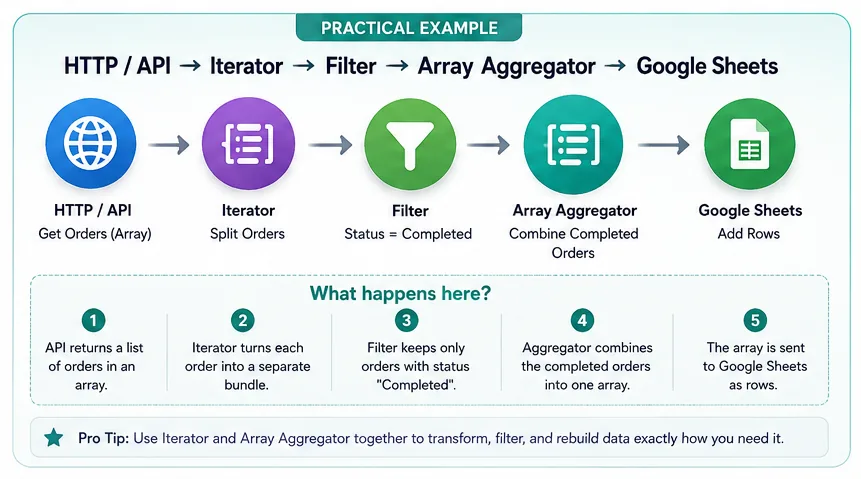
Practical Example: Filter Products and Rebuild the Array
Suppose an online store sends this simplified product data:
{
  "products": [
    {"name": "Keyboard", "price": 150},
    {"name": "Mouse", "price": 40},
    {"name": "Monitor", "price": 900}
  ]
}
Your goal is to keep only products priced above 100 and send them to another API as one array.
The scenario would look like this:
- Parse or receive the JSON data.
- Map
products[]into the Iterator. - Add a filter with the condition
price > 100. - The Mouse bundle is rejected while Keyboard and Monitor continue.
- Set the Iterator as the relevant aggregation source and configure the Array Aggregator fields.
- The final output contains an array with Keyboard and Monitor.
- Send the array through the Make.com HTTP module or another destination.
Do You Always Need an Iterator Before an Array Aggregator?
No. This is one of the most important points in a Make.com Iterator vs Array Aggregator comparison.
An Array Aggregator needs bundles to aggregate. If a previous module already outputs multiple bundles, there is no reason to insert an Iterator merely because you plan to aggregate later.
For example, a search module may return multiple bundles directly. Those bundles can often feed an Array Aggregator without an Iterator. Likewise, a Google Sheets module that outputs multiple rows as bundles may be aggregated directly depending on the scenario.
Use this rule:
- Your data is one bundle containing an array? Consider Iterator.
- Your data is already multiple bundles? Iterator may be unnecessary.
- You need those bundles combined into one array? Consider Array Aggregator.
Arrays vs Bundles in Make.com
Understanding arrays and bundles makes both modules much easier to use. It also makes the Make.com Iterator vs Array Aggregator decision much clearer.
An array is a data structure that can contain multiple items inside one field. A bundle is a unit of data that moves from one Make module to another during a scenario run.
The Iterator changes the shape of the flow:
One bundle containing items[] → several bundles
The Array Aggregator changes it back:
Several bundles → one bundle containing array[]
This is why the modules are often described as opposites.
How the Array Aggregator Source Module Works
The Source Module tells the aggregator where it should begin collecting bundles. After you choose it, Make visually marks the aggregation route between the source and the aggregator.
Be careful with fields created between the Source Module and Array Aggregator. Data from those bundles is not automatically available after aggregation unless the required values are included in the aggregator’s output structure.
If a value disappears after the Array Aggregator, return to the aggregator configuration and confirm that the field is actually being aggregated.
Iterator → Filter → Array Aggregator
This three-part combination is one of the most useful Make.com Iterator vs Array Aggregator data-processing patterns:
Iterator: separates the items.
Filter: decides which items continue.
Array Aggregator: rebuilds the accepted items.
For more complex branching where different bundles need completely different routes, use our Make.com Router Tutorial. A Router and an Iterator solve different problems: the Iterator changes an array into bundles, while the Router sends bundles down different paths.
Most Make.com Iterator vs Array Aggregator problems come from misunderstanding whether the previous module is outputting one array or several bundles.
Common Iterator and Array Aggregator Mistakes
Mapping the Wrong Field into the Iterator
The Iterator’s Array field must receive an actual array. If the mapping panel does not show the expected array structure, run the preceding module once with sample data so Make can learn its output structure.
Adding an Iterator When Bundles Already Exist
Do not add modules simply because a tutorial workflow contains them. Check the output of the previous module first. If it already produces separate bundles, another Iterator may be unnecessary.
Selecting the Wrong Source Module
An incorrect Array Aggregator Source Module can change what gets collected. Think carefully about where the aggregation should start.
Forgetting Fields in the Aggregated Output
If you need a value after the Array Aggregator, include it in the aggregated fields or target structure. Otherwise it may no longer be available to later modules.
Filtering Everything Out
If no bundles reach the aggregator, review your filter conditions. Make also provides an option to stop processing after an empty aggregation, which can be useful when nothing should continue.
Ignoring Scenario Efficiency
Iterating a large array can cause downstream modules to execute many times. Keep this in mind when calling APIs or performing other actions for every item.
Make.com Iterator vs Array Aggregator: Which Should You Use?
| Your situation | Use |
|---|---|
| I have one array and need to process every item | Iterator |
| I already have multiple bundles | No Iterator required just for splitting |
| I need multiple bundles converted into one array | Array Aggregator |
| I need to remove some items from an array | Iterator → Filter → Array Aggregator |
| I need to process every item and then send one final payload | Iterator → Process → Array Aggregator |
| I need different processing paths | Consider Router/Filters in addition to Iterator or Aggregator |
For a complete introduction to scenarios, modules, mapping, filters and automation structure, visit our Make.com Tutorial for Beginners. You can also connect aggregated data to spreadsheets using our Make.com Google Sheets Automation guide.
Frequently Asked Questions
What is the main difference between Iterator and Array Aggregator in Make.com?
The Iterator converts an array into separate bundles so each item can be processed individually. The Array Aggregator collects multiple bundles and produces an array inside a single output bundle.
Is Array Aggregator the opposite of Iterator?
In terms of data transformation, yes. Iterator performs an array-to-bundles transformation, while Array Aggregator performs a bundles-to-array transformation.
Can I use Iterator and Array Aggregator together?
Yes. A common workflow is Iterator → processing or filtering → Array Aggregator. This lets you separate items, work with them individually, and then rebuild the results.
Do I need an Iterator before every Array Aggregator?
No. If your source already outputs multiple bundles, the Array Aggregator can aggregate those bundles directly. An Iterator is needed when an array itself must first be converted into individual bundles.
Why can I not see fields after an Iterator?
If Make does not yet know the structure of the array items, run the preceding module or scenario once with sample data. This often allows Make to learn the output structure and display the mappable fields.
Why did a field disappear after the Array Aggregator?
Fields from bundles inside the aggregation route are not automatically exposed after aggregation. Include the values you need in the Array Aggregator’s selected fields or target structure.
What should I use to filter items inside an array?
A common approach is to iterate the array into bundles, apply a filter to those bundles, and then use an Array Aggregator if the accepted items need to become an array again.
Conclusion
The easiest way to understand Make.com Iterator vs Array Aggregator is to focus on data direction. Iterator turns one array into individual bundles. Array Aggregator turns multiple bundles into one array. Use Iterator when items must be processed separately, Array Aggregator when results must be combined, and both when you need to split, transform, filter, and rebuild structured data.
Continue with our Make.com Iterator Tutorial for detailed Iterator setup and our Make.com Array Aggregator Tutorial for a deeper guide to aggregation. Together with Filters, JSON, and the HTTP module, these tools form a powerful foundation for advanced Make.com automation.