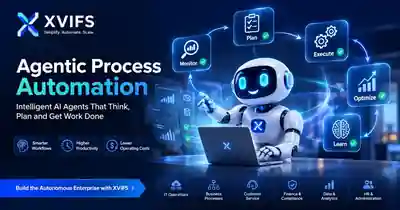
Agentic Process Automation: How AI Agents Improve Business Workflows in 2026
Agentic process automation combines AI agents with workflow automation so business processes can do more than follow fixed rules. Instead of only moving data from one system to another, an agentic workflow can interpret context, choose an action, use tools, coordinate multiple steps, and involve a human when a decision needs approval.
This matters because many real business processes are not perfectly predictable. Customer requests vary, documents arrive in different formats, priorities change, and exceptions appear. Traditional automation is excellent when the path is known in advance. AI agents become useful when part of the process requires reasoning, classification, planning, or tool selection.
If you are building a broader AI strategy, see our AI Business Solutions guide. For a deeper look at agent types, read Types of AI Agents.
What Is Agentic Process Automation?
Agentic process automation is a workflow approach in which AI agents participate in executing business processes. The agent can receive a goal, inspect available context, decide what to do next, call approved tools or APIs, and pass results to another step or agent.
A practical architecture often combines deterministic workflow logic with agent reasoning. Microsoft’s Agent Framework guidance describes workflows that coordinate agents with explicit execution logic, while AWS guidance on workflow-orchestration agents describes agents coordinating multistep tasks, tools, context, and intermediate results.
That hybrid model is usually safer than allowing an AI agent to control every step. Rules remain rules where predictability matters, while AI is used where interpretation adds value.
Agentic Process Automation vs Traditional Process Automation
| Area | Traditional Automation | Agentic Process Automation |
|---|---|---|
| Decision logic | Predefined rules | Rules plus AI reasoning |
| Best for | Repeatable, predictable tasks | Variable, context-heavy workflows |
| Tool use | Fixed integrations | Agent can select from approved tools |
| Exceptions | Often routed to humans | Can interpret and triage some exceptions |
| Control | Highly deterministic | Requires stronger guardrails and monitoring |
The important point is not that agentic automation replaces normal automation. In many production systems, the strongest design uses both.
How AI Agents Improve Business Workflows
1. They interpret unstructured requests
A normal workflow may expect a specific form field or status code. An AI agent can interpret an email, support request, document, or natural-language instruction and convert it into structured information that downstream systems can use.
2. They choose the next action based on context
An agent can evaluate the current situation and choose between approved actions. For example, a customer-service workflow might answer a routine request, search a knowledge base, create a ticket, or escalate to a human depending on the issue.
3. They coordinate multiple tools
Modern agents can work across APIs, databases, CRM platforms, knowledge systems, and automation tools. AWS describes orchestration agents that can delegate work, maintain state, retry failed actions, and pass intermediate results through a sequence of tasks.
4. They reduce manual handoffs
Many business processes slow down because one team must interpret information before another team can act. Agentic workflows can classify, summarize, enrich, and route work before a person becomes involved.
5. They support human approval gates
Agentic automation does not have to mean full autonomy. High-risk actions such as payments, account changes, legal decisions, or customer-impacting exceptions can remain behind human approval. This is often the right design for business use.
9 Practical Agentic Process Automation Use Cases
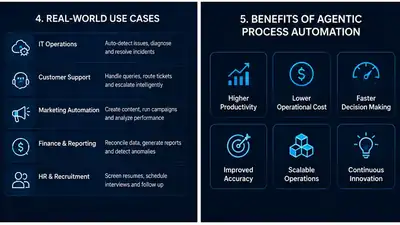
1. Customer support triage
An agent reads incoming requests, identifies intent and urgency, retrieves relevant information, drafts a response, and escalates cases that require a person.
2. Sales lead qualification
An agent can review form submissions, CRM context, company information, and engagement signals before recommending the next sales action.
3. Employee onboarding
Agentic workflows can coordinate account creation requests, document collection, policy guidance, training tasks, and follow-up reminders while keeping sensitive approvals with HR or IT.
4. Finance document processing
An agent can extract information from invoices or expense documents, identify missing data, categorize the request, and route it for approval. Payment execution should still follow strict controls.
5. IT service management
AI agents can classify incidents, retrieve troubleshooting guidance, collect diagnostic information, execute low-risk approved actions, and escalate unresolved cases.
6. Marketing operations
Agents can summarize campaign performance, classify leads, prepare content variants, and coordinate repetitive marketing tasks. See our guide to Task Automation for additional automation examples.
7. Knowledge management
An agent can search internal knowledge, synthesize an answer, identify missing documentation, and suggest updates. Strong source grounding is important because generated answers can still be wrong.
8. Procurement workflows
Agents can gather vendor information, compare structured requirements, flag missing documents, and prepare a recommendation for human review.
9. Multi-step business orchestration
For complex processes, one orchestration agent can coordinate specialist agents or tools. AWS documents workflow-orchestration patterns for coordinating agents, tools, state, and multistep execution.
A Simple Agentic Workflow Architecture
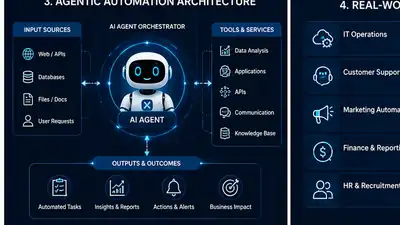
A practical workflow can look like this:
Trigger → Context Retrieval → Agent Decision → Approved Tool Action → Validation → Human Approval if Required → Logging
The deterministic parts should remain explicit. The agent should be given a defined objective, a limited toolset, clear boundaries, and a way to stop or escalate when confidence is low.
Best Practices for Reliable Agentic Process Automation
- Use least-privilege tool access. Give agents only the permissions required for the task.
- Separate reasoning from irreversible actions. Let the agent recommend or prepare high-impact actions before a person approves them.
- Keep audit logs. Record what the agent saw, what it decided, which tool it called, and the result.
- Add checkpoints. Long-running workflows should be able to resume after failure rather than restarting from the beginning.
- Validate outputs. Use deterministic checks for critical fields, calculations, IDs, and business rules.
- Measure business outcomes. Track resolution time, manual handoffs, error rates, completion rates, and cost rather than only model quality.
Agentic Process Automation Implementation Checklist
Before moving an agentic workflow into production, confirm the process has a clear owner, a measurable business objective, approved data sources, defined tool permissions, validation rules, logging, and an escalation path. The agent should know which actions it may take automatically and which actions require approval.
A useful implementation pattern is to start with a recommendation-only agent, then move to low-risk automated actions after the workflow proves reliable. This reduces operational risk while still allowing teams to measure whether the agent is actually improving speed, quality, or workload.
Teams should also test failure scenarios deliberately. Remove a required field, simulate an unavailable API, provide ambiguous instructions, and check whether the workflow stops safely. A production-ready agentic process should fail predictably rather than improvise when a critical dependency is missing.
Common Risks and Limitations
Agentic process automation introduces new risks because the system can make decisions and take actions. Incorrect reasoning, poor source data, excessive permissions, tool failures, prompt injection, and weak monitoring can turn a useful agent into an operational problem.
For that reason, autonomy should increase only when the task truly requires it. AWS’s agentic AI guidance describes structured orchestration for multistep agent workflows, while Microsoft’s workflow guidance explains how explicit workflows can coordinate agents and deterministic logic.
If you are considering external implementation support, our Artificial Intelligence Automation Agency guide explains how businesses can evaluate automation partners and use cases.
How to Start With Agentic Process Automation
- Choose one process with measurable pain, such as slow routing, repetitive triage, or frequent manual handoffs.
- Map the existing workflow and separate deterministic steps from judgment-heavy steps.
- Select one reasoning task for the agent instead of trying to automate the entire process at once.
- Define the agent’s approved tools, data sources, limits, and escalation rules.
- Add validation, logging, and human approval for high-impact actions.
- Test with real edge cases and failure scenarios.
- Measure the business result before expanding autonomy.
Frequently Asked Questions
What is agentic process automation?
It is the use of AI agents inside automated business processes so selected steps can interpret context, reason, choose actions, and use approved tools rather than relying only on fixed rules.
Is agentic automation the same as RPA?
No. RPA typically automates predefined user-interface or rules-based tasks. Agentic automation can add reasoning and dynamic decision-making, although the two approaches can be combined.
Do AI agents replace workflow automation?
Usually no. A hybrid approach is often stronger: workflows provide structure and controls while agents handle tasks that require interpretation or reasoning.
Can agentic process automation run without human approval?
Yes for carefully scoped, low-risk tasks, but high-impact actions should normally include approval gates, validation, or other safeguards.
What businesses can use agentic automation?
Use cases exist across customer support, sales, HR, finance, IT, marketing, operations, procurement, and knowledge management.
What is the biggest risk of agentic automation?
The biggest risk is allowing an agent to make incorrect decisions or take unintended actions without sufficient permissions control, validation, observability, and escalation mechanisms.
Final Thoughts
Agentic process automation is most useful when businesses combine the reliability of structured workflows with the flexibility of AI reasoning. The goal should not be maximum autonomy. The goal should be a workflow that completes more useful work with fewer unnecessary handoffs while remaining observable, secure, and controllable.
Start with one well-defined process, keep the agent’s permissions narrow, measure the results, and expand only when the system proves reliable.