78Cloud infrastructure gives businesses access to scalable computing, storage, applications, and data services without maintaining every physical system themselves. However, moving workloads to the cloud does not eliminate the need for monitoring, security, backups, updates, cost control, performance management, and technical support.This is where Managed Cloud Services become valuable. Instead of building a large internal cloud operations team, businesses can use experienced specialists to manage some or all of their cloud environment while their own teams remain focused on products, customers, and business growth.In this complete 2026 guide, we explain what managed cloud services are, how they work, what they normally include, their advantages and limitations, typical pricing models, security considerations, and how to choose the right managed cloud provider for your business.
What Are Managed Cloud Services?
Managed Cloud Services are professional services that handle some or all of the ongoing operation, monitoring, maintenance, security, optimization, and support of a business cloud environment.A company may still own its applications, data, cloud accounts, policies, and business decisions while a managed cloud service provider handles agreed technical responsibilities such as infrastructure monitoring, backups, patching, performance optimization, incident response, and cloud cost management.For example, a business may host applications on Amazon Web Services, Microsoft Azure, or Google Cloud while using a managed provider to operate the infrastructure around those applications.
Cloud infrastructure monitoring
Security management
Backup and disaster recovery
Operating system patching
Performance optimization
Cloud migration support
Cost and FinOps management
Incident response
24/7 technical support
The important point is that “managed” does not automatically mean the provider is responsible for everything. Businesses should clearly document which responsibilities belong to the provider and which remain with the internal team.Microsoft’s current Cloud Adoption Framework similarly emphasizes defining cloud operating models and assigning clear ownership across governance, security, platform, and workload responsibilities.
How Managed Cloud Services Work
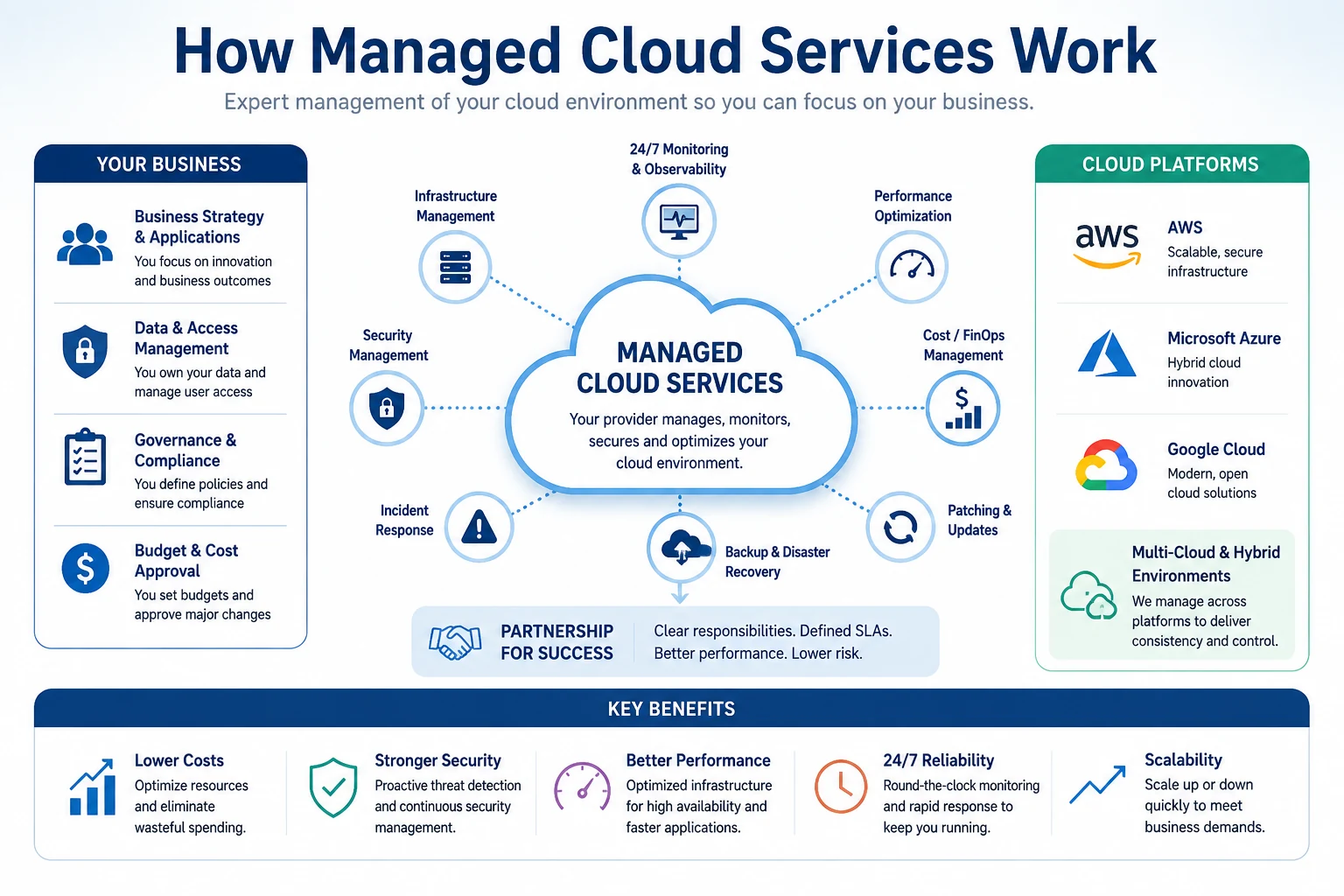
A managed cloud relationship usually begins by deciding what the business wants to keep internally and what it wants the provider to operate.Managed cloud providers can monitor, secure, optimize, back up, and maintain business cloud infrastructure while the organization retains ownership of its business strategy and data.The exact operating model varies, but a simplified responsibility structure might look like this:
Area
Business Responsibility
Managed Provider Responsibility
Business strategy
Primary
Advisory support
Applications
Ownership
Infrastructure support
Business data
Ownership
Protection and monitoring
Cloud infrastructure
Governance
Day-to-day management
Security monitoring
Shared
Shared
Backups
Policy approval
Configuration and monitoring
Cloud costs
Budget approval
Optimization and reporting
Incident response
Shared
Shared
This is only an example. Every contract should establish a clear responsibility matrix, service levels, response times, escalation process, reporting requirements, and access controls.
What Do Managed Cloud Services Include?
The service package varies between providers, but most comprehensive managed cloud offerings include several of the following areas.
1. Cloud Infrastructure Management
Providers can manage virtual machines, cloud storage, databases, networks, containers, load balancers, access controls, and other infrastructure resources.They may also use infrastructure automation to keep environments consistent and reduce manual configuration errors.
2. 24/7 Monitoring and Observability
Continuous monitoring can help detect technical problems before they seriously affect users. Providers may monitor application availability, server health, network performance, storage capacity, databases, error rates, security alerts, and latency.AWS describes cloud management as the systematic control and oversight of cloud infrastructure, services, and applications. Its cloud-management guidance also covers areas such as monitoring, cost visibility, governance, and operational optimization. You can review the official AWS cloud management overview for additional background.
3. Security Management
Security services may include identity and access management, vulnerability monitoring, security configuration, firewall management, log monitoring, threat detection, patching, and incident response support.Businesses should still understand which security responsibilities remain internally. Hiring a managed provider does not eliminate the organization’s responsibility to protect its users, data, credentials, and business processes.
4. Backup and Disaster Recovery
A provider may configure automated backups, replication, retention policies, restore procedures, and disaster-recovery environments.Businesses should ask four practical questions: How frequently is data backed up? Where is it stored? How long is it retained? And how often is restoration actually tested?
5. Patching and Updates
Cloud environments still contain operating systems, software, databases, and supporting components that require maintenance. Managed providers can coordinate security updates and scheduled patches while attempting to reduce disruption to business operations.
6. Performance Optimization
Providers can analyze resource usage and recommend improvements such as right-sizing virtual machines, optimizing databases, adjusting autoscaling rules, improving storage configuration, and removing unnecessary infrastructure.
7. Cloud Cost Optimization and FinOps
Cloud costs can grow quickly when unused resources, oversized servers, unnecessary storage, duplicate services, or inefficient architectures are left running.A strong managed provider should provide clear cost reporting and help identify waste rather than simply forwarding the monthly cloud bill.
8. Cloud Migration Support
Businesses moving from traditional infrastructure to the cloud may need help with discovery, workload assessment, migration planning, architecture design, testing, data movement, application modernization, and post-migration optimization.
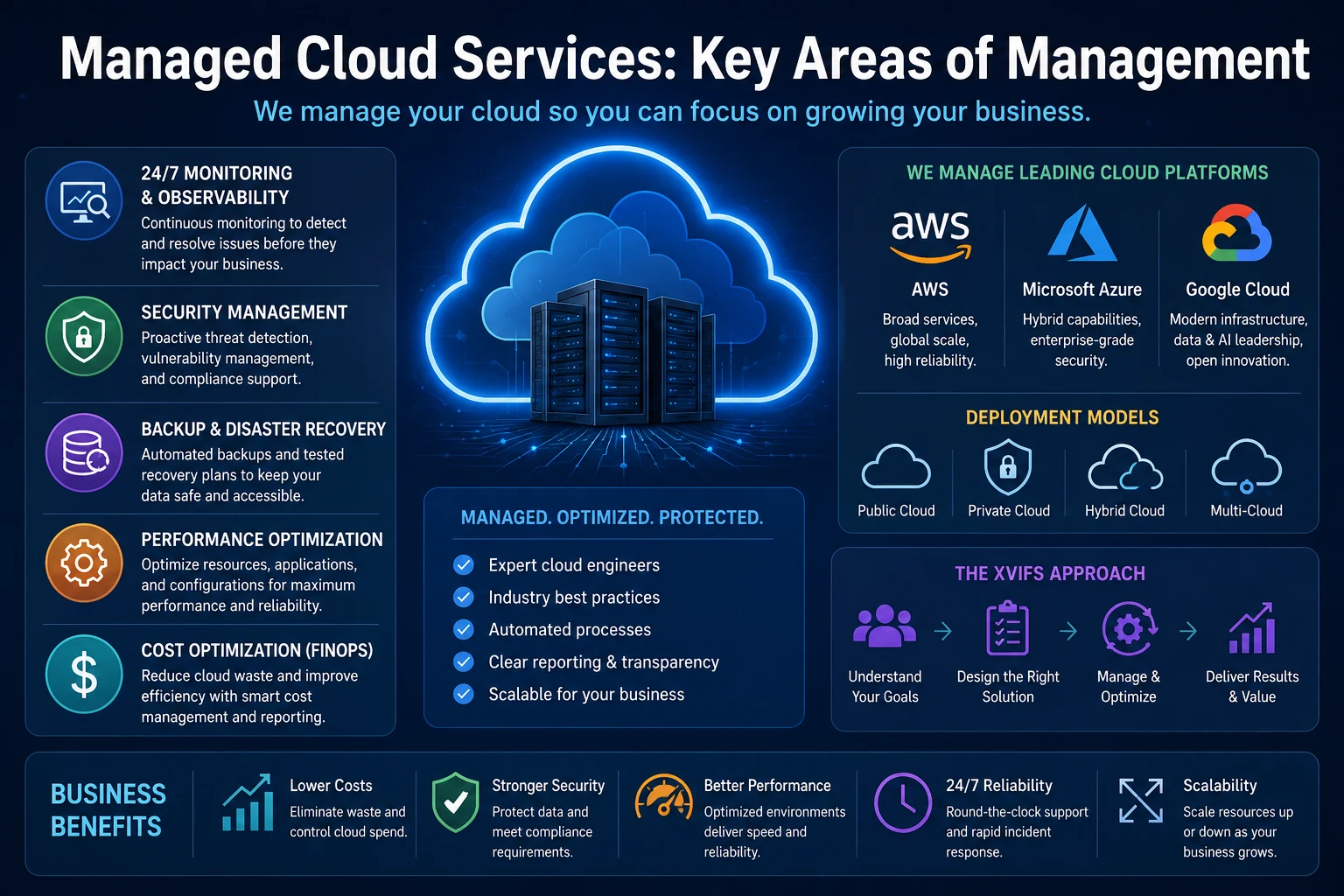
Key Areas of Managed Cloud Services
Key managed cloud service areas include monitoring, security, backup and disaster recovery, performance optimization, FinOps, and multi-cloud management.
Types of Managed Cloud Services
Public Cloud Management
Public cloud management covers workloads hosted on platforms such as AWS, Microsoft Azure, or Google Cloud. This model is common among businesses that want scalable infrastructure without maintaining physical data-center hardware.
Private Cloud Management
A private cloud environment is dedicated to one organization. It can provide greater control but may require more operational management than standardized public cloud services.
Hybrid Cloud Management
Hybrid cloud combines public cloud resources with private cloud or on-premises infrastructure. These environments often need careful coordination because applications, networks, identities, security controls, and data can operate across different locations.
Multi-Cloud Management
Multi-cloud environments use services from more than one public cloud provider. This can reduce dependence on a single platform or allow companies to choose different services for different workloads, but it also introduces additional operational complexity.
8 Benefits of Managed Cloud Services
Access to specialist expertise: Businesses gain access to cloud engineers without recruiting every capability internally.
Reduced operational workload: Routine infrastructure work can be handled externally while internal teams focus on higher-value priorities.
Continuous monitoring: Providers can monitor environments beyond normal office hours.
Improved scalability: Resources can be adjusted as demand changes.
Better cost visibility: FinOps and utilization reviews can identify wasted cloud resources.
Security support: Specialized teams can strengthen monitoring, configuration, and incident response.
Faster cloud adoption: Experienced providers can support migration and architecture decisions.
Improved resilience: Backup, monitoring, redundancy, and disaster-recovery processes can improve business continuity.
Managed Cloud Services vs Unmanaged Cloud
Area
Managed Cloud
Unmanaged Cloud
Infrastructure management
Provider handles agreed tasks
Internal team
Monitoring
Usually included
Business configures it
Patching
Often included
Internal responsibility
Security operations
Provider/shared
Mainly internal
Cost optimization
Often included
Internal analysis
Internal expertise required
Lower for outsourced areas
Higher
Direct control
Shared
Higher
Management fee
Yes
Usually no MSP fee
Best fit
Businesses needing operational support
Mature internal cloud teams
An unmanaged environment may work well for companies with experienced DevOps, site reliability engineering, networking, cloud security, and platform teams. Managed cloud services can be more attractive when an organization wants cloud capabilities without creating every operating function internally. Smaller organizations comparing their wider cloud options can also read our Cloud Computing for Small Business guide.
Managed Cloud Services for AWS, Azure, and Google Cloud
The three largest public cloud ecosystems provide powerful native management capabilities, and managed providers generally work alongside those platform services.
AWS
AWS provides cloud-management services covering monitoring, infrastructure provisioning, budgets, governance, cost reporting, security, and operations. A managed provider can combine these native tools with its own processes and support teams.
Microsoft Azure
Microsoft’s Cloud Adoption Framework provides guidance around governance, security, management, cloud operating models, workload ownership, and shared management. Microsoft currently recommends documenting cloud responsibilities clearly so that internal and partner roles do not overlap or leave gaps.See the official Microsoft Cloud Adoption Framework for its current cloud-operating guidance.
Google Cloud
Google Cloud also provides infrastructure, security, operations, logging, monitoring, networking, data, application, and cost-management capabilities that managed providers can incorporate into broader operational services.The right platform should be chosen according to workload requirements, internal skills, integrations, security requirements, cost structure, and business objectives rather than assuming one provider is universally best.
How Much Do Managed Cloud Services Cost?
There is no single standard price for Managed Cloud Services. Costs depend on the infrastructure size, workload complexity, support coverage, required response times, cloud platforms, security requirements, compliance obligations, and engineering support needed.Common pricing models include:
Fixed monthly fee: A predictable monthly price for an agreed service package.
Percentage of cloud spend: Management fees are calculated as a percentage of the underlying cloud bill.
Per-resource pricing: Charges are based on servers, databases, devices, users, or other managed resources.
Tiered packages: Providers offer different service levels for monitoring, operations, and fully managed support.
For a realistic comparison, calculate the total cost:Cloud infrastructure + managed service fee + project charges + additional support + internal staffing still required.This is much more useful than comparing only the provider’s advertised monthly fee.
Managed Cloud Services Security and Compliance
Security should be one of the most carefully reviewed parts of any managed cloud agreement.
Identity and access controls
Privileged account management
Encryption
Security monitoring
Vulnerability management
Incident response
Logging and audit trails
Backup security
Data location
Compliance support
Provider employee access
Subcontractor access
Technology also needs to be supported by clear organizational policies. Our Cloud Security Policy guide explains how businesses can define cloud access, security responsibilities, data handling, monitoring, and governance rules.
Who Should Use Managed Cloud Services?
Small and Medium-Sized Businesses
SMBs may need reliable cloud infrastructure but may not have enough workload to justify building a large internal cloud operations department.
SaaS Companies
SaaS businesses often depend on availability, scalability, databases, monitoring, backups, security, and automated deployment infrastructure. Managed support can complement internal product and development teams. For businesses evaluating external software engineering support as well, see our SaaS Development Services guide.
E-Commerce Businesses
Online stores may experience seasonal traffic spikes and require strong uptime, monitoring, security, backup, and performance capabilities.
Rapidly Growing Companies
Infrastructure complexity can increase quickly as businesses add applications, users, locations, integrations, and data.
Organizations Moving to the Cloud
Companies performing their first major cloud migration can benefit from specialist architecture, migration, security, and operational experience.
How to Choose a Managed Cloud Services Provider
Do not choose a managed cloud provider only because it offers the lowest price. Use a structured evaluation so that the provider supports the business long after the initial migration.
XVIFS 10-Point Provider Checklist
Cloud expertise: Confirm genuine experience with the cloud platforms and workloads your company uses.
Certifications and partnerships: Useful signals, but they should support—not replace—real implementation experience.
A low headline price can become expensive if important support, security, migrations, backups, or engineering work is charged separately.
Assuming Everything Is Managed
Document exactly which responsibilities belong to each party. Assumptions become dangerous during outages and security incidents.
Giving Excessive Access
Use least-privilege access wherever practical and review privileged permissions regularly.
Ignoring Cloud Costs
Managed infrastructure can still waste money. Cost reporting and optimization should remain visible to business owners.
Failing to Test Disaster Recovery
A backup strategy should be tested. A recovery plan that has never been validated may not work when the business actually needs it.
Ignoring the Exit Strategy
Your organization should retain control of its cloud accounts, documentation, configurations, data, and credentials even if it later changes providers.
Managed Cloud Services and Cloud Application Development
Managed infrastructure can be especially useful when businesses continuously develop and deploy cloud applications. Development teams need reliable environments, monitoring, security, automated deployments, databases, scaling, and production support.For a deeper explanation of building modern applications for cloud environments, read our Cloud Application Development guide.
Managed Cloud Services and Automation in 2026
Cloud operations are becoming increasingly automated through infrastructure as code, policy automation, observability platforms, autoscaling, FinOps tools, automated remediation, AIOps, and AI-assisted incident management. Our Agentic Process Automation guide explores how increasingly autonomous workflows are changing business automation more broadly.Automation does not eliminate the need for experienced engineers. Instead, it can reduce repetitive administration and allow engineers to spend more time on architecture, governance, reliability, security, optimization, and complex exceptions.
Are Managed Cloud Services Worth It in 2026?
For many organizations, managed cloud services can provide significant value when they solve a genuine capability or operational problem.They are particularly useful when a business lacks sufficient internal cloud expertise, requires continuous monitoring, is struggling with cloud costs, operates complex infrastructure, needs migration assistance, wants stronger operational security, or needs internal technical teams focused on other priorities.They may provide less value when a company already has a mature and efficient internal cloud platform team.The decision should therefore be based on capability, operational workload, reliability requirements, security risk, total cost, and business priorities rather than outsourcing simply because managed services are available.
Frequently Asked Questions About Managed Cloud Services
What are Managed Cloud Services?
Managed cloud services involve outsourcing agreed cloud-management responsibilities to a specialist provider. Services can include monitoring, infrastructure management, security, backups, optimization, migration, patching, and technical support.
What is a managed cloud service provider?
A managed cloud service provider is a company that operates agreed portions of another organization’s cloud environment.
Are Managed Cloud Services secure?
They can strengthen security operations when properly implemented, but security remains a shared responsibility. Businesses should review access controls, incident response, monitoring, contractual obligations, and compliance requirements.
What is the difference between managed and unmanaged cloud?
With managed cloud services, an external provider performs agreed operational tasks. In an unmanaged environment, the customer normally handles more infrastructure configuration and operations internally.
Can small businesses use Managed Cloud Services?
Yes. Managed services can allow small businesses to access specialist cloud expertise without building a large internal operations team. The financial value depends on workload complexity and support requirements.
Do managed cloud providers support AWS, Azure, and Google Cloud?
Many providers specialize in one cloud platform, while others support multiple platforms. Businesses should verify genuine technical expertise before signing an agreement.
How much do Managed Cloud Services cost?
Pricing varies considerably. Providers may use fixed monthly fees, a percentage of cloud spending, per-resource pricing, tiered packages, or customized enterprise contracts.
Can Managed Cloud Services reduce cloud costs?
They can help identify oversized or unused resources and improve cost visibility, but savings are not guaranteed. Businesses should compare optimization benefits with management fees and remaining internal costs.
Final Thoughts
Managed Cloud Services can give businesses access to specialized cloud expertise, continuous monitoring, security support, backups, cost optimization, automation, and operational assistance without requiring every capability to be built internally.The most important factor is not simply choosing a provider. It is creating a clear operating relationship with defined responsibilities, measurable service levels, transparent reporting, appropriate access controls, and an exit strategy that keeps the business in control of its technology.Before signing an agreement, evaluate the provider’s cloud expertise, security capabilities, SLA, 24/7 support, FinOps approach, disaster recovery, reporting, pricing structure, and transition process.The strongest managed-cloud relationship allows an organization to retain ownership and visibility while gaining specialized operational capability where it creates measurable business value.
XVIFS helps businesses, marketers, creators, and entrepreneurs discover practical AI tools, SaaS platforms, automation solutions, and digital marketing strategies. Explore our tutorials, software reviews, comparisons, and step-by-step guides designed to help you work smarter, automate faster, and grow your business online.