119Desktop as a Service (DaaS) gives businesses a way to deliver secure virtual desktops and applications from cloud infrastructure instead of relying entirely on traditional office PCs or company-managed desktop infrastructure.Employees can connect to their work environment from supported laptops, desktops, tablets and other devices while the desktop itself runs in a centrally managed cloud environment. This makes DaaS particularly relevant for remote teams, hybrid workplaces, contractors, seasonal workers and organizations that need to provision desktops quickly.However, moving desktops to the cloud does not automatically make every environment cheaper, faster or more secure. Businesses still need to evaluate performance, identity management, application compatibility, licensing, network quality, compliance requirements and total cost.This XVIFS guide explains how Desktop as a Service works in 2026, its benefits and limitations, how DaaS compares with traditional VDI, common business use cases, security considerations, costs and the factors to evaluate before choosing a provider.
What Is Desktop as a Service?
Desktop as a Service (DaaS) is a cloud computing model in which virtual desktop environments are delivered to users as a managed service.Instead of every employee relying only on the operating system, applications and business data stored directly on a physical computer, much of the desktop environment can run remotely on cloud infrastructure.The user connects to that environment over a network connection and interacts with the remote desktop through a client application or supported browser, depending on the service.The DaaS provider generally takes responsibility for significant portions of the underlying infrastructure and service operation, while the customer continues to manage areas such as users, access policies, applications, desktop configurations and business data according to the particular service model.Businesses already using cloud applications may recognize the model. Our Cloud Application Development guide explains the broader shift toward delivering business computing resources through cloud infrastructure.
How Desktop as a Service Works
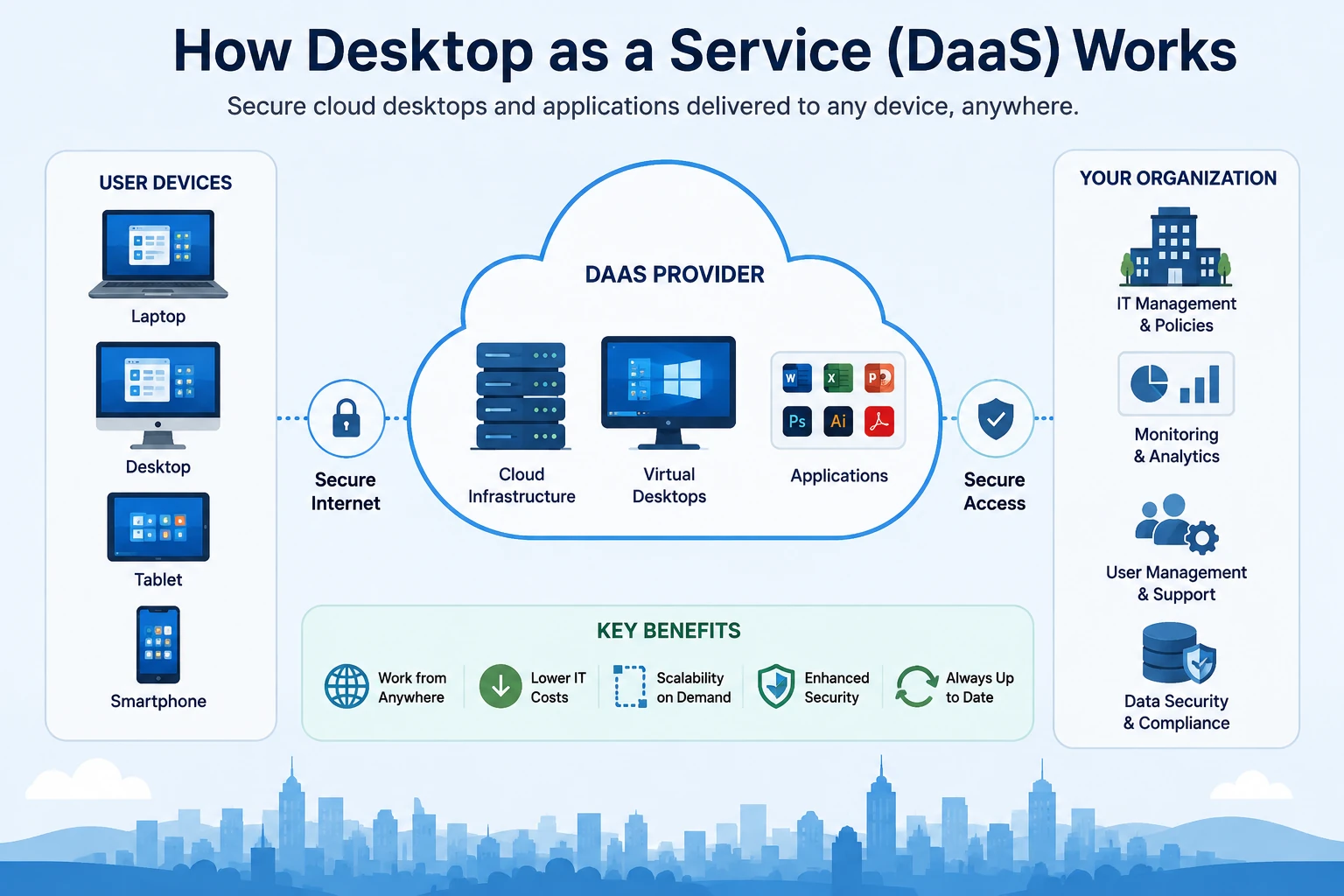
A typical Desktop as a Service environment separates the user’s physical device from the computing environment where business applications and desktop resources actually run.Desktop as a Service delivers centrally managed virtual desktops and applications from cloud infrastructure to authorized users.The process generally works like this:
The business configures its desktop environment. IT teams define operating systems, applications, access policies, storage and user requirements.
The provider hosts the computing infrastructure. Virtual desktop workloads run on cloud resources rather than depending entirely on local employee hardware.
The user authenticates. Identity controls verify that the person is permitted to access the environment.
A virtual desktop session is delivered. The user interacts with the cloud-hosted desktop from a supported endpoint.
Applications execute remotely. Much of the processing occurs in the hosted environment while display and input information is transmitted between the service and the device.
IT manages users centrally. Administrators can control policies, configurations, access and desktop resources without individually configuring every physical endpoint in the same way as a traditional PC fleet.
This architecture can make desktop provisioning significantly more flexible, especially when organizations have distributed employees or frequently changing workforce requirements. Businesses planning the wider infrastructure behind these environments can also review our Cloud Computing for Small Business guide.
Key Components of a DaaS Environment
Cloud Infrastructure
Compute, memory, storage and networking resources provide the foundation on which virtual desktops operate. Depending on the provider, businesses may select different configurations according to workload requirements.
Virtual Desktop
The virtual desktop provides the operating environment employees use for their work. Persistent desktop configurations can retain user-specific settings between sessions, while nonpersistent approaches may provide a fresh standardized environment when a user signs in.
Applications
Business applications can be installed in desktop images, deployed through management tools or delivered through application-streaming and virtualization technologies depending on the architecture.
Identity and Access Management
Authentication and authorization determine who can access a desktop and what resources they can use. Strong identity controls are therefore an essential part of a secure DaaS deployment.
Endpoint Device
The employee still needs a physical endpoint such as a laptop, desktop, thin client or supported mobile device. The difference is that the endpoint does not necessarily need to perform all of the processing or permanently store all business data locally.
Desktop as a Service vs VDI: What’s the Difference?
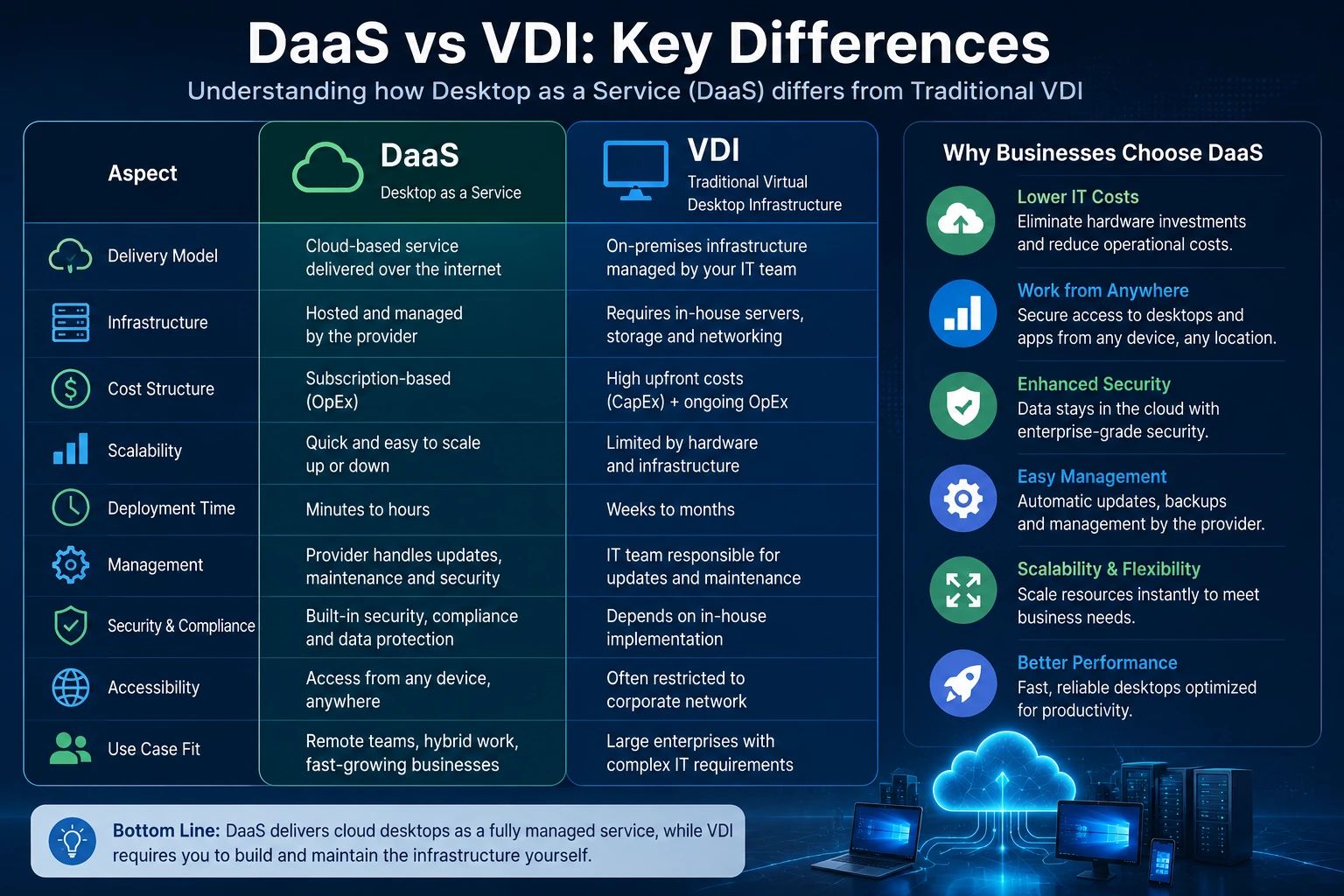
DaaS and virtual desktop infrastructure (VDI) both deliver virtual desktops, which is why the terms are sometimes confused. The main distinction is generally who operates the infrastructure and where management responsibility sits.DaaS shifts more infrastructure responsibility to a cloud service provider, while traditional VDI commonly requires greater in-house infrastructure management.
Internal IT generally has greater infrastructure responsibility
Upfront Hardware
Usually lower infrastructure investment
Can require significant infrastructure investment
Scaling
Cloud resources can simplify expansion and reduction
Capacity depends more heavily on deployed infrastructure
Cost Model
Typically subscription or usage based
Can involve larger capital expenditure plus ongoing operations
Control
Depends on provider and service architecture
Can provide greater direct infrastructure control
Maintenance
More infrastructure work shifted to provider
More infrastructure work remains with internal IT
DaaS is therefore not necessarily a replacement for every VDI environment. Organizations with highly specialized infrastructure, regulatory requirements or existing VDI investments may still prefer traditional or hybrid approaches.
Benefits of Desktop as a Service for Businesses
1. Support for Remote and Hybrid Work
One of the clearest DaaS benefits is the ability to provide employees with access to a standardized work environment from different locations.This can reduce the dependence on employees being physically connected to an office network or using one particular corporate desktop.
2. Faster Desktop Provisioning
IT teams can create standardized desktop configurations and provision virtual environments without purchasing and installing new desktop infrastructure for every change in workforce demand.This can be valuable when onboarding new employees, contractors or temporary teams.
3. Scalability
Cloud infrastructure allows organizations to increase or reduce virtual desktop resources more flexibly than environments that depend entirely on fixed on-premises hardware capacity.This makes DaaS attractive for seasonal businesses, fast-growing organizations and companies experiencing workforce changes.
4. Reduced Infrastructure Management
The service provider handles substantial portions of the underlying cloud infrastructure, allowing internal IT teams to spend less time maintaining physical desktop-delivery infrastructure.This does not eliminate IT administration. Businesses still need to manage identities, applications, policies, configurations, endpoint security and user support.
5. Centralized Management
Administrators can manage desktop configurations and access policies centrally rather than relying entirely on individual endpoint configurations.
6. Potential Security Advantages
DaaS can reduce the amount of sensitive information that must remain permanently stored on employee endpoints because data and applications can stay within centrally managed environments. This centralized approach also makes cloud governance especially important as organizations expand their hosted infrastructure.That architecture can improve security, but only when supported by appropriate identity controls, encryption, monitoring, patching and endpoint policies.
7. Operational Expense Model
DaaS can shift more desktop infrastructure spending from large upfront capital purchases toward recurring operational expenditure.This may improve budgeting flexibility, although organizations should calculate total cost carefully rather than assuming that subscription pricing will automatically be cheaper.
Potential Disadvantages of Desktop as a Service
DaaS has meaningful advantages, but it also introduces trade-offs.
Internet and Network Dependence
The user experience depends heavily on network quality. High latency, unstable connections or insufficient bandwidth can make cloud desktops feel slow even when the hosted computing resources are powerful.
Recurring Costs
Subscription, compute, storage, data transfer, licensing and support costs can accumulate over time. A DaaS environment should therefore be evaluated using total cost of ownership rather than only the advertised per-user price.
Application Compatibility
Some legacy, hardware-dependent or highly specialized applications may require additional testing or architecture changes before they perform properly in a hosted desktop environment.
Provider Dependence
The organization becomes dependent on its provider’s platform availability, supported regions, service architecture and product roadmap.
Complex Licensing
Operating-system and application licensing can become complicated, particularly when existing enterprise licenses are brought into cloud desktop environments.
Is Desktop as a Service Secure?
Desktop as a Service can support a strong security architecture, but DaaS itself does not guarantee security.A well-designed deployment can keep more business data in centrally controlled cloud environments, enforce access policies consistently and reduce the need to store sensitive information directly on endpoints.Businesses should still evaluate:
Multi-factor authentication
Identity and access management
Encryption in transit and at rest
Endpoint security
Role-based access controls
Session monitoring
Patch and vulnerability management
Backup and recovery policies
Data residency
Compliance requirements
Logging and security analytics
Provider responsibility versus customer responsibility
Distributed employees can access centrally managed business desktops without needing to work permanently from the corporate office.
Hybrid Workforces
Employees moving between home and office locations can use a consistent desktop environment across supported devices and locations.
Contractors and Temporary Staff
Businesses can provision controlled desktop environments for contractors without necessarily configuring permanent corporate PCs for every temporary user.
Seasonal Businesses
Organizations with temporary increases in staff can scale desktop capacity according to changing workforce requirements.
Contact Centers
Virtual desktops can provide standardized work environments to agents working from centralized or distributed locations.
Developers and Technical Teams
Cloud desktops can provide predefined computing environments with specific CPU, memory, storage or operating-system configurations for development and technical workloads.
Business Continuity
DaaS can form part of a broader continuity strategy by reducing dependence on employees accessing one particular physical workplace or computer.
Leading Desktop as a Service Platforms in 2026
The DaaS market includes cloud providers and specialist virtual-app and desktop platforms. The right choice depends on the organization’s existing technology stack, applications, identity systems, cloud strategy and required level of control.
Microsoft Windows 365
Windows 365 delivers Microsoft’s Cloud PC model, providing Windows desktops from Microsoft’s cloud environment. It can be particularly relevant to organizations already standardized around Microsoft 365, Windows and Microsoft identity technologies.Businesses considering it should evaluate the current official Windows 365 offering according to user requirements and licensing.
Amazon WorkSpaces
Amazon WorkSpaces provides managed cloud desktop options across Windows and Linux environments and supports different computing and storage configurations.A significant 2026 change is that Amazon WorkSpaces Pools is no longer available to new customers. Organizations should therefore use the provider’s current product information rather than older DaaS comparisons that recommend Pools as a new deployment option.See the official Amazon WorkSpaces DaaS page for current availability and capabilities.
Citrix DaaS
Citrix provides virtual application and desktop technologies for organizations requiring centralized delivery, security controls and flexible deployment architectures.Citrix can be particularly relevant to larger organizations with complex application-delivery, hybrid infrastructure or existing virtualization requirements.Current capabilities can be reviewed through the official Citrix virtual apps and desktops platform.
How Much Does Desktop as a Service Cost?
There is no single DaaS price because the cost depends on the provider, virtual machine configuration, operating system, licensing, storage, usage pattern, region and support requirements.Common pricing approaches include:
Fixed monthly price per user or desktop
Hourly or usage-based computing
Monthly infrastructure plus usage charges
Storage charges
Operating-system or application licensing
Data transfer or networking charges
Premium support
Additional security and management services
For example, Amazon WorkSpaces currently supports monthly subscription and hourly metering models for DaaS resources, depending on the selected service and configuration.Businesses should calculate total cost per productive user rather than comparing only headline subscription prices.
DaaS Cost vs Traditional PCs
It is tempting to compare a monthly DaaS subscription directly with the purchase price of a laptop, but that comparison is incomplete.A proper business calculation should consider:
Endpoint purchase and replacement
Server and infrastructure costs
Desktop administration
Software licensing
Security tooling
IT support time
Employee onboarding and offboarding
Storage and backup
Downtime
Network infrastructure
Cloud consumption
Expected hardware lifecycle
DaaS may reduce some infrastructure and management expenses while introducing new recurring cloud costs. Whether it saves money depends on the organization’s actual workload and operating model.
How to Choose a Desktop as a Service Provider
Choosing a provider should start with business requirements rather than vendor popularity.
1. Define User Workloads
Separate basic office workers from developers, designers, engineers and other employees with higher computing or graphics requirements.
2. Test Application Compatibility
Confirm that critical applications, peripherals and authentication systems work correctly in the proposed environment before large-scale migration.
3. Evaluate Performance
Test the service from the actual locations and networks employees will use. A demonstration running near the provider’s infrastructure does not necessarily represent the experience of every remote worker.
Regulated organizations should confirm whether the provider’s available regions, contractual commitments and security controls meet applicable requirements.
6. Understand the Pricing Model
Model realistic user activity rather than assuming every user consumes the same resources. Persistent full-time desktops and occasional task-worker sessions can have very different cost profiles.
7. Review Provider Lock-In
Understand how desktop images, applications, profiles and data could be migrated if the business later changes providers or architecture.
8. Run a Pilot
Before migrating the entire workforce, test DaaS with a representative group of employees covering different roles, locations and applications.
Desktop as a Service Implementation Checklist
Identify user groups and workload requirements
Inventory business applications
Assess existing identity infrastructure
Measure network performance
Define security requirements
Review compliance obligations
Select persistent or nonpersistent desktop requirements
Determine CPU, memory and storage needs
Review licensing
Estimate monthly and annual costs
Test peripherals and specialized applications
Create desktop images and policies
Configure authentication and access controls
Run a limited pilot
Collect employee feedback
Measure performance
Optimize resource allocation
Plan user support
Create backup and recovery procedures
Roll out gradually
Who Should Consider Desktop as a Service?
DaaS is worth evaluating when a business has one or more of the following characteristics:
A significant remote or hybrid workforce
Rapid employee growth
Frequent onboarding and offboarding
Seasonal staffing requirements
Contractors requiring controlled access
Multiple office locations
Limited desire to operate desktop infrastructure internally
Traditional VDI may remain appropriate for organizations that need extensive direct infrastructure control, already operate mature virtualization environments, have highly specialized workloads or face requirements that make a public-cloud desktop model difficult.The decision should therefore not be framed as “DaaS is modern and VDI is outdated.” Both models can be valid depending on business requirements.
The Future of Desktop as a Service
DaaS continues to evolve beyond basic remote desktop delivery. Providers are increasingly connecting cloud desktops with stronger security controls, automated management, application streaming, analytics and AI-enabled operations. Organizations exploring the broader operational role of AI can also read our AI Business Solutions guide.In 2026, AWS says Amazon WorkSpaces was recognized as a Leader in both Gartner’s Desktop as a Service evaluation and IDC’s worldwide DaaS assessment, illustrating the continuing enterprise focus on cloud-delivered desktop infrastructure.The longer-term direction is likely to involve more automated provisioning, policy management, workload optimization and integration between virtual desktops, SaaS applications, secure browsers and AI-enabled work environments.
Frequently Asked Questions About Desktop as a Service
What is Desktop as a Service?
Desktop as a Service is a cloud model that delivers virtual desktop environments to users while a service provider manages significant portions of the underlying infrastructure.
What does DaaS stand for?
DaaS stands for Desktop as a Service.
Is DaaS the same as VDI?
No. Both provide virtual desktops, but traditional VDI generally places more infrastructure deployment and management responsibility on the organization, while DaaS shifts more of that responsibility to a cloud service provider.
Does DaaS require an internet connection?
Users generally need network connectivity to access their hosted desktop sessions. Network quality therefore has a direct impact on the user experience.
Is Desktop as a Service good for small businesses?
It can be. Small businesses with remote employees or limited infrastructure-management resources may benefit from DaaS, but they should compare the recurring cost with simpler alternatives such as managed laptops and SaaS applications.
Can employees use DaaS from home?
Yes. Supporting remote access is one of the major DaaS use cases, provided the user has an approved endpoint, appropriate credentials and sufficient network connectivity.
Is DaaS cheaper than VDI?
Not automatically. DaaS generally reduces upfront infrastructure requirements and can simplify scaling, but recurring subscription and cloud-resource costs can become significant. Total cost depends on workforce size, usage patterns and existing infrastructure.
What are examples of Desktop as a Service?
Major cloud-desktop offerings include Microsoft Windows 365, Amazon WorkSpaces and Citrix’s virtual desktop services and platform capabilities. Their architectures and management models differ, so businesses should compare them according to specific requirements.
Final Verdict: Is Desktop as a Service Worth It in 2026?
Desktop as a Service can be an excellent fit for businesses that need flexible, centrally managed desktops without wanting to build and operate all of the supporting infrastructure themselves.Its strongest use cases include remote and hybrid work, contractors, rapidly changing teams, seasonal employees, multi-location businesses and organizations pursuing a cloud-first IT strategy.The main benefits are flexibility, scalability, centralized management, potentially faster provisioning and reduced infrastructure responsibility. The main trade-offs include network dependence, recurring costs, application compatibility, licensing complexity and dependence on the chosen provider.For most businesses, the best decision is not to migrate every desktop immediately. Start by identifying a suitable user group, calculate the full cost, test critical applications and security requirements, and run a controlled pilot.If the pilot delivers the required performance, security and economics, DaaS can become a practical foundation for a more flexible workplace in 2026 and beyond.XVIFS Editorial Note: Cloud desktop products, availability and pricing change frequently. Product information in this guide was reviewed against current provider information in August 2026. Always verify current features, regional availability, licensing and pricing with the provider before deployment.
XVIFS helps businesses, marketers, creators, and entrepreneurs discover practical AI tools, SaaS platforms, automation solutions, and digital marketing strategies. Explore our tutorials, software reviews, comparisons, and step-by-step guides designed to help you work smarter, automate faster, and grow your business online.