AI agent automation is changing how businesses handle work that once required people to jump between applications, interpret information, make decisions, and coordinate several steps by hand. Instead of limiting AI to a single task such as writing, classifying, or summarizing, an agentic system can combine a language model with tools, business data, memory, and an execution loop to work toward a defined objective.
That does not mean every AI-powered process should become autonomous. For predictable work, conventional automation or a structured AI workflow is often easier to control, cheaper to run, and simpler to maintain. Agents become more useful when the route to the result cannot be fully mapped in advance and the system needs to decide what action to take next.
This guide explains how AI agent automation works, where it can be useful in business, how it differs from more traditional workflow automation, and what teams should consider before putting autonomous AI workflows into production.
What Is AI Agent Automation?
AI agent automation is the use of AI systems that can reason about a task, choose or use available tools, observe what happens, and keep working toward an objective with less step-by-step human direction. Anthropic distinguishes agentic systems from fixed workflows by noting that workflows follow predefined code paths, while agents dynamically direct their own processes and tool usage. OpenAI similarly describes agents as systems that can independently accomplish tasks on behalf of users.
A typical agentic system includes several core components:
- Model: The language model provides reasoning and decision-making capabilities.
- Instructions: The system receives an objective, operating rules, and constraints.
- Tools: Tools let the system retrieve information or take actions in connected environments.
- Context and data: Retrieval systems, files, business information, or other approved context can provide the information needed for the task.
- Execution loop: The agent can use results from its environment to decide what to do next.
- Guardrails and approvals: Permissions, checkpoints, monitoring, and stopping conditions help keep autonomous work controlled.
This is what separates an agent from a simple AI prompt. The system is built to complete a broader task, not just return one response.
How AI Agent Automation Works
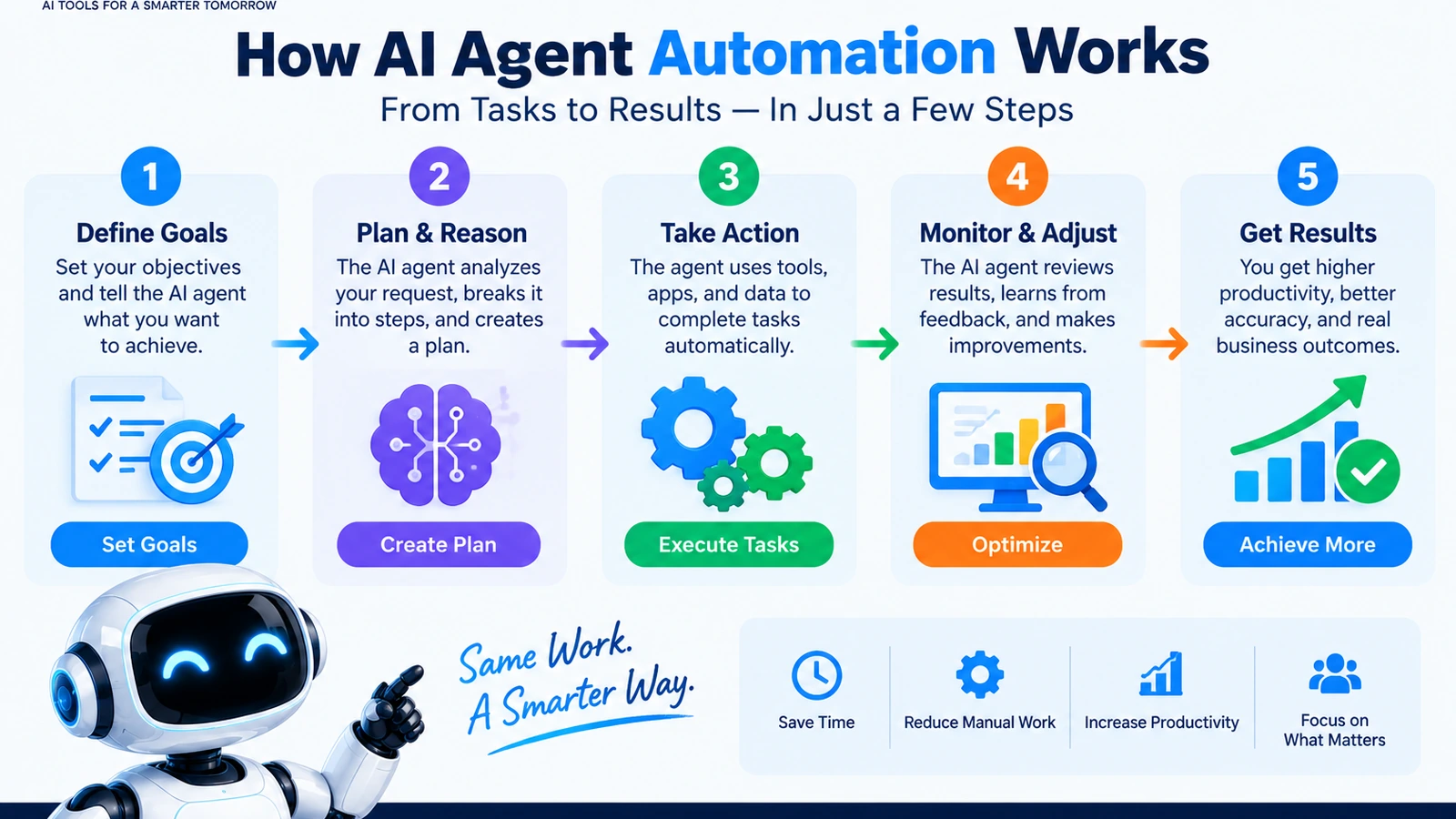
Implementations vary, but most autonomous workflows follow the same broad pattern: understand the objective, choose an action, use a tool when necessary, inspect the result, and continue until the task is complete or a stopping condition is reached.
1. Define the objective
The process starts with a clear business goal. A team might ask an agent to research incoming requests, classify them, gather relevant information, and prepare a response for approval.
The goal should be specific enough that success can be evaluated. If the objective is vague, it becomes much harder to judge whether the agent actually completed the work correctly.
2. Give the agent appropriate context
An agent becomes far more useful when it can work with the information required for the task. That may include retrieved documents, approved business data, or information returned by connected tools.
OpenAI’s agent-building tools, for example, include web search, file search, and computer use capabilities alongside APIs and an Agents SDK. The wider principle is the same regardless of platform: the model needs clear interfaces to the information and actions relevant to its job.
3. Select and use tools
An agent does not have to rely only on whatever is already in the model’s context. It can use tools to retrieve information or interact with an environment. This matters most when the task depends on current information, company documents, software systems, or actions that cannot be completed through text generation alone.
4. Observe the result
Each tool result becomes feedback for the next step. Anthropic describes this as gaining ground truth from the environment, such as tool outputs or code execution. That feedback helps the agent judge progress instead of blindly following a fixed sequence.
5. Continue, escalate, or stop
The agent can continue when more work is needed, but it can also pause for human input when it reaches a checkpoint, encounters a blocker, or needs a decision outside its authority.
Stopping conditions are important. Without them, an autonomous system may keep making decisions longer than necessary. Maximum iterations, approval gates, and explicit completion criteria are practical ways to make agentic workflows more predictable.
AI Workflows vs. Autonomous AI Agents
AI workflow automation and AI agent automation overlap, but they are not the same thing.
| Approach | How it works | Best fit |
|---|---|---|
| Traditional automation | Uses predefined triggers, rules, and actions. | Highly predictable repetitive processes. |
| AI workflow | Uses AI inside a structured sequence of steps. | Processes that need AI capabilities but still have a known path. |
| AI agent | Allows the model to determine actions and tool usage dynamically. | Open-ended or variable tasks where the required steps are difficult to hard-code. |
Anthropic recommends using the simplest solution that meets the need. Workflows offer predictability and consistency for well-defined tasks, while agents are better suited to situations where flexibility and model-driven decisions are necessary. Agentic systems can also add latency, cost, and the possibility of errors compounding over several steps.
For a broader explanation of different agent architectures and categories, see Types of AI Agents: 10 Types Explained With Examples (2026).
Business Use Cases for AI Agent Automation
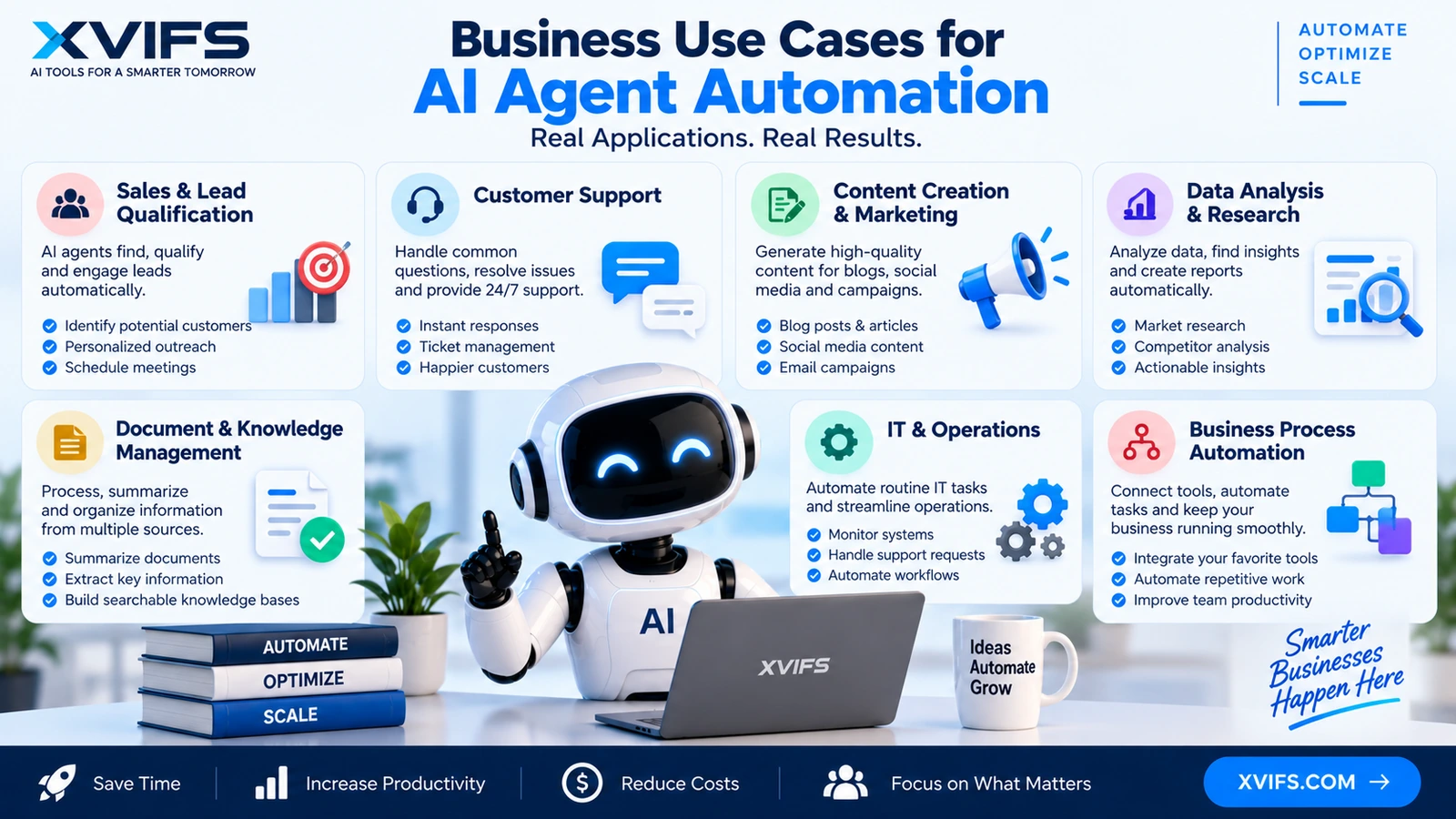
The strongest use cases tend to be tasks where employees spend significant time gathering information, moving between systems, making intermediate decisions, or coordinating several steps before they can finish the work.
Sales and lead qualification
An agent can support a lead-management workflow by researching prospects, applying a qualification rubric, preparing personalized outreach, and updating approved systems when the right permissions and approval checkpoints are in place. OpenAI presents lead qualification and routing as an example of an agentic workflow.
IT request handling
AI agents can help assess incoming IT requests, compare them with approved systems, prepare responses, and document decisions. Sensitive actions should still remain subject to appropriate permissions and approval rules rather than being left completely uncontrolled.
Marketing content operations
Agentic workflows can turn a brief into draft marketing materials such as blog posts, social content, emails, or landing-page drafts. OpenAI describes this as a use case for its workspace agents. Human review can remain part of the workflow before anything is published or distributed.
Research and information gathering
Research often requires multiple searches, documents, and intermediate findings. An agent can determine dynamically which information to gather and how to proceed. Anthropic identifies research tasks as a good fit for orchestrator-worker patterns when the needed subtasks cannot be predicted in advance.
Document and knowledge workflows
File retrieval can help an agent locate relevant information across large document collections. This can support customer support, internal knowledge retrieval, technical documentation, and similar information-heavy workflows.
Legacy computer-based processes
When a useful API is unavailable, computer-use capabilities can allow an agent to interact with browser-based or desktop interfaces. OpenAI describes computer-use applications including quality assurance and data-entry workflows involving legacy systems.
For a related look at business process automation with agents, see Agentic Process Automation: How AI Agents Transform Workflows in 2026.
How to Choose the Right AI Agent Automation Use Case
Starting with the most autonomous process is usually the wrong move. A better approach is to begin with a task where the value is clear and the boundaries can be defined.
Choose tasks with measurable outcomes
Define what a successful result looks like before building the agent. If the team cannot explain the desired outcome, it will also struggle to evaluate whether the system is performing well.
Prefer bounded autonomy
Give the agent access only to the tools and actions it actually needs. Human approval can be required before sensitive actions such as sending messages, changing important records, or triggering downstream processes.
Use workflows when the path is predictable
If every request follows the same sequence, a conventional workflow with carefully placed AI steps may be easier to maintain than a fully autonomous agent. Agents are most valuable when the number or order of steps genuinely varies.
Consider cost and latency
Agentic systems may require multiple model turns and tool calls. That can make them slower or more expensive than a single model call or fixed workflow. The added autonomy should solve a real business problem rather than simply add complexity.
How to Build a Reliable AI Agent Workflow
Reliability needs to be designed into the system from the beginning rather than added after deployment.
Keep the architecture simple
Anthropic’s research recommends starting with simple, composable patterns and increasing complexity only when needed. Useful patterns include prompt chaining, routing, parallelization, orchestrator-workers, and evaluator-optimizer loops.
Make tools clear and well documented
Agents depend heavily on the interfaces they use. Tool descriptions should explain what each tool does, what inputs it expects, and what results it returns. Poorly designed interfaces make autonomous decision-making much harder to debug.
Add checkpoints for sensitive actions
Approval gates can keep a human involved when an action has meaningful consequences. OpenAI’s workspace-agent description includes permissions, approval checkpoints, monitoring, and role-based access as governance mechanisms.
Test before expanding autonomy
Agents can make mistakes that compound across multiple steps. Anthropic recommends extensive testing in sandboxed environments together with appropriate guardrails before autonomous behavior is trusted in production environments.
Why Evaluation Matters for AI Agent Automation
Testing an agent is more complicated than deciding whether a single answer sounds good. An agent can use tools across many turns, modify state, and adapt to intermediate results. One bad decision early in the process can affect everything that follows.
Anthropic’s evaluation guidance describes several useful grader types:
- Code-based graders: Useful for objective checks, outcome verification, tool-call verification, and reproducible tests.
- Model-based graders: Useful for open-ended outputs, rubric-based scoring, and tasks where nuance matters.
- Human graders: Useful for expert judgment, calibration, and quality checks that automated methods cannot reliably capture.
Teams should also distinguish between capability evaluations and regression evaluations. Capability tests measure what an agent can do, while regression tests protect against losing behaviors that already worked. Together, they provide a clearer quality baseline as models, prompts, tools, and workflows evolve.
Governance and Safety Controls
Autonomy should never mean unrestricted access. A production agent should operate within clearly defined boundaries.
- Role-based permissions: Limit who can create or use agents and which tools they can access.
- Action permissions: Separate read access from actions that change records or communicate externally.
- Approval gates: Require human approval for sensitive actions.
- Monitoring and audit logs: Record activity so teams can understand what the agent did.
- Stopping conditions: Set boundaries around iterations and completion.
- Sandbox testing: Test new behavior before allowing broader access to production environments.
OpenAI describes these controls for workspace agents, including role-based access, audit logs, monitoring, centralized administration, and approval gates. Anthropic similarly emphasizes guardrails and controlled testing because autonomous systems can produce compounding errors.
Common Mistakes to Avoid
Using an agent when a workflow is enough
More autonomy is not automatically better. If the process is deterministic, a fixed workflow may deliver better predictability and easier maintenance.
Giving the agent too much authority
Tools should be scoped to the business task. Unnecessary permissions increase the potential impact of an incorrect decision.
Skipping evaluation
Manual testing may be enough during early experimentation, but it becomes difficult to maintain a consistent quality bar as the system scales. Evaluation suites make expected behavior measurable and help teams catch regressions.
Ignoring the cost of multiple steps
An autonomous agent may need several model turns and tool calls. Teams should evaluate the cost and latency of the entire workflow rather than judging it from a single model response.
Measuring only the final text
The final answer can look good even when the underlying process used the wrong tools or changed the wrong state. Evaluation should consider both the agent’s behavior and the actual outcome.
AI Agent Automation in 2026: What Businesses Should Do Next
The practical opportunity is not to make every business process autonomous. It is to identify the workflows where dynamic reasoning and tool use create value that simpler automation cannot provide.
A sensible rollout starts with one bounded use case. Define the objective, identify the required context and tools, establish permissions, specify approval points, and create measurable success criteria. Then test the workflow in a controlled environment before expanding its authority.
For teams comparing agentic approaches with broader workflow automation, our related guide covers AI Workflow Automation: How It Works, Examples, and Best Tools in 2026.
The core principle is straightforward: use autonomy where flexibility is genuinely valuable, but keep the system observable, testable, and governed. That balance is what turns an experimental AI agent into a useful business workflow.
Frequently Asked Questions
What is AI agent automation?
AI agent automation uses AI systems that can pursue a defined objective by reasoning, using tools, observing results, and deciding what to do next rather than following only a fixed sequence of steps.
What is the difference between AI automation and AI agents?
AI automation can place AI capabilities inside a predefined workflow. An AI agent can dynamically determine its process and tool usage, making agents better suited to tasks where the required steps are difficult to predict.
When should a business use an AI agent?
An agent is a good candidate for open-ended tasks where the number or order of steps varies and model-driven decision-making is useful. For simple, predictable processes, a fixed workflow may be the better option.
Are AI agents fully autonomous?
They can operate with substantial autonomy, but production systems can still include human checkpoints, permissions, monitoring, and stopping conditions. The appropriate level of autonomy depends on the task and its risks.
How can businesses make AI agents safer?
Use limited permissions, approval gates, monitoring, audit logs, clear tool interfaces, stopping conditions, and evaluation suites. Test autonomous behavior in controlled environments before expanding access.
Official sources used: New tools for building agents; OpenAI for agentic workflows; Workspace agents for business.