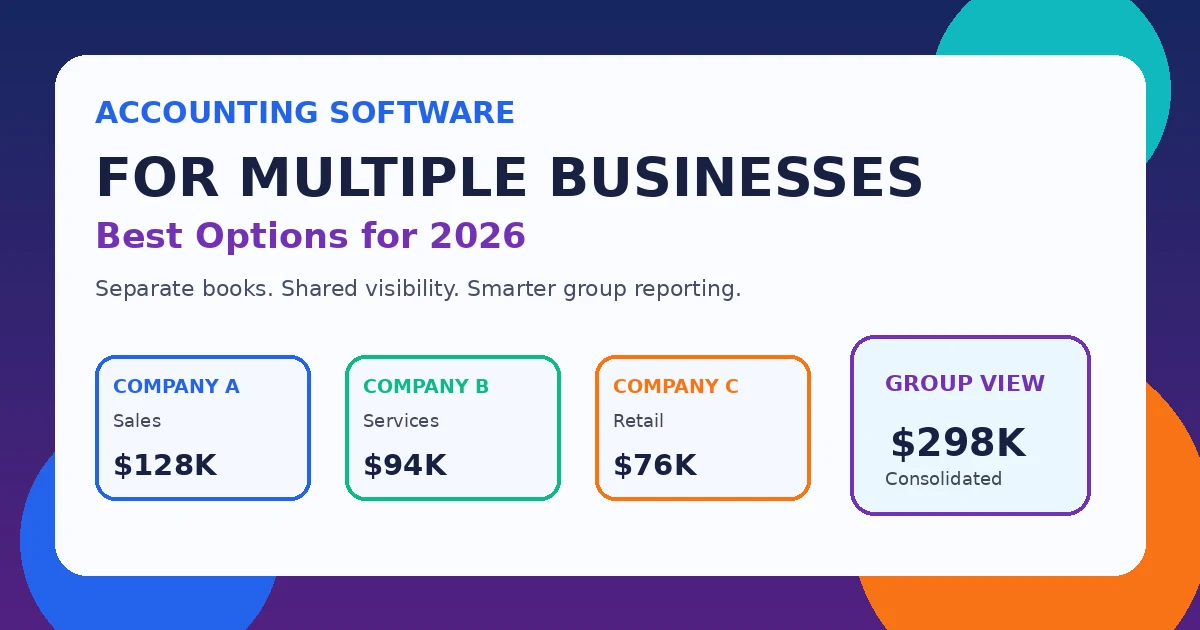
Managing the books for one company is fairly simple. Managing several companies is different: every entity may have its own bank accounts, tax registrations, users, currencies, reporting deadlines, and approval rules. The right accounting software for multiple businesses should keep those records clearly separated while making it easy for owners and finance teams to see what is happening across the group.
That does not always mean buying an enterprise system. A person who owns two unrelated small businesses may only need separate company files under one login. A group with subsidiaries, intercompany transactions, and consolidated reporting needs something more powerful. This guide explains both situations and compares practical options for 2026.
Best Accounting Software for Multiple Businesses in 2026
| Software | Most suitable for | How multiple businesses are handled |
|---|---|---|
| QuickBooks Online | Owners with a few independent companies | Separate company files under one sign-in; each company needs its own subscription |
| Xero | Cloud-first small and growing businesses | Multiple organizations under one user account; each organization is separate |
| Zoho Books | SMBs already using Zoho | Multiple organizations from one account, with separate subscriptions |
| FreshBooks | Service businesses | Multiple businesses can share a login, while each business remains independent |
| QuickBooks Enterprise | Established SMBs needing deeper controls | Multiple company files with more advanced accounting and reporting |
| Sage Intacct | Mid-market multi-entity groups | Shared multi-entity environment with consolidation and intercompany capabilities |
| NetSuite OneWorld | Complex or international groups | Subsidiary, currency, intercompany, and consolidated ERP accounting |
For most small owners, the strongest starting point is QuickBooks Online, Xero, or Zoho Books. For finance teams that need true group accounting, Sage Intacct and NetSuite OneWorld sit in a different class. The important step is matching the software to your structure rather than buying the product with the longest feature list.
What Accounting Software for Multiple Businesses Actually Needs to Do
The phrase accounting software for multiple businesses covers several very different situations. Before choosing a platform, identify which one describes you.
- Independent businesses: Each company has separate books, invoices, bank accounts, tax records, and financial statements.
- Branches or locations: One legal company operates across stores, offices, or business units.
- Parent company and subsidiaries: Each entity needs its own accounts, while management also needs consolidated results.
- International entities: The group deals with multiple currencies, countries, tax rules, or statutory requirements.
- Shared finance team: One accountant or finance department works across several companies and needs controlled access.
If your companies are independent, separate subscriptions may be completely acceptable. If they trade with one another, share costs, or report to a parent company, manual spreadsheets quickly become a weak point. That is where multi-entity software starts to earn its cost.
1. QuickBooks Online for Separate Small Businesses
QuickBooks Online is a practical choice for entrepreneurs who own a few separate businesses and want familiar cloud accounting. Intuit confirms that you can keep multiple companies under the same sign-in, but each company requires its own paid subscription. QuickBooks explains the multi-company setup here.
That arrangement works well when the businesses do not need consolidated accounts. You can switch between companies without maintaining separate logins, but each set of books stays independent. For a small owner, that separation can be a benefit because transactions, bank feeds, invoices, taxes, and reports remain cleanly divided.
QuickBooks Online becomes less attractive when the number of companies grows because the subscription cost multiplies. It also should not be confused with a true multi-entity consolidation platform. If your finance team is exporting several company reports and combining them manually every month, it may be time to evaluate a different category of software.
2. Xero for Cloud-First Businesses and Accountants
Xero is another strong option for accounting software for multiple businesses when companies are separate but managed by the same owner or finance team. Xero allows a user to add another organization, and each organization has its own subscription. Xero documents that process in its official support center. Xero also allows one billing account to pay for multiple organizations, which can simplify administration for a group.
Its biggest advantage is the surrounding ecosystem. Businesses can connect payments, ecommerce, payroll, inventory, reporting, and expense tools without building everything from scratch. If your companies rely on many SaaS products, that integration depth can matter as much as the accounting features themselves.
Xero is usually a better fit for separate organizations than for complex legal consolidation. If the group needs automatic eliminations, sophisticated intercompany accounting, or group-level reporting across many entities, a dedicated multi-entity platform is more appropriate.
3. Zoho Books for Value and a Connected Business Stack
Zoho Books deserves consideration when budget matters and the companies already use Zoho CRM, Expense, Inventory, Analytics, or other Zoho applications. Zoho confirms that one account can contain multiple organizations, while each organization remains separate and requires its own subscription after any trial period. Zoho’s official multi-organization guidance is available here.
That makes Zoho Books useful for owners who want more than bookkeeping. A connected CRM, inventory system, analytics layer, and accounting package can reduce duplicate data entry and make automation easier. If you are comparing the wider business stack as well, our guide to CRM software examples explains how sales platforms fit alongside finance systems.
For businesses with inventory, it is also worth reviewing our small business inventory management guide before choosing a plan. The accounting system should support the operational tools you already use rather than create another isolated data silo.
4. FreshBooks for Service Businesses
FreshBooks is aimed more at invoicing, time tracking, expenses, and straightforward accounting than complex corporate finance. It is a sensible option for consultants, agencies, and other service businesses that run more than one company but do not need group consolidation.
FreshBooks says users can manage multiple businesses from the same login while each business runs independently and has its own subscription. Its official help article explains how multiple businesses work.
The attraction is simplicity. If the main jobs are sending invoices, tracking client work, recording expenses, and viewing straightforward financial reports, FreshBooks may be easier to manage than a larger accounting platform. Companies with inventory-heavy operations or complex entity relationships will usually need something stronger.
5. QuickBooks Enterprise for More Complex SMB Accounting
QuickBooks Enterprise is relevant when a company has outgrown entry-level accounting but still prefers the QuickBooks environment. It can support more advanced accounting workflows, reporting, inventory management, and user controls than basic small-business bookkeeping products. Intuit provides current QuickBooks Enterprise product details here.
For several independent companies, separate company files can still work well. The benefit is that finance staff keep the familiar QuickBooks workflow while gaining more control. The limitation is structural: maintaining multiple files is still different from operating a single multi-entity finance platform.
If consolidation, intercompany transactions, or group reporting are becoming a regular monthly burden, do not choose Enterprise simply because it is a more powerful version of QuickBooks. First decide whether your real problem is company-file capacity or multi-entity accounting.
6. Sage Intacct for True Multi-Entity Accounting
Sage Intacct becomes more relevant when several legal entities operate as one group. Sage describes its multi-entity capability as a shared environment that supports multi-entity and multi-currency accounting, inter-entity transactions, and automated consolidation. Sage’s official multi-entity page outlines these capabilities.
This can remove a large amount of spreadsheet work. Instead of exporting results from several accounting systems and rebuilding a consolidated profit and loss statement manually, the finance team works in software designed around entity-level and group-level reporting.
Sage Intacct is therefore a stronger example of accounting software for multiple businesses when the businesses are financially connected. The trade-off is implementation effort. It is a serious finance system rather than a simple self-service bookkeeping app, so businesses should plan for setup, process design, user training, and ongoing administration.
7. NetSuite OneWorld for International and Complex Groups
NetSuite OneWorld is designed for organizations that manage subsidiaries, legal entities, multiple currencies, international operations, and broader ERP processes. Oracle’s official OneWorld material highlights multi-subsidiary management, intercompany accounting, consolidation, multi-currency, and global reporting. The NetSuite OneWorld overview is available here.
It is much more than bookkeeping. Accounting can connect with purchasing, inventory, sales, order management, and other operational functions. That can be valuable when the group has reached a scale where disconnected systems are creating control and reporting problems.
For two or three small companies, however, NetSuite would normally be excessive. The implementation cost, configuration, training, and process changes only make sense when the organization genuinely needs ERP-level control.
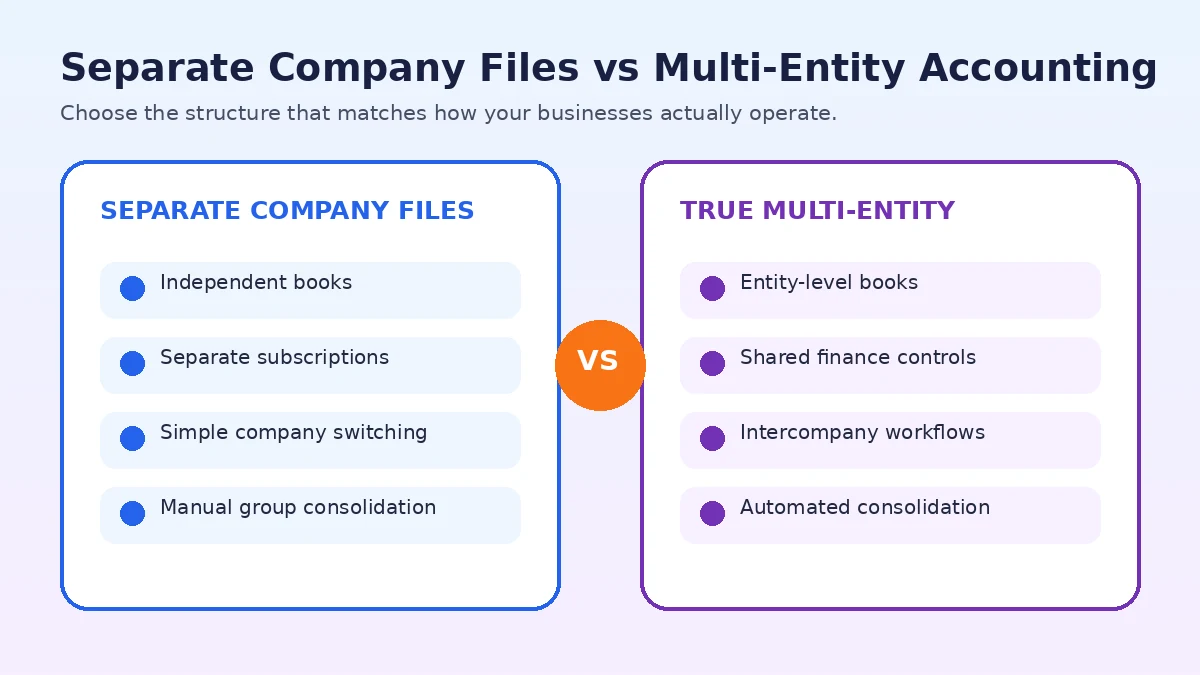
Separate Company Files vs True Multi-Entity Accounting
| Requirement | Separate company files | True multi-entity platform |
|---|---|---|
| Independent books for each company | Yes | Yes |
| Easy switching between entities | Usually | Yes |
| Consolidated group reporting | Often manual or limited | Built for it |
| Intercompany transactions | Usually manual | Often automated or structured |
| Multi-currency group reporting | Depends on product and plan | Usually stronger |
| Implementation effort | Low to moderate | Moderate to high |
| Typical fit | Independent SMBs | Groups, subsidiaries, complex organizations |
This distinction should drive your shortlist. If the businesses are unrelated, separate company files are often the simplest and most cost-effective solution. If the entities operate as a group, exchange money, share costs, or require consolidated statements, a true multi-entity platform can reduce manual work and improve control. When choosing accounting software for multiple businesses, decide first whether you need separate books or genuine group-level consolidation.
Key Features to Check Before You Buy
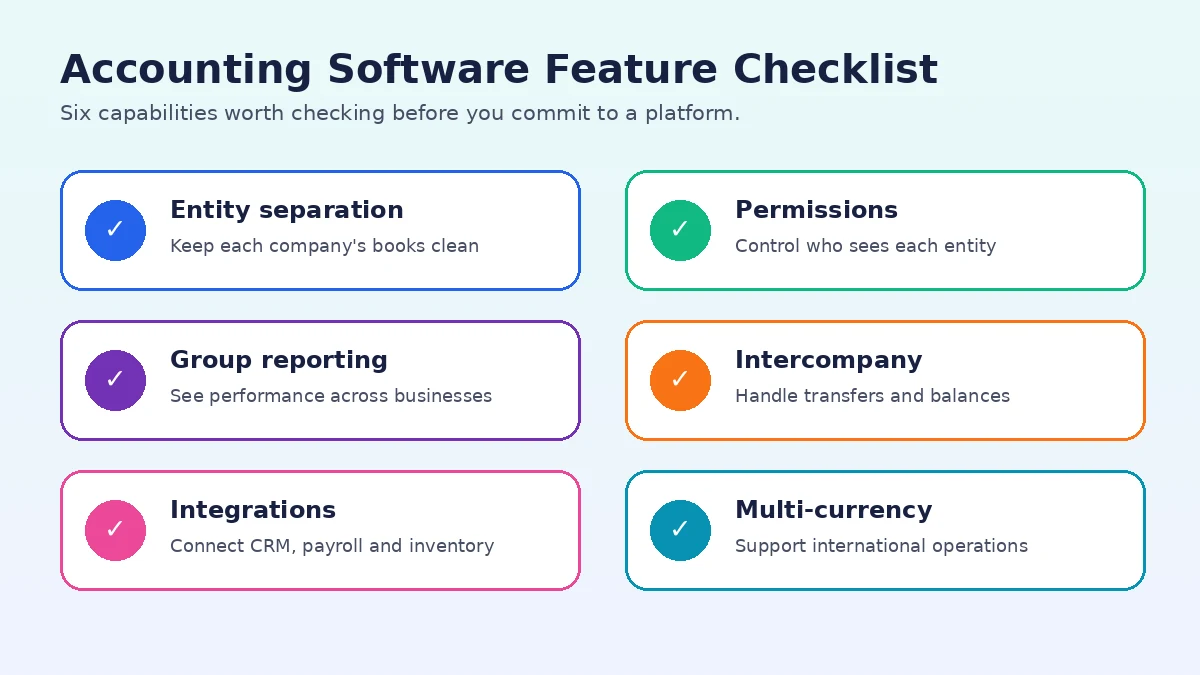
When comparing accounting software for multiple businesses, focus on the jobs that create the most work for your finance team:
- Company switching: Moving between businesses should be quick and secure.
- Clear entity separation: Bank accounts, invoices, vendors, taxes, and reports must stay tied to the correct company.
- Consolidated reporting: Essential when leadership needs a group-level view.
- Permissions: Users should only see the entities and functions relevant to their role.
- Multi-currency: Important for international trading and overseas subsidiaries.
- Intercompany accounting: Valuable when companies regularly bill, lend, or transfer money to one another.
- Audit trail: Finance teams need visibility into who changed what and when.
- Integrations: Accounting should connect cleanly with CRM, payroll, inventory, ecommerce, and expense systems.
- Scalability: Adding another entity should not make the system unmanageable.
The best accounting software for multiple businesses should also make it practical to add another entity without turning routine finance work into a manual consolidation project.
If your companies are also adding staff across locations, our cloud-based HR software guide can help you evaluate another part of the shared business stack. For organizations considering custom integrations, see our guide to SaaS development services.
How Much Does Accounting Software for Multiple Businesses Cost?
There is no single price because the products use different models. QuickBooks Online, Xero, Zoho Books, and FreshBooks generally treat each company or organization as a separate subscription. That makes them affordable for a small number of companies but progressively more expensive as the group grows.
Sage Intacct and NetSuite are usually sales-led products. Pricing can depend on entities, users, modules, implementation scope, and transaction complexity. The monthly software fee is only part of the decision; implementation and finance-team time matter too.
A cheaper subscription can become expensive if staff spend days consolidating reports manually. On the other hand, paying for enterprise software is wasteful if all you need is two clean sets of books. The right accounting software for multiple businesses should reduce total accounting effort, not merely minimize the sticker price.
Which Option Fits Your Situation?
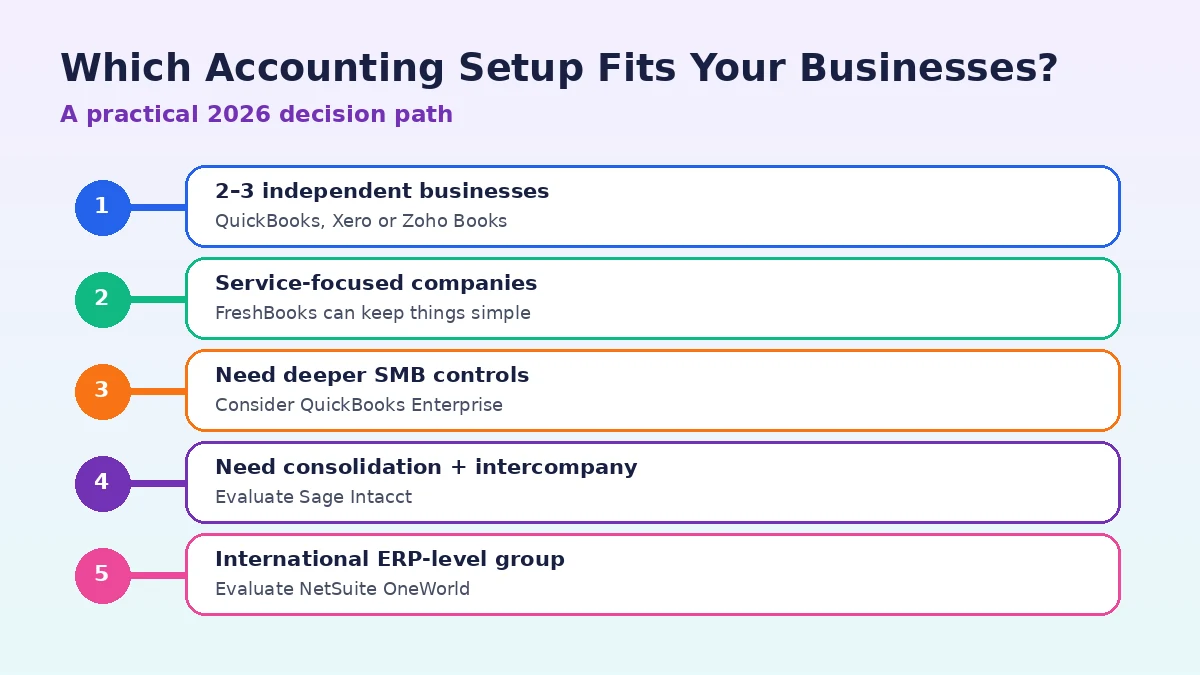
When comparing accounting software for multiple businesses, use your ownership structure and reporting needs rather than brand recognition alone. Owners of two or three independent small businesses should usually begin with QuickBooks Online, Xero, or Zoho Books. Service companies that care mainly about invoicing and simple financial management can also consider FreshBooks.
If you need deeper controls but still prefer separate company files, QuickBooks Enterprise can make sense. Once your finance team needs genuine entity consolidation, intercompany workflows, or group reporting, Sage Intacct becomes a stronger candidate. International groups that already need ERP functionality should evaluate NetSuite OneWorld.
The tipping point is usually operational pain. If month-end takes too long, intercompany balances do not match, management reporting depends on spreadsheets, or the group cannot see performance without manual consolidation, the accounting system is probably holding the business back.
Frequently Asked Questions
Can one account manage several businesses?
Yes. Several providers let one user access multiple companies or organizations. However, each business may still require its own subscription and its books normally remain separate.
Can QuickBooks Online manage multiple businesses?
Yes. QuickBooks Online lets users keep multiple companies under the same sign-in, but Intuit states that each company needs its own subscription.
Can Xero handle multiple companies?
Yes. Xero supports multiple organizations under the same user account. Each organization is maintained separately and normally has its own subscription.
Does Zoho Books support multiple organizations?
Yes. Zoho Books lets users create and switch between multiple organizations from one account, with separate subscription requirements by organization.
What is the best accounting software for multiple businesses with subsidiaries?
For subsidiaries that require consolidation and intercompany accounting, Sage Intacct and NetSuite OneWorld are stronger candidates than basic small-business bookkeeping platforms.
Do I need consolidated accounting software?
Not always. If the companies are independent and only need separate financial statements, standard accounting software may be enough. Consolidation matters when management needs a combined financial view of several connected entities.
Final Recommendation
The best accounting software for multiple businesses depends more on how the companies relate to one another than on the number of companies you own. Separate small businesses can often stay efficient with QuickBooks Online, Xero, Zoho Books, or FreshBooks. A growing group with subsidiaries, shared costs, intercompany transactions, and consolidated reporting should look toward platforms built specifically for multi-entity finance.
Choose the simplest system that handles today’s accounting reliably and gives you a realistic path for growth. That approach avoids both common mistakes: buying an enterprise platform too early and forcing a complex business group to live inside spreadsheets for too long.