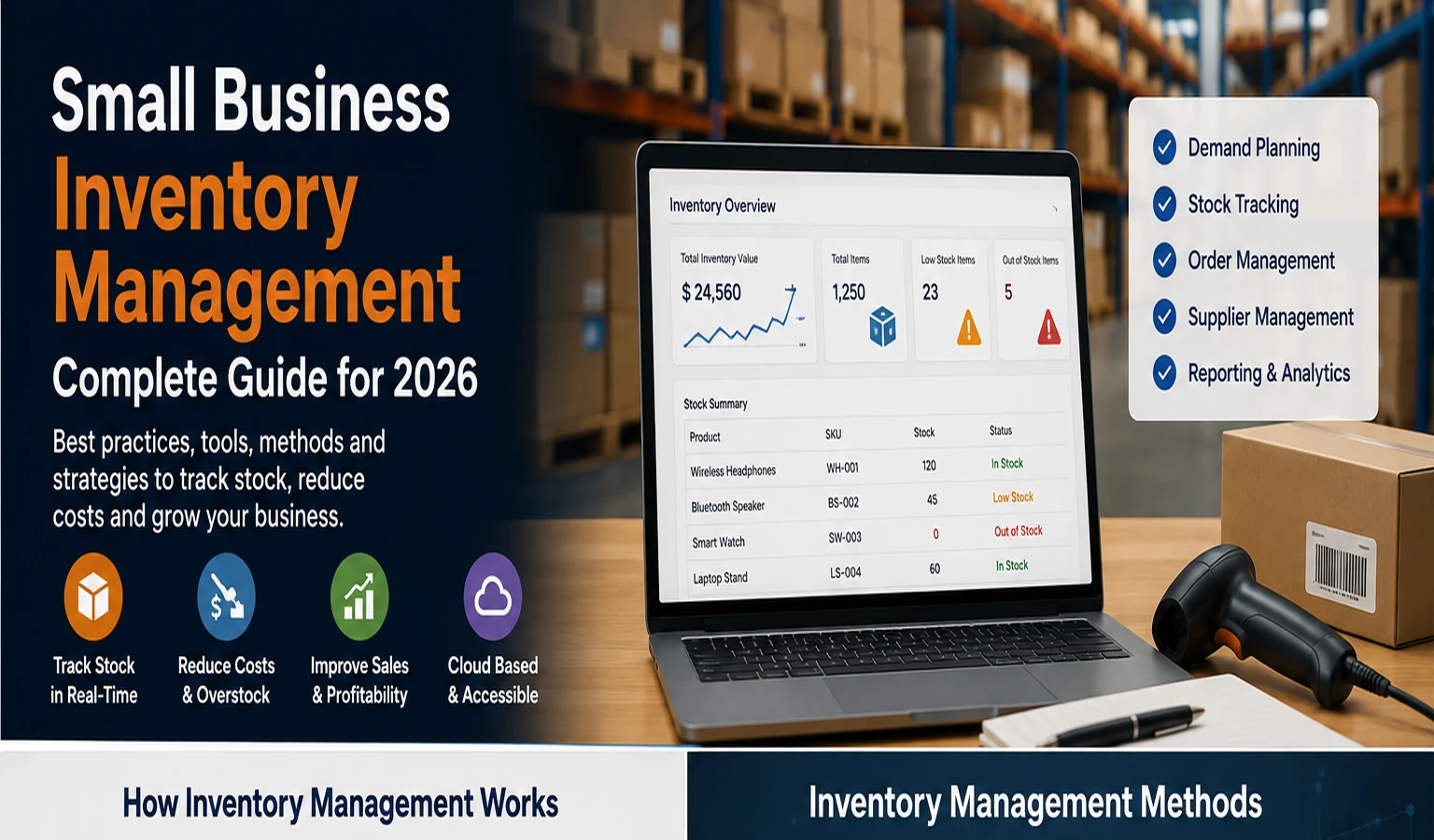
What Is Small Business Inventory Management?
Small Business Inventory Management covers the complete movement of stock through a company: deciding what to buy, ordering from suppliers, receiving products, organizing storage, tracking quantities, fulfilling customer orders, processing returns, and deciding when to reorder.
Inventory can include finished products ready for sale, raw materials used to manufacture goods, work in progress, packaging materials, spare parts, and other items a business needs to operate.
The goal is not simply to keep as much stock as possible. Inventory ties up cash and requires storage, handling, insurance, and administration. The objective is to maintain enough stock to meet realistic demand without carrying excessive inventory that may become damaged, obsolete, or difficult to sell.
Why Small Business Inventory Management Matters
Inventory directly affects sales, customer experience, purchasing, operations, and cash flow. A product cannot generate revenue if a customer wants it and it is unavailable. On the other hand, buying far more inventory than customers need can leave valuable working capital sitting on shelves.
Effective inventory management can help a small business:
- reduce stockouts and lost sales;
- avoid excessive inventory;
- improve purchasing decisions;
- understand which products sell quickly or slowly;
- improve order accuracy;
- reduce time spent manually counting and updating stock;
- plan replenishment more consistently;
- identify shrinkage, damage, and discrepancies earlier;
- improve visibility across sales channels and locations.
Businesses that are also modernizing other operations can explore the XVIFS guide to AI Business Solutions for additional ways technology can improve everyday business processes.
The Small Business Inventory Management Process
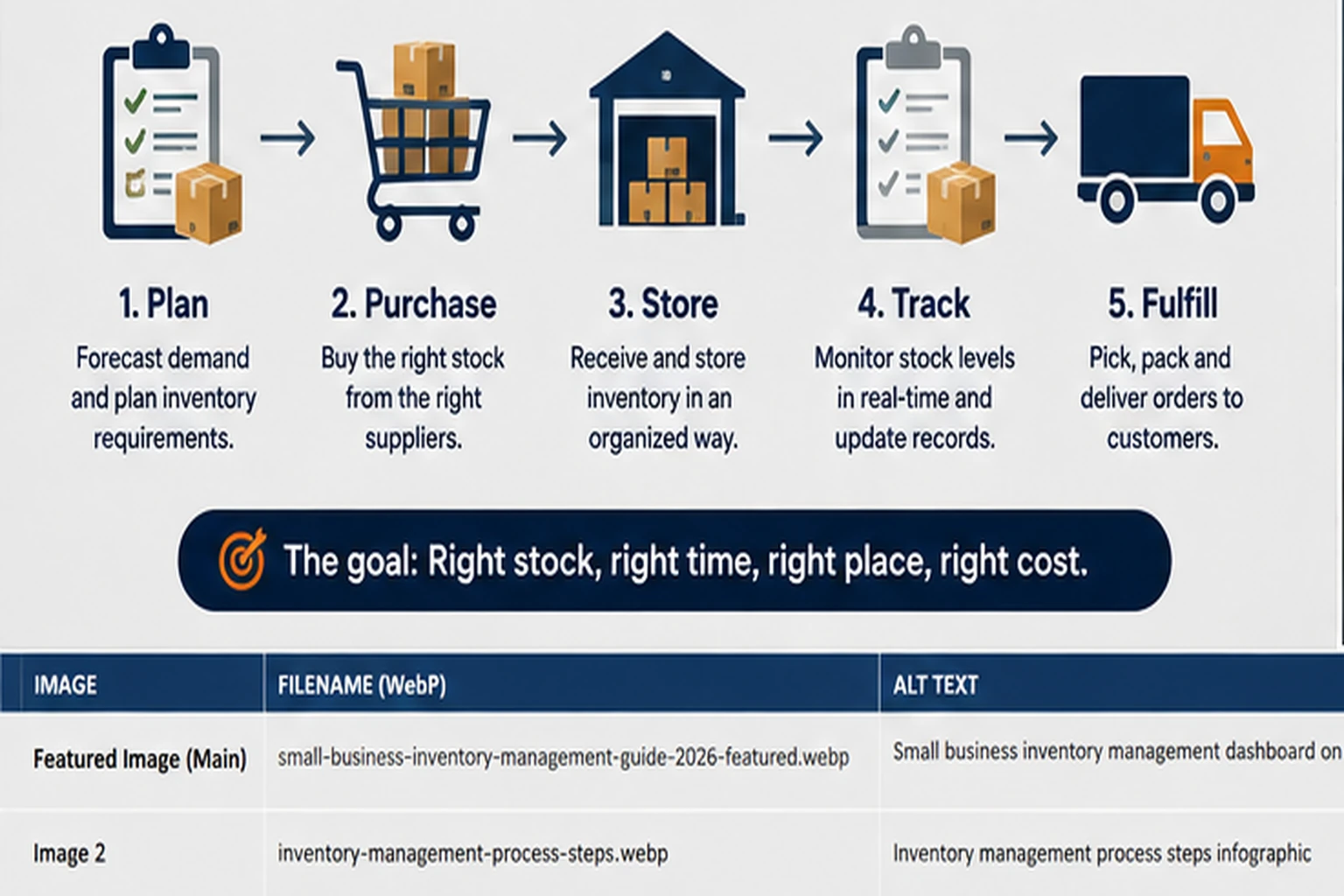
A practical inventory process can be understood as five connected stages: planning, purchasing, storing, tracking, and fulfillment. Each stage affects the next, so inaccurate information early in the process can create problems later.
1. Forecast and Plan Inventory
Estimate expected demand using historical sales, current trends, promotions, seasonality, supplier lead times, and known business changes. Forecasts will never be perfect, but even a simple evidence-based forecast is usually more useful than purchasing entirely by instinct.
2. Purchase the Right Stock
Create purchase orders based on expected demand, existing inventory, open customer orders, safety stock, supplier lead times, and available cash. Businesses should also monitor supplier reliability because an inexpensive supplier can become costly if deliveries are frequently late or incomplete.
3. Receive and Organize Stock
When goods arrive, confirm the quantity and condition against the purchase order. Record received items promptly and place them in clearly identified storage locations. Consistent product codes and storage locations make later counting and picking much easier.
4. Track Inventory Levels
Inventory quantities should change when products are received, sold, transferred, returned, damaged, or adjusted. The closer this information is to real time, the easier it becomes to make reliable purchasing and sales decisions.
5. Fulfill and Replenish
Pick, pack, and ship customer orders accurately, then monitor remaining quantities and reorder when stock reaches predefined levels. This creates a repeating inventory cycle rather than a series of disconnected purchasing decisions.
5 Inventory Management Methods Small Businesses Should Understand
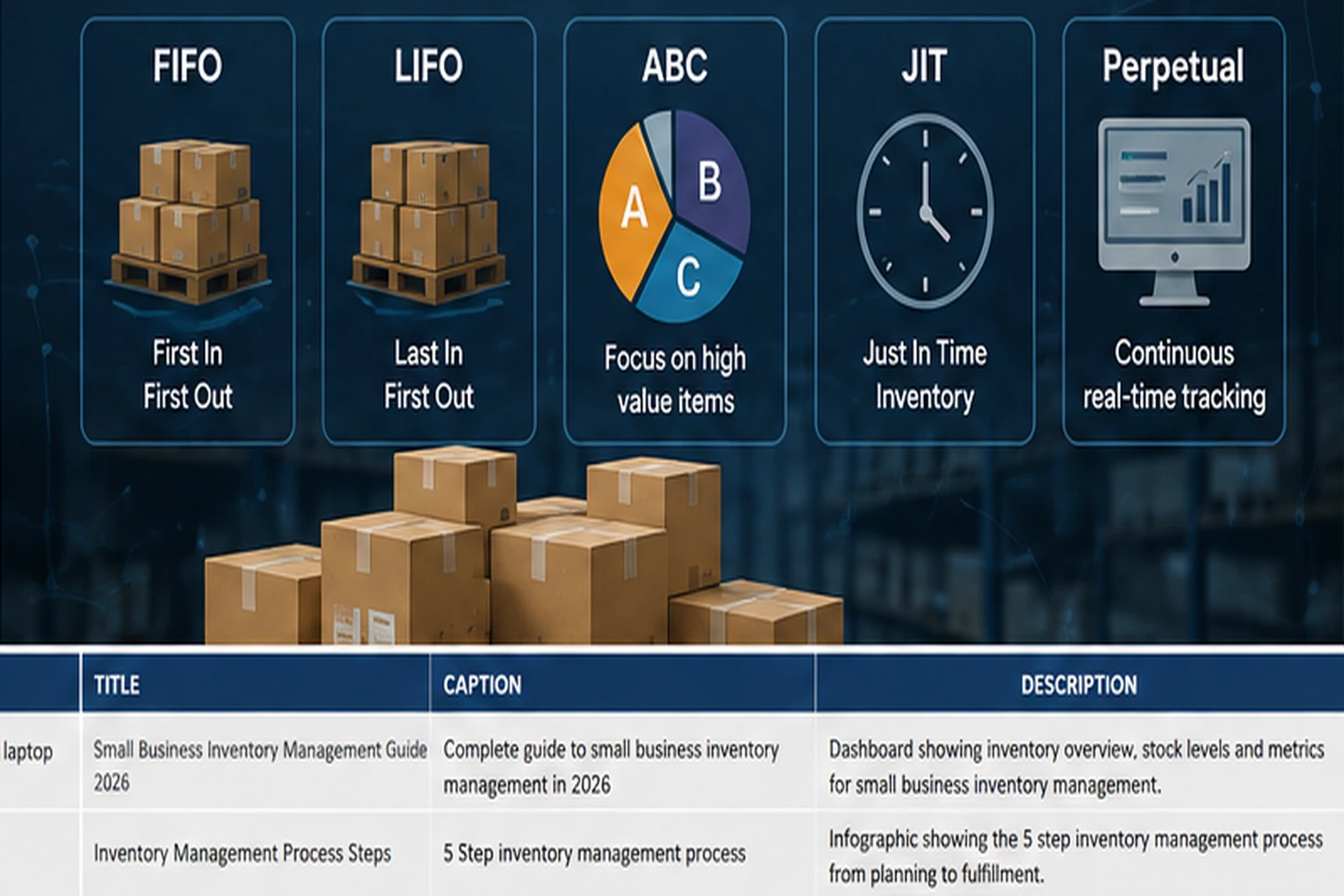
There is no single inventory method that is right for every company. The appropriate approach depends on product type, shelf life, demand predictability, storage costs, accounting requirements, and supplier reliability.
FIFO — First In, First Out
FIFO assumes the oldest inventory is sold or used first. Operationally, this is particularly useful for products with expiry dates, changing styles, or a risk of becoming obsolete because older stock is moved before newer stock.
LIFO — Last In, First Out
LIFO assumes the newest inventory is sold first for accounting purposes. Its accounting treatment varies by jurisdiction and reporting framework, so businesses should obtain appropriate accounting advice before relying on it for financial reporting.
ABC Analysis
ABC analysis separates inventory according to importance. A-items are usually the highest-value or most important products and deserve close control. B-items receive moderate attention, while C-items may be lower-value items that can be managed with simpler controls.
Just-in-Time Inventory
Just-in-Time, or JIT, aims to keep inventory relatively lean by ordering closer to when goods are needed. It can reduce carrying costs, but it also increases dependence on reliable suppliers and accurate demand planning.
Perpetual Inventory
A perpetual inventory system updates stock records continuously as transactions occur. This is common in modern inventory software and can provide much better visibility than waiting for periodic manual counts. Physical counts are still useful for identifying shrinkage, damage, and data errors.
Spreadsheet vs Inventory Tracking Software for Small Business
Spreadsheets can be perfectly reasonable for a very small operation with a limited number of products and transactions. The problem begins when several employees, sales channels, warehouses, or product variations must be kept synchronized.
| Area | Spreadsheet | Inventory Software |
|---|---|---|
| Initial cost | Usually low | Subscription or implementation cost |
| Setup | Simple for basic needs | Requires configuration |
| Real-time updates | Mostly manual | Often automated |
| Multiple users | Can become difficult to control | Designed for shared workflows |
| Barcode support | Limited without extra tools | Common in dedicated systems |
| Integrations | Limited or custom | Often connects to ecommerce, accounting, POS, and shipping tools |
| Reporting | Manually designed | Usually built in |
| Audit trail | Can be limited | Often tracks users and adjustments |
A business does not need to abandon spreadsheets merely because software exists. The right time to upgrade is when manual inventory work is creating errors, delaying decisions, consuming excessive employee time, or preventing the company from scaling efficiently.
What Is Cloud Inventory Tracking?
Cloud inventory tracking means inventory information is stored and managed through an online software platform rather than being limited to one local computer or manually maintained file.
Authorized employees can typically access current inventory information from different locations, while integrations may update quantities when purchases, sales, returns, or transfers occur.
Cloud systems can be especially useful for businesses with ecommerce stores, retail locations, warehouses, remote employees, or multiple sales channels. Companies building custom inventory or operational software can also review our Cloud Application Development guide for architecture, deployment, scalability, and integration considerations. However, companies should still evaluate data security, user permissions, backups, uptime, export capabilities, and vendor dependence, supported by a clear cloud security policy where appropriate.
Cloud software is part of the broader SaaS model. For businesses evaluating cloud-based operational systems, the key question should be whether the platform reliably solves the workflow problem rather than whether it simply has the largest feature list.
Businesses considering a custom subscription-based inventory platform can also review our SaaS development services guide for practical information on SaaS architecture, development, security, deployment, and scaling.
Essential Features in an Inventory System for Small Business
An inventory system for small business should match the company’s actual workflow. Paying for dozens of unused enterprise features can be just as inefficient as using a system that is too limited.
Real-Time Stock Levels
The system should clearly show available quantities and update inventory as relevant transactions occur.
Product and SKU Management
Each product or variation should have a consistent identifier, description, unit, cost, selling price, and other relevant information.
Barcode or QR Code Support
Scanning can reduce manual entry during receiving, stock counts, picking, and transfers.
Low-Stock and Reorder Alerts
Alerts help purchasing teams act before important products run out.
Purchase Order Management
A useful system should help track what has been ordered, from which supplier, at what cost, and whether it has been received.
Sales Channel Integration
Businesses selling through ecommerce, marketplaces, retail POS systems, or several locations should evaluate how inventory quantities synchronize between channels. If paid campaigns are part of the sales mix, our guide to Internet Advertising Platforms can help businesses understand the major channels that may feed demand into these connected systems.
Reporting and Analytics
Useful reports include stock valuation, sales velocity, aging inventory, stock movements, purchase history, and product performance.
User Permissions and Audit History
Not every employee should have permission to change costs, delete products, or make stock adjustments. Role-based access and activity history improve accountability.
How to Calculate Reorder Points
A reorder point helps a business decide when to replenish an item before it runs out. A simple approach is:
Reorder Point = Average Demand During Lead Time + Safety Stock
For example, suppose a business sells an average of 10 units per day and its supplier normally takes 7 days to deliver. Expected demand during lead time is 70 units. If the company keeps 20 additional units as safety stock, the reorder point would be approximately 90 units.
This is a simplified example. Real businesses may need to account for demand variability, supplier delays, minimum order quantities, seasonality, promotions, and available cash.
What Is Safety Stock?
Safety stock is extra inventory kept to protect against unexpected demand or supply delays. Too little safety stock increases stockout risk, while too much can tie up cash and storage space. The appropriate level should reflect the importance of the item and the variability of demand and lead time.
Barcode Inventory Tracking for Small Businesses
Barcode systems give products or storage locations machine-readable identifiers. Employees can scan items during receiving, picking, counting, transferring, or selling instead of repeatedly typing product information.
For a small business, the main benefits can include faster stock counts, fewer manual-entry mistakes, better product identification, and more consistent warehouse procedures.
Barcode technology does not automatically fix poor inventory data. Product records, units of measure, storage locations, and operating procedures still need to be organized correctly.
Important Small Business Inventory Management KPIs
Inventory should be measured rather than managed entirely by intuition. The most useful KPIs depend on the business, but several metrics provide a strong starting point.
Inventory Turnover
Inventory turnover measures how often inventory is sold and replaced during a period. Very slow turnover may indicate excessive or slow-moving stock, although healthy turnover differs significantly between industries.
Stockout Rate
Track how often customers cannot buy an item because it is unavailable. Repeated stockouts can indicate weak forecasting, reorder points, or supplier performance.
Sell-Through Rate
Sell-through compares the quantity sold with the quantity available or received during a period. It can help identify products that are moving faster or slower than expected.
Inventory Accuracy
Compare recorded inventory with actual physical quantities. Large differences can indicate receiving errors, incorrect adjustments, shrinkage, damage, or process problems.
Days Inventory Outstanding
This metric estimates how long inventory remains before being sold. Businesses can use it alongside turnover and product-level aging reports to identify cash tied up in slow-moving goods.
Carrying Cost
Inventory costs more than its purchase price. Storage, insurance, financing, handling, damage, obsolescence, and administrative effort should also be considered.
How to Implement Small Business Inventory Management Software
Step 1: Document the Current Process
Map how products are purchased, received, stored, sold, returned, transferred, and adjusted today. Identify where errors or delays occur.
Step 2: Clean Product Data
Standardize product names, SKUs, units, categories, supplier information, costs, and starting quantities before migrating them into a new system.
Step 3: Define Locations
Set up warehouses, stores, shelves, bins, or other locations at the level of detail the business genuinely needs.
Step 4: Configure Reorder Rules
Use demand, lead time, safety stock, and supplier requirements to create practical replenishment rules for important products.
Step 5: Connect Essential Systems
Integrate ecommerce, accounting, POS, shipping, CRM, or other applications where integration removes meaningful manual work.
Businesses that need more complex cross-application processes can use automation platforms. XVIFS has practical resources on Make.com workflows and AI automation agencies for organizations considering more advanced automation.
Step 6: Train Employees
Employees need clear procedures for receiving, scanning, picking, returns, counts, and adjustments. Even excellent software produces unreliable data when people use it inconsistently.
Step 7: Perform a Verified Opening Count
Before relying on the system, establish accurate starting quantities through an appropriate physical count or reconciliation process.
Step 8: Review and Improve
Monitor discrepancies, stockouts, slow-moving products, supplier delays, and user feedback. Inventory management should improve continuously as the business changes.
10 Common Small Business Inventory Management Mistakes
- No consistent SKUs: duplicate or unclear product identifiers create reporting and fulfillment errors.
- Ordering entirely by instinct: purchasing decisions should use sales and lead-time information where available.
- Ignoring supplier lead times: a reorder made too late can still result in a stockout.
- Excessive safety stock: extra inventory can quietly consume cash and warehouse space.
- Never counting physical inventory: software records should periodically be compared with reality.
- Too many manual updates: repeated data entry increases the chance of mistakes.
- No employee accountability: unrestricted stock adjustments make discrepancies difficult to investigate.
- Ignoring slow-moving inventory: aging products can become obsolete or require heavy discounting.
- Disconnected sales channels: unsynchronized quantities can cause overselling.
- Choosing software before defining requirements: the most popular product is not automatically the best fit.
How to Choose the Best Inventory Tracking Software for a Small Business
Start with requirements rather than brand names. Create a short list of processes the system must handle and separate essential features from optional features.
Ask the following questions before selecting software:
- How many SKUs, users, locations, and monthly orders must it support?
- Does it handle product variants and bundles if needed?
- Can it track purchase orders and supplier information?
- Does it support barcode scanning?
- Can it integrate with the company’s ecommerce, POS, accounting, and shipping systems?
- Does it support multiple warehouses or locations?
- Can data be exported in a usable format?
- What permissions and audit logs are available?
- What reporting does the business actually need?
- How does pricing change as users, orders, or locations grow?
- What support and onboarding are included?
- How is business data protected?
When comparing products, verify current features and pricing directly with vendors. Inventory software changes frequently, and a feature available on one subscription tier may not be available on another.
Examples of Inventory Software for Small Businesses
There are many SaaS inventory platforms, ranging from accounting products with inventory features to dedicated warehouse and multichannel systems. Examples worth researching include Zoho Inventory, Cin7, and inventory functionality offered within Xero.
These examples are not universal recommendations. The right product depends on the company’s country, accounting setup, number of products, order volume, sales channels, integrations, warehouse complexity, and budget. Always check current vendor documentation, plan limits, and pricing before making a decision.
When Should a Small Business Upgrade Its Inventory System?
Consider upgrading when inventory problems are becoming operational rather than occasional. Warning signs include frequent stock discrepancies, repeated overselling, growing stockouts, excessive manual data entry, difficulty locating products, inconsistent information between sales channels, and purchasing decisions made without reliable inventory visibility.
A new system should solve specific problems. Migrating simply because another company uses a particular platform can create cost and disruption without improving operations.
Frequently Asked Questions About Small Business Inventory Management
What is small business inventory management?
Small business inventory management is the process of planning, purchasing, receiving, storing, tracking, selling, and replenishing the products and materials a small company holds.
What is the best inventory system for a small business?
The best system depends on the number of products, locations, users, sales channels, integrations, and budget. A very small company may begin with a spreadsheet, while a growing multichannel business may need dedicated cloud inventory software.
Can a small business manage inventory in Excel or Google Sheets?
Yes. Spreadsheets can work for small and relatively simple inventories. They become less practical when transaction volumes increase, several people update stock, or multiple channels and locations must stay synchronized.
What is cloud inventory tracking?
Cloud inventory tracking uses online software to maintain inventory records and make current stock information available to authorized users from connected locations and devices.
What is a reorder point?
A reorder point is the inventory level at which a business should place a replenishment order. A basic calculation combines expected demand during supplier lead time with additional safety stock.
What is the difference between FIFO and LIFO?
FIFO assumes older inventory is sold first, while LIFO assumes newer inventory is sold first for accounting purposes. The permitted accounting treatment depends on the applicable reporting framework and jurisdiction.
Does inventory software eliminate physical stock counts?
No. Even perpetual inventory systems can develop discrepancies because of damage, theft, receiving mistakes, returns, or incorrect adjustments. Physical counts remain an important control.
How often should a small business review inventory?
Important stock levels should be monitored continuously or frequently, while purchasing rules, slow-moving stock, supplier performance, and inventory KPIs should be reviewed on a schedule appropriate to the business.
Final Thoughts
Small Business Inventory Management is ultimately about balancing customer availability with responsible use of cash. Too little inventory can cost sales, while too much inventory can increase carrying costs and trap working capital.
Start by creating consistent product records, understanding demand and supplier lead times, establishing practical reorder points, and measuring inventory accuracy. As the business becomes more complex, an inventory tracking system for small business can reduce manual work and provide better visibility across products, locations, and sales channels.
The right solution does not need to be the most expensive. It needs to give the business reliable information, support the way employees actually work, integrate with essential systems, and help management make better inventory decisions as the company grows.